web
You’re offline. This is a read only version of the page.
close
Skip to main content

Notifications

Announcements

No record found.

Community site session details

Community site session details

Session Id :
Microsoft Dynamics AX (Archived)

Problem with labels in spreadsheet

(0) ShareShare
ReportReport
Posted on by 1,645

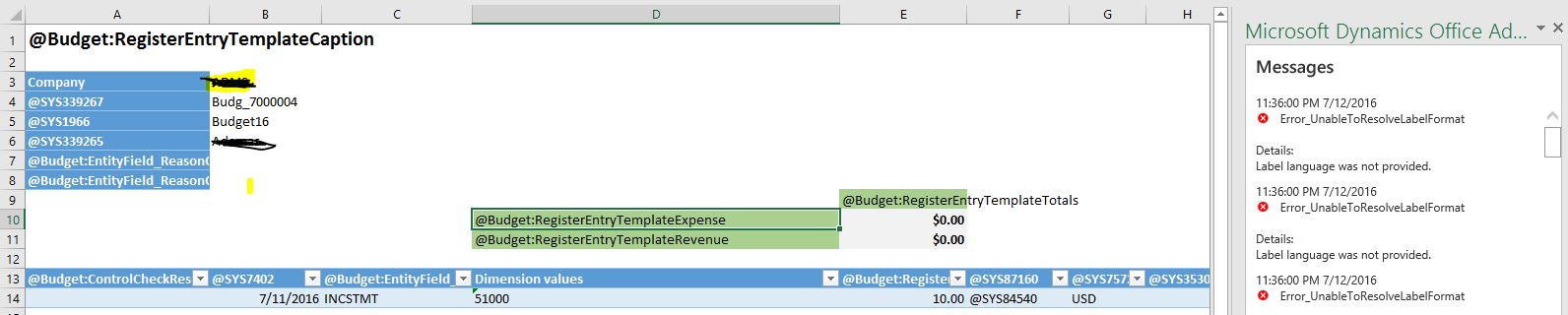
8664.Capture.JPG

Hi, I get the error "Error_UnableToResolveLabelFormat Details: Label language was not provided" as shown in the screenshot whenever I try to open the budger entries in the excel using "open in excel" button.  It just displays the label id rather than the label name/description in the spreadsheet. Any reason for this one? 

*This post is locked for comments

I have the same question (0)
  • André Arnaud de Calavon Profile Picture
    301,156 Super User 2025 Season 2 on at

    Hi Alok,

    What language did you setup for your user in AX? Is it en-us or another language?

    Are you using "Update 1", "RTM" or another instance of AX?

  • AlokShrestha Profile Picture
    1,645 on at

    Hi Andre,

                 We have setup en-us language for our user and we are using RTW without update 1.

    Regards,

    Alok

  • André Arnaud de Calavon Profile Picture
    301,156 Super User 2025 Season 2 on at

    Hi Alok,

    Was the excel sheet created with this instance of AX or was it copied from another environment?

  • AlokShrestha Profile Picture
    1,645 on at

    It was just created with the same instance of AX. I just tried to do "Open with Excel" and open the spreadsheet.  Actually it happens for all the documents. Like if I try to open sales order or purchase order from spreadsheet, same issue persists.

  • André Arnaud de Calavon Profile Picture
    301,156 Super User 2025 Season 2 on at

    I haven't see this issue before. It works in my environments correctly. Do you have created customizations or installed other application packages?

    Have you tried to complete a full build of AX or restart the WWW service?

  • Suggested answer
    Community Member Profile Picture
    on at

    View the detailed error messages that are recorded for the Reporting module in the Exceptions form. Click System administration > Periodic > Services and Application Integration Framework > Exceptions.

  • Verified answer
    AlokShrestha Profile Picture
    1,645 on at

    Hi,

        There were files missing from our environment. MSFT helped us get those files and it's working now.

    Thanks

  • Suggested answer
    Stanislas MENARD Profile Picture
    on at

    Hi,

    We faced the same issue.

    We solved it with Microsoft help and these steps:

    CAUSE

    missing web.configs:

    J:\AosService\WebRoot\OfficeApps\Public

    J:\AosService\WebRoot\OfficeApps\Resources

    J:\AosService\WebRoot\bin\OfficeApps

    RESOLUTION

    Copy web.config from the working environment into non-working

    Kind regards,

Under review

Thank you for your reply! To ensure a great experience for everyone, your content is awaiting approval by our Community Managers. Please check back later.

Helpful resources

Quick Links

Responsible AI policies

As AI tools become more common, we’re introducing a Responsible AI Use…

Neeraj Kumar – Community Spotlight

We are honored to recognize Neeraj Kumar as our Community Spotlight honoree for…

Leaderboard > 🔒一 Microsoft Dynamics AX (Archived)

#1
Martin Dráb Profile Picture

Martin Dráb 4 Most Valuable Professional

#1
Priya_K Profile Picture

Priya_K 4

#3
MyDynamicsNAV Profile Picture

MyDynamicsNAV 2

Last 30 days Overall leaderboard

Featured topics

Product updates

Dynamics 365 release plans



