Hi Brad,
I saw a previous thread from yours which implied you were touched Event customization with Angular code,
Now the solution could be based on whether you hosted it on Portal or Own server:
1. Portal:
Allow anonymous registrations also works for Portal hosted,
1.1 so firstly you should let your contacts to sign in to registration,
then create a customization whole number field called Registraion count, add it to registration form and hide it.
1.2 In every time when contact submits field, make this value plus 1, (Control it by Javascript) then all informations will be saved to CRM,
1.3 When this number reach to limit we set(still check by Script), prevent submit event or jump into our own function instead of submit data to CRM.
2. Own server:
Unfortunately due to Allow anonymous registrations not works in custom web server
So what we could do from frontend side would just below:
2.1 Write/generate a cookie to client browser in registerToEvent() function after registrationResult.status === "Success", the function is in eventregistration.component.ts (src\app\components\eventregistration)
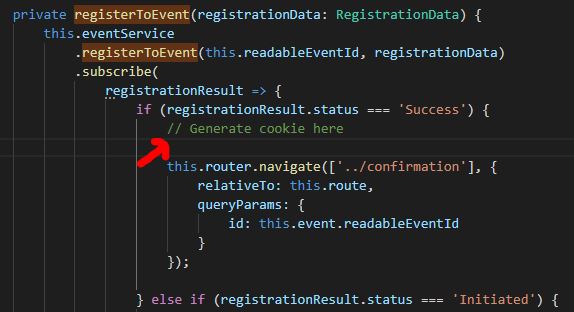
2.2 There is a function called isCheckoutButtonDisabled() for Checkout button ineventregistration.component.html,
then we could add "check whether the cookie has been generated" code in its logic, return true if cookie has been generated.
2.3 Or add check function for Register Now button in event.component.html(src\app\components\event)
However, to restrict registration from frontend may not be easy, because contacts might clear their cache or close browser and enter event page again to remove cookies to register again.
For more effective ristriction, you might consider integrate Event page with some third party service for Email Address Vertification.
Finally, please suggest your idea to Ideas forum to let Event module has more advanced backend features.
Regards,
Clofly


