Hi
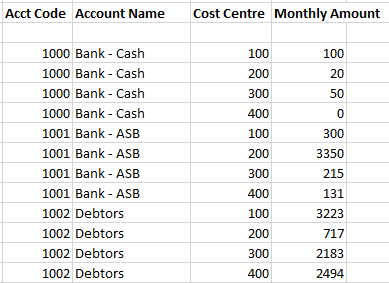
In report designer, is there an easy way to make cost centres show on multiple lines/rows (ie prevent them from rolling up to one line).
As this report will have a large number of columns (monthly amounts), I don't want to allocate them on the column definition.
Ideally I want it to look like the screenshot below:
Edit. I believe I may have found a potential solution via Edit -> Insert Rows from Dimensions, then putting "All &&&" for MainAccount and CostCentre.
The issue with this is that it only brought through items with current balances and therefore I assume I'll have to do this each time I go to run the report which would be time consuming.
If there's a way using 'Insert Rows from Dimensions' to pull through all items (regardless if there's a transaction against that GL account and cost centre, I believe this would solve my question).
Thanks,
Rick







