web
You’re offline. This is a read only version of the page.
close
Skip to main content

Notifications

Announcements

No record found.

Community site session details

Community site session details

Session Id :
Finance | Project Operations, Human Resources, ...
Unanswered

On-premises deployment stuck at checking fabric:/AXSF health

(0) ShareShare
ReportReport
Posted on by 5

Hi

I have been trying to deploy an on-premises sandbox environment for Dynamics 365 Finance & Operations.

I have a recurring issue where, according the the Event Viewer log on the primary Orchestrator node, the process freezes here:
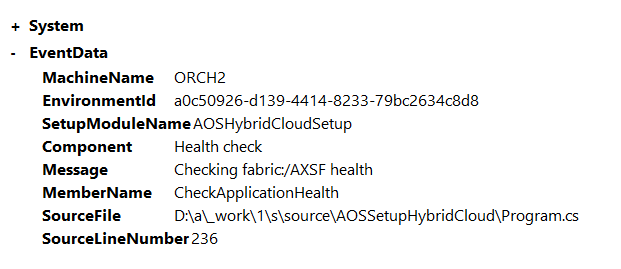
pastedimage1661939370794v1.png

At the same time, I am also getting the following error messages from the Service Fabric explorer site:
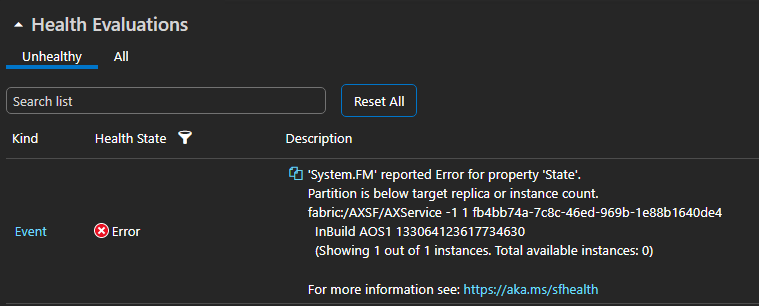
pastedimage1661939462585v2.png

The Service Fabric event viewer is also throwing up the following warnings:

pastedimage1661939742569v3.png

I have tried various troubleshooting methods including (1) reinstalling the Service Fabric cluster; (2) redeploying the environment multiple times; and (3) re-encrypting the Credentials.json folder.

Any help or suggestions would be greatly appreciated!

I have the same question (0)
  • Ong Chee Yeow Profile Picture
    5 on at

    Just to add more information, when I check my AOS VM's Event Viewer log, I noticed that the Microsoft Service Fabric log is constantly throwing up the following warning:

    Event ID: 2561

    Text:  RSMessage::GetActivityId Missing activity id header

    Any help would be greatly appreciated!

  • Komi Siabi Profile Picture
    13,109 Most Valuable Professional on at

    Hi,

    I would suggest you raise a support ticket to Microsoft.

  • huijij Profile Picture
    19,811 on at

    Hi Ong,

    Please check yourself if the installation environment and prerequisites is suitable:

    docs.microsoft.com/.../setup-deploy-on-premises-pu12

  • Ong Chee Yeow Profile Picture
    5 on at

    Dear Judy

    Thank you for the reply! I've been following the deployment instructions set out here https://docs.microsoft.com/en-us/dynamics365/fin-ops-core/dev-itpro/deployment/setup-deploy-on-premises-pu41 and so far every step up until deployment has been successful and has not thrown out any errors.

    I have also previously had a successful deployment with the same setup and by following the same steps. However, I previously did not encounter any issues with the AOS machine or the Service Fabric warnings.

    Would you have a sense or a suspicion of where the problem lies? This might help narrow down the areas to troubleshoot.

    Thank you!

Under review

Thank you for your reply! To ensure a great experience for everyone, your content is awaiting approval by our Community Managers. Please check back later.

Helpful resources

Quick Links

Responsible AI policies

As AI tools become more common, we’re introducing a Responsible AI Use…

Neeraj Kumar – Community Spotlight

We are honored to recognize Neeraj Kumar as our Community Spotlight honoree for…

Leaderboard > Finance | Project Operations, Human Resources, AX, GP, SL

#1
André Arnaud de Calavon Profile Picture

André Arnaud de Cal... 456 Super User 2025 Season 2

#2
Martin Dráb Profile Picture

Martin Dráb 429 Most Valuable Professional

#3
BillurSamdancioglu Profile Picture

BillurSamdancioglu 239 Most Valuable Professional

Last 30 days Overall leaderboard

Product updates

Dynamics 365 release plans



