web
You’re offline. This is a read only version of the page.
close
Skip to main content

Notifications

Announcements

No record found.

Community site session details

Community site session details

Session Id :
Microsoft Dynamics CRM (Archived)

How to get the Account Entity Notes from the CRM System to Portals..???

(0) ShareShare
ReportReport
Posted on by

Hi to All,

please help on one scenario.

i want to see the Account Entity Notes From the CRM System to Portals.

after google search, i created entity form with section of entity form metadata.
2451.Capture1.PNG

for this Account Entity permissions (privileges levels)also given.

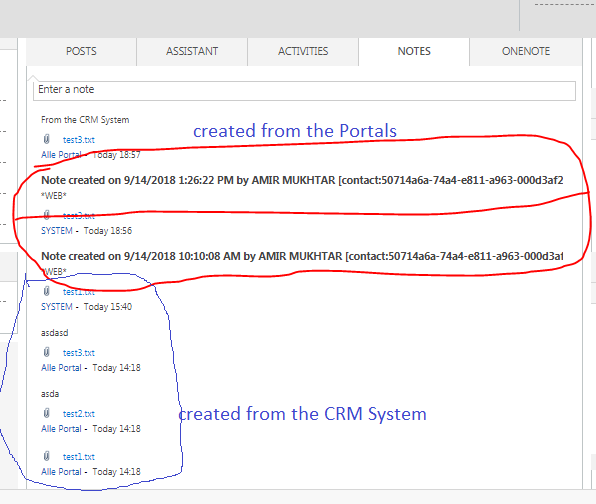
after than i was created Notes from the both sides(CRM/Portals), i am able to see the portals created notes for that account entity in CRM System, but i am unable to see the CRM systems notes in Portals.....???? 

below one is CRM System Notes:

2451.Capture1.PNG

but in portals i am able to see only what ever created in portals one,  but i want all notes in Portals.

1447.Capture3.PNG

Thanks to time with me....!!!

*This post is locked for comments

I have the same question (0)
  • Suggested answer
    RaviKashyap Profile Picture
    55,410 Moderator on at

    Hi,

    Tou need to put *web* in the notes body in order to appear it on portal.

    Hope this helps

  • Verified answer
    RaviKashyap Profile Picture
    55,410 Moderator on at

    Check the screenshot on the last suggested answer 8n the below link.

    community.dynamics.com/.../251266

    Hipe this helps

  • Community Member Profile Picture
    on at

    Hi Ravi,

    ohh God thanks man, now i am getting all notes from the CRM system to Portals, but once click on note attachment it is navigate to new tab but result is Not found......(any solution for that)

  • Verified answer
    RaviKashyap Profile Picture
    55,410 Moderator on at

    Hi,

    Notes visibility from CRM to Portal is controlled by that keyword *web*. This was done to ensure that portal displays only the notes which we want and not all. So if you put *web* on all notes, all will be visible.

    Regarding the Notes attachment issue, it is controlled by the properties you have mentioned in the metadata "File Attachment Location". Ensure that this is set as "Notes Attachment".

    Also, if you got the answer to this questions, I would appreciate marking the suggestion as helpful/ verified and close the thread. For any new issues, open a new thread. This ensure the thread is only related to main questions and will help other looking for same/ similar issue.

    Hope this helps.

  • Verified answer
    Community Member Profile Picture
    on at

    Thanks issue was solved from your suggested answer 

Under review

Thank you for your reply! To ensure a great experience for everyone, your content is awaiting approval by our Community Managers. Please check back later.

Helpful resources

Quick Links

Responsible AI policies

As AI tools become more common, we’re introducing a Responsible AI Use…

Neeraj Kumar – Community Spotlight

We are honored to recognize Neeraj Kumar as our Community Spotlight honoree for…

Leaderboard > 🔒一 Microsoft Dynamics CRM (Archived)

#1
SA-08121319-0 Profile Picture

SA-08121319-0 4

#1
Calum MacFarlane Profile Picture

Calum MacFarlane 4

#3
Alex Fun Wei Jie Profile Picture

Alex Fun Wei Jie 2

Last 30 days Overall leaderboard

Featured topics

Product updates

Dynamics 365 release plans
Liquid error: parsing "/globalsearch/?q=%E0%B8%A8%E0%B8%B2%E0%B8%A5%E0%B8%B2%E0%B9%81%E0%B8%94%E0%B8%87++%E0%B8%A0%E0%B8%B2%E0%B8%A9%E0%B8%B2%E0%B8%AD%E0%B8%B1%E0%B8%87%E0%B8%81%E0%B8%A4%E0%B8%A9" - Nested quantifier +.



