web
You’re offline. This is a read only version of the page.
close
Skip to main content

Notifications

Announcements

No record found.

Community site session details

Community site session details

Session Id :
Microsoft Dynamics AX (Archived)

customer pools, customer collection pools

(0) ShareShare
ReportReport
Posted on by

Hi experts,

I set up customer pools as folows:
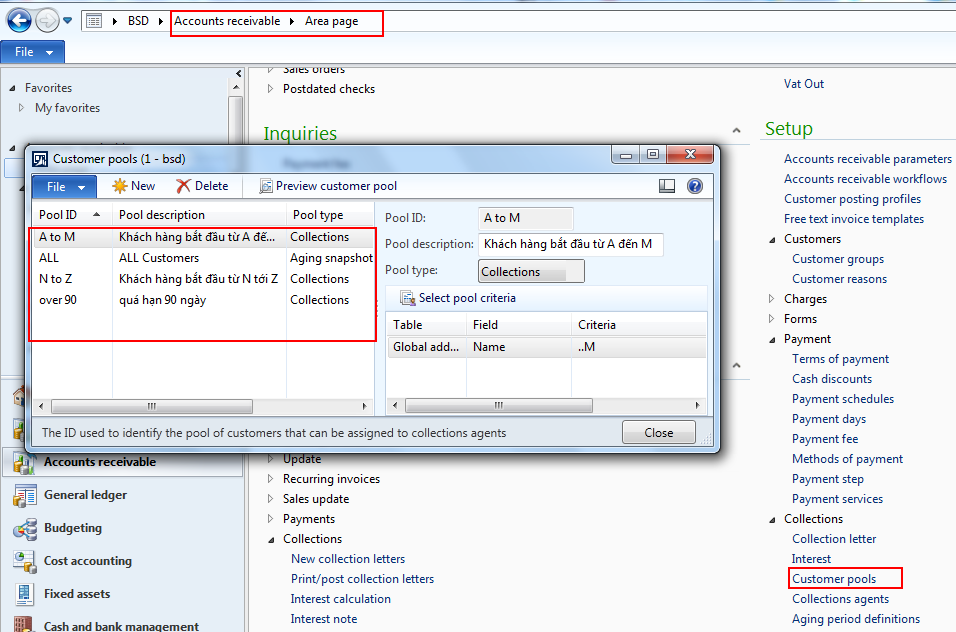
7_2D00_7_2D00_2016-4_2D00_26_2D00_53-PM.png

Viewing Collection Statuses By Customer Pool
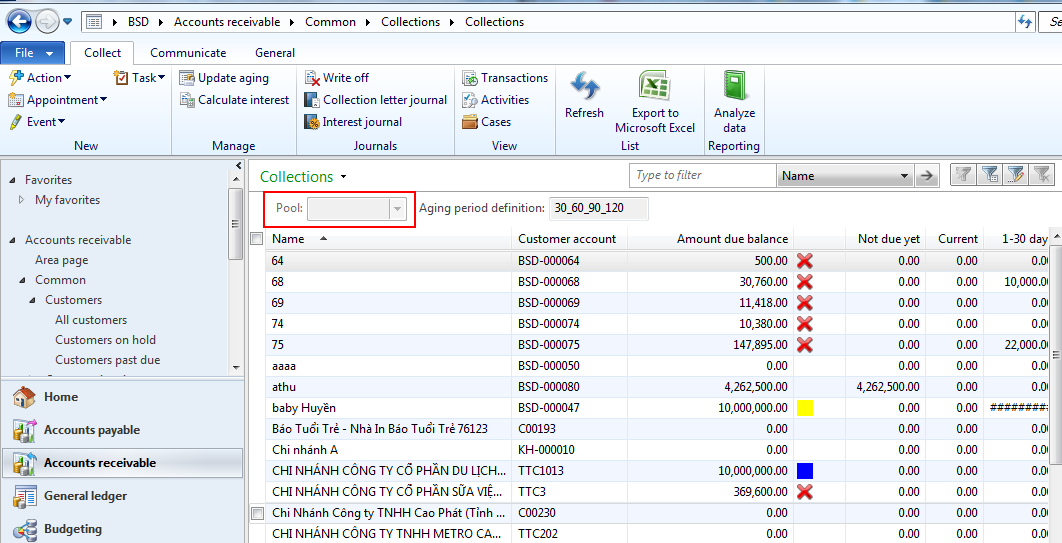
7_2D00_7_2D00_2016-4_2D00_29_2D00_05-PM.png

I can't filter the data the pool, I do not know why this is so, Can you help me fix it ? 

I’m extremely grateful for your help. Thanks in advanced.

*This post is locked for comments

I have the same question (0)
  • Suggested answer
    André Arnaud de Calavon Profile Picture
    300,911 Super User 2025 Season 2 on at

    Hi Huyentran450,

    In addition you should also setup the collection agents. Then you can setup per user which pool is applicable.

  • Suggested answer
    Ludwig Reinhard Profile Picture
    Microsoft Employee on at

    Hi,

    How does the setup of your collection agents look like (=> menu item just below the customer pools). Have you Setup yourself there and specified that you can see all pools?

    Ludwig

  • Community Member Profile Picture
    on at

    Hi experts,

    I set up collection agens as follows:

    7_2D00_8_2D00_2016-9_2D00_58_2D00_11-AM.png

    I set up customer gens but pool not working, 

    7_2D00_8_2D00_2016-9_2D00_58_2D00_11-AM.png

    I’m extremely grateful for your help. Thanks in advanced.

  • Suggested answer
    Ludwig Reinhard Profile Picture
    Microsoft Employee on at

    Hello huyentran450,

    Can you check the following:

    1) In the System admin module under your user ID whether the employee "Huyen" is linked to your user

    2) In the organization admin module whether your user is assigned to the collections Team (Path: Orga. admin/Setup/Organization/Teams). There should be a collections Team there and you should be a member thereof.

    Hope this helps,

    Ludwig

  • Loz Saunders Profile Picture
    51 on at

    Hello huyentran450,

    Did you ever find a solution to this, since I have the same problem?

  • Ludwig Reinhard Profile Picture
    Microsoft Employee on at

    Hi Loz Saunders,

    Have you set up

    - customer pools

    - collection agents

    - aging period definitions

    - teams and

    - the AR parameters correspondingly?

    If your user is linked to an employee, things should work.

    Can you double check those setups and let us know where things do not work.

    Ludwig

  • Loz Saunders Profile Picture
    51 on at

    Hi Ludwig, thanks for the prompt reply. We are using Dynamics AX 2012 R3 CU8.

    Customer pools

    teams.jpg

    Collection agents

    Collections-agents.jpg

    Aging period definitions

    aging-period-definitions.jpg

    Teams

    teams.jpg

    AR Parameters

    sales-ledger-parameters.png

    All users are related to a corresponding Employee and the users in the Collection team have been allocated the "Collections agent" security role.

    If I access Dynamics with a System administrator account, everything works as I'd expect. The Collections form opens with the default pool selected and I can select different Pools using the dropdown.

    working.jpg

    If I access Dynamics as any other member of the Collections team, the form opens unfiltered and the Pools field is grayed-out. 

    not_2D00_working.jpg

    I have tracked the problem as far as the findCurrentAgent method of the CustCollectionsAgent table. It is something to do with the connection between the  dirPartyRelationship table but I cannot pin it down

  • Suggested answer
    Ludwig Reinhard Profile Picture
    Microsoft Employee on at

    Hi,

    Your setup looks in general fine and you should be able to switch between pools.

    Are Laurence and Julian employees in your company and have a position assigned?

    Have you double checked their roles and user rights?

    Best regards,

    Ludwig

  • Loz Saunders Profile Picture
    51 on at

    Yes, both these have their User relations set to the appropriate Employee and both have the "Collections agent" role. I think this may actually be a bug in the Microsoft code because I've been over these settings many times and the problem persists. Thanks for trying.

  • Ludwig Reinhard Profile Picture
    Microsoft Employee on at

    Hi Loz Saunders,

    Yes, I think you are right with the bug because in later AX versions things work with a setup similar to yours. Unfortunately, I have not found something on LCS. Probably check yourself once again and/or contact the MS support.

    All the best,

    Ludwig

Under review

Thank you for your reply! To ensure a great experience for everyone, your content is awaiting approval by our Community Managers. Please check back later.

Helpful resources

Quick Links

Responsible AI policies

As AI tools become more common, we’re introducing a Responsible AI Use…

Neeraj Kumar – Community Spotlight

We are honored to recognize Neeraj Kumar as our Community Spotlight honoree for…

Leaderboard > 🔒一 Microsoft Dynamics AX (Archived)

#1
Martin Dráb Profile Picture

Martin Dráb 4 Most Valuable Professional

#1
Priya_K Profile Picture

Priya_K 4

#3
MyDynamicsNAV Profile Picture

MyDynamicsNAV 2

Last 30 days Overall leaderboard

Featured topics

Product updates

Dynamics 365 release plans



