web
You’re offline. This is a read only version of the page.
close
Skip to main content

Notifications

Announcements

No record found.

Community site session details

Community site session details

Session Id :
Microsoft Dynamics AX (Archived)

EP Ok button behavior (modal window)

(0) ShareShare
ReportReport
Posted on by 735

Hi, All.

At EP AX2012 I have modal window with “Save and close” buttons (at the left top corner (let’s say “TopOk”) and at the right bottom corner(let’s say “BottomOk”)) that are created with property “AutoGenerateEditButton” = true on the form.

The problem is the following: there are two different behavior of the form whether the user clicks TopOk or BottomOk (I expected that they will be working the same, but not). The BottomOk works correct (as expected). And when I press TopOk there are some validations that I couldn’t catch.

Validation could be caused by the following: I have added a AxMultiSection, and one of the AxSection is additional control which has it’s own Dataset (where some of the fields are “Mandatory”), but this AxSection become Edit(true) only if I mark the checkbox (see in red).

The problem is occurs only when the checkbox is unchecked.

So, does anybody experienced ever with similar problem? If no – maybe someone know the sequences of methods called by the TopOk buttonEP1.jpg
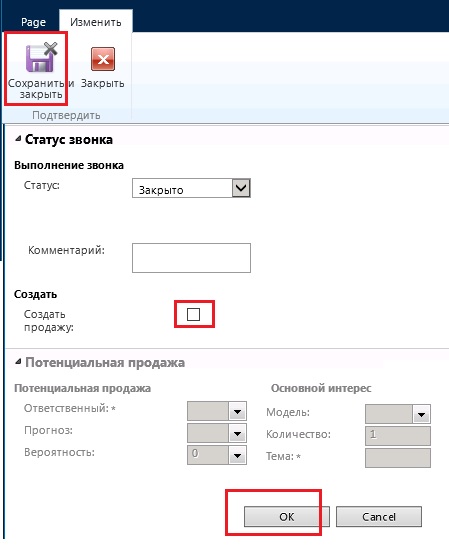
*This post is locked for comments

I have the same question (0)
  • Ragoza Oleksandr Profile Picture
    735 on at

    Dear experts, any ideas?

  • Rodolfo Recalde Profile Picture
    on at

    Hi,

    First, whenever possible, try to encapsulate the validation rules in method validateWrite (dataSet/dataSource or table)


    Another possibility (in agreement with the description of your problem) is include the field as mandatory in the dataset/dataSource (image 1)

    7181.EP_5F00_dataSet_5F00_Mandatory_5F00_DAX_5F00_Recalde2.png

    Image 1


    Another option is use the event ItemInserting (or ItemUpdating) to implement the validation rules:

    Occurs before the new item has been inserted by the form control.

    Example: HcmEPOpenJobApply (Image 2)


    7181.EP_5F00_dataSet_5F00_Mandatory_5F00_DAX_5F00_Recalde2.png

    Image 2


    Create and Update behavior

    "When the user clicks the "Save and close" button on the action pane for the User Control, the AxForm component will fire the appropriate events to create or update the data for the form component. If you are using additional components in the User Control, such as an AxGridView, you may have to explicitly invoke the events for these other components to have their create or update operations performed when the user clicks "Save and close".

    For example, the following C# code is the event handler for the ItemUpdating event of an AxForm component named EPSalesTableEdit. In this code, the UpdateRow event for an AxGridView component is called explicitly to ensure that any changes on the current row of the grid are saved."


    https://msdn.microsoft.com/en-us/library/cc551671.aspx

    Take a look:

    Microsoft Dynamics AX 2012 White Paper: Enterprise Portal Development Cookbook


    I Hope this Helps!

    Regards,

    Rodolfo Recalde

Under review

Thank you for your reply! To ensure a great experience for everyone, your content is awaiting approval by our Community Managers. Please check back later.

Helpful resources

Quick Links

Responsible AI policies

As AI tools become more common, we’re introducing a Responsible AI Use…

Neeraj Kumar – Community Spotlight

We are honored to recognize Neeraj Kumar as our Community Spotlight honoree for…

Leaderboard > 🔒一 Microsoft Dynamics AX (Archived)

#1
Martin Dráb Profile Picture

Martin Dráb 4 Most Valuable Professional

#1
Priya_K Profile Picture

Priya_K 4

#3
MyDynamicsNAV Profile Picture

MyDynamicsNAV 2

Last 30 days Overall leaderboard

Featured topics

Product updates

Dynamics 365 release plans
