web
You’re offline. This is a read only version of the page.
close
Skip to main content

Notifications

Announcements

No record found.

Community site session details

Community site session details

Session Id :
Microsoft Dynamics AX (Archived)

Dialog Box and Processing on Batch Mode

(0) ShareShare
ReportReport
Posted on by 352

Hello Everyone

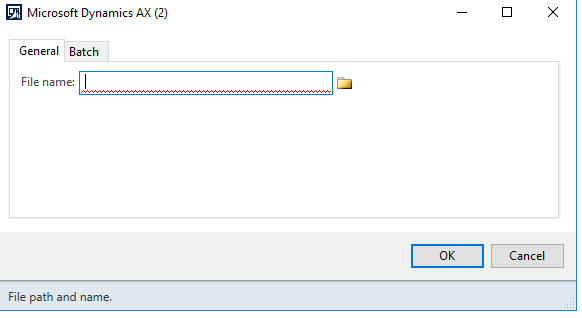
I have one need : I want to start one class execution in Batch mode after submitting my Dialog Box (I have to navigate to one CSV file and choosing Batch and once I click on "OK" the processing must be executed in Batche mode).

For the moment, even I select Batch TabPage and enabling Batch Processing when I click on OK, the process is made in normal mode and I have to wait untill the process is finished to do something else in AX ...

Do I have to modify some thing in my logic ? My Class is extending RunBaseBatch (MyClass extends RunBaseBatch) and RunOn "Client".
Thanks.
6433.Screenshot3.png

*This post is locked for comments

I have the same question (0)
  • Martin Dráb Profile Picture
    237,855 Most Valuable Professional on at

    You can't execute your logic on batch server if you make it runnable only on client. Change RunOn to CalledFrom.

  • JauB Profile Picture
    352 on at

    If I put RunOn "CalledForm" or "Server" and I start my Class, chossing my file and click on "OK" I have this error message :

    CommaTextIo object not initialized.

    Stack trace

    (S)\Classes\MyCalss\controlFields - line 50
    (S)\Classes\MyClass\main - line 10

    In ClassDeclaration I have this :

    class MyClass extends RunBaseBatch
    {
    Filenameopen filename;
    
    DialogField dlgFileName;
    
    CommaTextIo commaTextIo, commaTextIo2;
    
    FileIOPermission permission;
    container containFromRead, containFromRead2 ;
    #File
    }


    My main Method :

    public static server void main(Args _args)
    {
    
        MyClass importClass =  new MyClass();


        if (importClass.prompt())
        {
            if (importClass.controlFields()){
                importClass.run();
            }
        }
    
    }


    What am I missing please ?

  • Suggested answer
    Martin Dráb Profile Picture
    237,855 Most Valuable Professional on at

    You didn't show the relevant code, but if you're opening a file and it works on client, the most likely problem is that the file doesn't exist on the batch server. Another problem may be permissions.

    If you want to select a file on client and open it on server, it should be in a commonly accessible network location.

    Another (more complicated) approach would be getting a file on client, copy it to server and only then starting a batching processing it.

  • JauB Profile Picture
    352 on at

    No Martin, my file is existing on server side !

  • Martin Dráb Profile Picture
    237,855 Most Valuable Professional on at

    If the file is on the batch server and not on the client, how can you select it on client and how can your code work on client if the file doesn't exist there?

    The file selection dialog makes little sense if the file is on batch server and not on client.

  • JauB Profile Picture
    352 on at

    I'm not working on PROD environnment for the moment but only on PREPORD one. So my PREPROD server is at the same time Client and Server and I'm working in this server using remote desktop. AX CLient is not installed on my laptop.

  • Martin Dráb Profile Picture
    237,855 Most Valuable Professional on at

    All right, so you should thank me that I found this fundamental flaw in your design, because your testing procedures aren't good enough and you would find in only in production...

    By the way, does it mean that you're developing in PreProd and you deploy changes to production without testing on any test environment?

    I think you shouldn't redesign only this functionality, but your ALM processes as well.

  • JauB Profile Picture
    352 on at

    ou PREPROD server is the same as UAT server.

    by the way, what does'it meaning ALM ? :)

  • Martin Dráb Profile Picture
    237,855 Most Valuable Professional on at

    You can give the server as many labels as you want, but if you develop there, it's a development environment. And if you deploy code from this development environment to production, it means that you never test your environment outside DEV - what you actually deliver may be different than what you have in DEV and these environment has different topologies. You also never test the deployment itself.

    User Acceptance Testing (UAT) should be used by users for testing, after the application has been developed in DEV and deployed to UAT (possibly going through a kind of Factory Acceptance Testing). PreProd is usually a close copy of production - something completely different than a development environment.

    ALM stands for Application Lifecycle Management.

Under review

Thank you for your reply! To ensure a great experience for everyone, your content is awaiting approval by our Community Managers. Please check back later.

Helpful resources

Quick Links

Responsible AI policies

As AI tools become more common, we’re introducing a Responsible AI Use…

Neeraj Kumar – Community Spotlight

We are honored to recognize Neeraj Kumar as our Community Spotlight honoree for…

Leaderboard > 🔒一 Microsoft Dynamics AX (Archived)

#1
Priya_K Profile Picture

Priya_K 4

#1
Martin Dráb Profile Picture

Martin Dráb 4 Most Valuable Professional

#3
Ali Zaidi Profile Picture

Ali Zaidi 2

Last 30 days Overall leaderboard

Featured topics

Product updates

Dynamics 365 release plans
