web
You’re offline. This is a read only version of the page.
close
Skip to main content

Notifications

Announcements

No record found.

Community site session details

Community site session details

Session Id :
Microsoft Dynamics AX (Archived)

How to Hide "Document" in Document Handling form for a requisition in AX 2012 R3

(0) ShareShare
ReportReport
Posted on by

Hi,

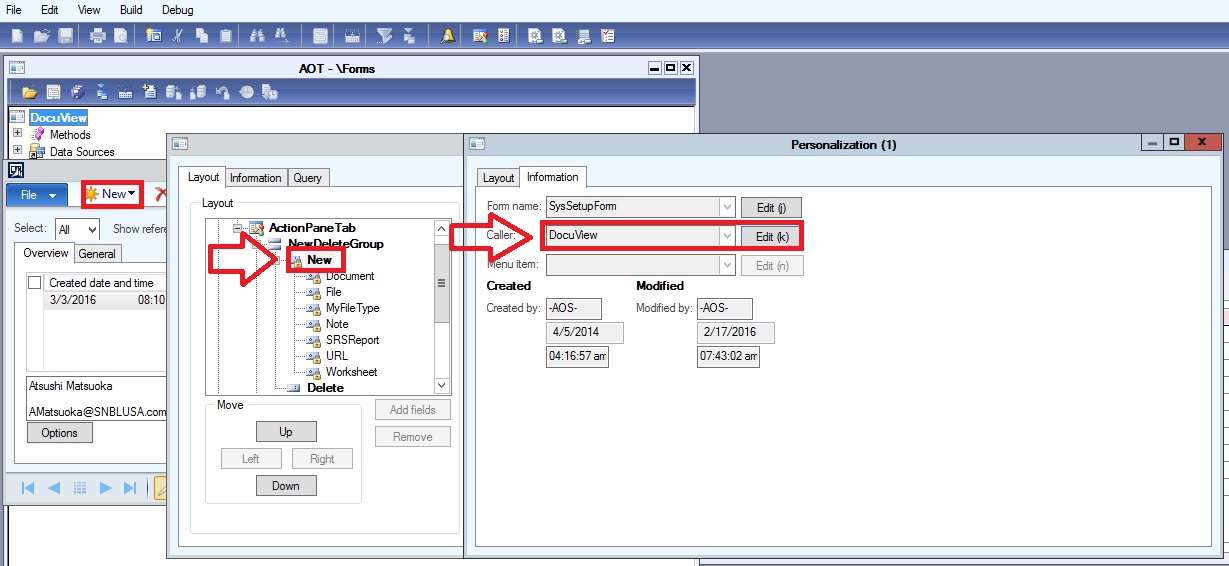
I have a need to hide "Document" in the Document Handling form for a requisition. The reason is that several users often select Document instead of File & the result is that all reviewers/approvers cannot open those documents in AX Enterprise  Portal. Please advise me how to hide or "remove" Document in the list when users click the New button.

HideOrRemoveDocument.jpg

Thanks

Thai

*This post is locked for comments

I have the same question (0)
  • Brandon Wiese Profile Picture
    17,788 on at

    Why not just remove Document from the Document types entirely?

  • Community Member Profile Picture
    on at

    Hi Brandon,

    In fact I already tried to delete, but I got error message like below:

    HideOrRemoveDocument_5F00_1.jpg

    Thanks

    Thai

  • Suggested answer
    Community Member Profile Picture
    on at

    It looks like you already have uploaded attachments of type "documents".

  • Suggested answer
    Tim Schofield Profile Picture
    on at

    If you tick 'Check table' on the document type setup you then have to specify in Options which tables you can use the document type for.

    Might be a bit of a pain for something as generic as 'File' but do-able I think.

    Tim

  • Verified answer
    Community Member Profile Picture
    on at

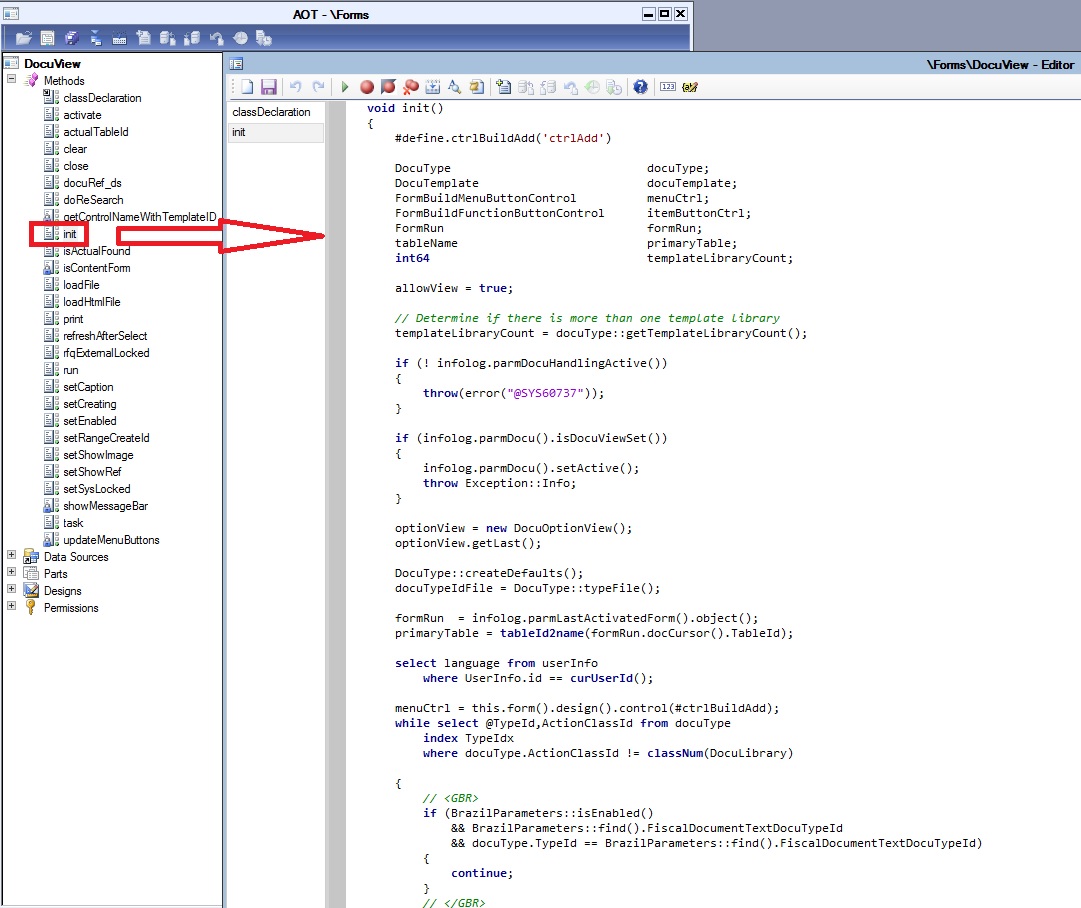
    On unit method of this form there is a for look which usually add all these options. You can add your condition there like for which table, you don't need this option. But you may need to hide value from enum as well, because after creation of new blank record still user can select or change document type

  • Verified answer
    Community Member Profile Picture
    on at

    Typo , init method of form

  • Community Member Profile Picture
    on at

    Hi Anil,

    Thanks a lot for your advise & I'm sorry for late response: I totally forgot my "eliminate-Document-type" task in form Document handling of Purchase requisition. Following your instructions, I can find codes of the method Init & I've tried to modify a little bit like below. I haven't done any similar tasks in AX before, so please show me what to do next to test. Those codes in Red are just added.

    void init()

    {

       #define.ctrlBuildAdd('ctrlAdd')


       DocuType                           docuType;

       DocuTemplate                       docuTemplate;

       FormBuildMenuButtonControl         menuCtrl;

       FormBuildFunctionButtonControl     itemButtonCtrl;

       FormRun                             formRun;

       tableName                           primaryTable;

       int64                               templateLibraryCount;


       allowView = true;


       // Determine if there is more than one template library

       templateLibraryCount = docuType::getTemplateLibraryCount();


       if (! infolog.parmDocuHandlingActive())

       {

           throw(error("@SYS60737"));

       }


       if (infolog.parmDocu().isDocuViewSet())

       {

           infolog.parmDocu().setActive();

           throw Exception::Info;

       }


       optionView = new DocuOptionView();

       optionView.getLast();


       DocuType::createDefaults();

       docuTypeIdFile = DocuType::typeFile();


       formRun = infolog.parmLastActivatedForm().object();

       primaryTable = tableId2name(formRun.docCursor().TableId);


       select language from userInfo

           where UserInfo.id == curUserId();


       menuCtrl = this.form().design().control(#ctrlBuildAdd);

       while select @TypeId,ActionClassId from docuType

           index TypeIdx

           where docuType.ActionClassId != classNum(DocuLibrary)


       {

           // <GBR>

           if (BrazilParameters::isEnabled()

               && BrazilParameters::find().FiscalDocumentTextDocuTypeId

               && docuType.TypeId == BrazilParameters::find().FiscalDocumentTextDocuTypeId)

           {

               continue;

           }

           // </GBR>


           // Thai Hodac: Only add those document type (i.e. TypeId) different from “Document” into the menu item


            if docuType.TypeId!=” Document”

           {

           itemButtonCtrl = menuCtrl.addControl(FormControlType::MenuFunctionButton,docuType.TypeId);

                           itemButtonCtrl.menuItemType(MenuItemType::Action);

           itemButtonCtrl.menuItemName(menuitemactionstr(DocuActionNew));

           itemButtonCtrl.text(docuType.TypeId);

    }

       }

       // Now add the menu item buttons associated with the template libraries (this list is dynamic based on record selection)

       // We are adding them at the end to ensure we reduce the visual impact as controls appear/disappear when record selection changes.

       while select @TypeId,ActionClassId from docuType

           index TypeIdx

           where docuType.ActionClassId == classNum(DocuLibrary)

       {

           while select TypeID, TemplateID from docuTemplate

               where docuTemplate.TypeID == DocuType.TypeId

                       && DocuTemplate.Enabled == NoYes::Yes

                       && docuTemplate.PrimaryTable == primaryTable

                       && (docuTemplate.LanguageID   == userInfo.Language

                       || docuTemplate.LanguageID == '')


           {

               itemButtonCtrl = menuCtrl.addControl(FormControlType::MenuFunctionButton, this.getControlNameWithTemplateID(docuTemplate.TypeID, docuTemplate.TemplateID));

               itemButtonCtrl.menuItemType(MenuItemType::Action);

               itemButtonCtrl.menuItemName(menuitemactionstr(DocuActionNew));


               // If documents are being stored in more than 1 Template library(TypeID) append the Template library name to the button.

               if (templateLibraryCount > 1)

               {

                    if (currentSessionLanguageRTL())

                   {

                       itemButtonCtrl.text(DocuType.TypeID + " - " + docuTemplate.TemplateID);

                   }

                   else

                   {

                       itemButtonCtrl.text(docuTemplate.TemplateID + " - " + DocuType.TypeID);

                   }

               }

               else

               {

                   itemButtonCtrl.text(docuTemplate.TemplateID);

               }

           }

       }


       super();


       link.enabled(false);

       multiPaste.enabled(false);


       formSplitter_Y = new SysFormSplitter_Y(grpSplit,grpRefGrid,this);

       fromPrimaryTable = primaryTable;

    }
     InitOfDocumentHandlingofPR.jpg

    InitOfDocumentHandlingofPR.jpg

    Thanks so much

    Thai

  • Community Member Profile Picture
    on at

    NewCodesInInitOfDocumentHandlingOfRP.jpg

  • Community Member Profile Picture
    on at

    Hi,

    Finally I've tried to save & compiled the method Init of form Document handling of Purchase requisition in my development environment.

    It works successfully & I'm quite happy after ... kept worrying a while... Below is my screen shot of form Document handling of Purchase requisition in my AX dev.

    Now I'll intend to apply the new Init in my AX production, but I haven't done a similar task in AX before, please advise me how to do or I only need to do copy & paste & compiled as I did in my dev. environment .

    NomoreDocumentInDocumentHandlingOfPR.jpg

    Thanks a lot for all your help!

    Thai

  • Community Member Profile Picture
    on at

    Hi,

    Because most users in our company access AX via AX enterprise portal, I don't know if I have to do something in AX so the new change above can take effect.

    Thanks so much

    Thai

Under review

Thank you for your reply! To ensure a great experience for everyone, your content is awaiting approval by our Community Managers. Please check back later.

Helpful resources

Quick Links

Responsible AI policies

As AI tools become more common, we’re introducing a Responsible AI Use…

Neeraj Kumar – Community Spotlight

We are honored to recognize Neeraj Kumar as our Community Spotlight honoree for…

Leaderboard > 🔒一 Microsoft Dynamics AX (Archived)

#1
Martin Dráb Profile Picture

Martin Dráb 4 Most Valuable Professional

#1
Priya_K Profile Picture

Priya_K 4

#3
MyDynamicsNAV Profile Picture

MyDynamicsNAV 2

Last 30 days Overall leaderboard

Featured topics

Product updates

Dynamics 365 release plans