web
You’re offline. This is a read only version of the page.
close
Skip to main content

Notifications

Announcements

No record found.

Community site session details

Community site session details

Session Id :
Customer experience | Sales, Customer Insights,...
Answered

Help me close opportunities with Flow

(0) ShareShare
ReportReport
Posted on by 155

Hi team,

I want to be able to close opportunities with flow based on close quotes. I already have a business flow for automatically closing quotes on their expiry date (Close Quote Activities and update Quote status to closed). Now I want to close the related opportunities. I create a separate flow that triggers when the status of the quote changes to Closed, get the opportunity record and update Close activity record (Lost and canceled). close-quote.png
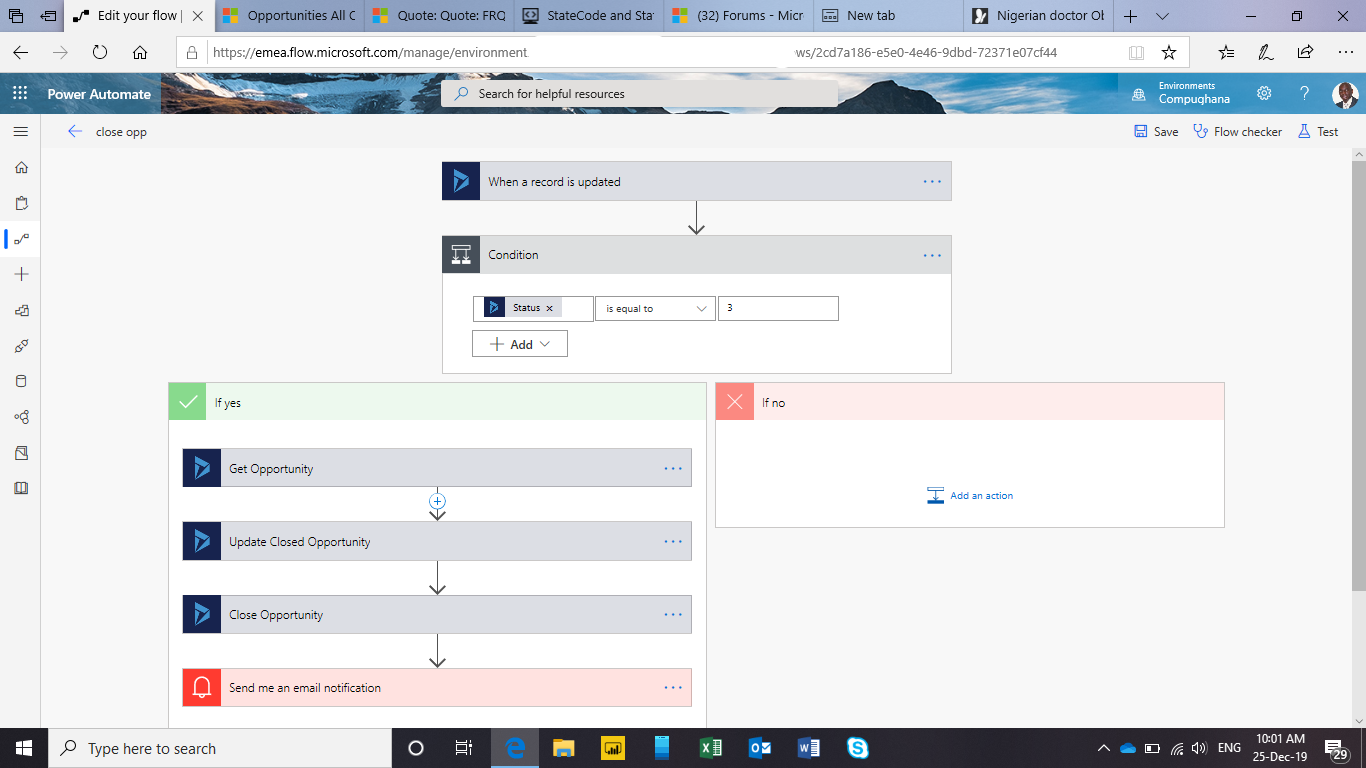
the flow runs indefinitely until it runs out of time.

Please your help will be appreciated to solve this.

Patrick

I have the same question (0)
  • Verified answer
    ba365guy Profile Picture
    2,950 on at

    Hi Patrick Mandengue

    I had a similar situation. The right way of implementing this is as follows:

    pastedimage1577286020521v1.png

    Let me know if this worked for you.

  • Patrick Mandengue Profile Picture
    155 on at

    Worked like a charm. My mistake was to use update not create

  • ba365guy Profile Picture
    2,950 on at

    Glad it worked!

  • Ankita Chavan Profile Picture
    104 on at

    Hi ba365guy, Patrick Mandengue

    I am also working on similar requirement. 

    I am trying to mark opportunity as won when quote is marked as won using MS Flows. My flow is running successfully but opportunity status is not getting updated. Any idea why is this happening?

    Flow:

    310738.png

    2475.png

    4555.png

  • Suggested answer
    ba365guy Profile Picture
    2,950 on at

    As mentioned the below link:

    ba365guy.home.blog/.../

    Create "Opportunity Close" record for the opportunity.

    Your "Flow" is missing that step.

    I see update "Opportunity Close", but ideally it should be "Create Opportunity Close"

  • Ankita Chavan Profile Picture
    104 on at

    ba365guy 

    i don't know why but its still not working.

    My flow is running successfully but its still not updating the status of opportunity.

    7245.png

    2148.png

  • ba365guy Profile Picture
    2,950 on at

    Did you add "create opportunity close" step?

  • Ankita Chavan Profile Picture
    104 on at

    ba365guy

    yes I have added the step

    3010.png

  • ba365guy Profile Picture
    2,950 on at

    Can you show full view of the step "Create Opportunity Close" - Show advanced options

  • Ankita Chavan Profile Picture
    104 on at

    Thank you ba365guy

    I have resolved my problem.

Under review

Thank you for your reply! To ensure a great experience for everyone, your content is awaiting approval by our Community Managers. Please check back later.

Helpful resources

Quick Links

Responsible AI policies

As AI tools become more common, we’re introducing a Responsible AI Use…

Neeraj Kumar – Community Spotlight

We are honored to recognize Neeraj Kumar as our Community Spotlight honoree for…

Leaderboard > Customer experience | Sales, Customer Insights, CRM

#1
Pallavi Phade Profile Picture

Pallavi Phade 98

#2
Tom_Gioielli Profile Picture

Tom_Gioielli 60 Super User 2025 Season 2

#3
Gerardo Rentería García Profile Picture

Gerardo Rentería Ga... 43 Most Valuable Professional

Last 30 days Overall leaderboard

Product updates

Dynamics 365 release plans



