web
You’re offline. This is a read only version of the page.
close
Skip to main content

Notifications

Announcements

No record found.

Community site session details

Community site session details

Session Id :
Dynamics 365 Community / Forums / Sales forum / Opportunity process st...
Sales forum

Opportunity process status doesn't sync with corresponding business flow status

(0) ShareShare
ReportReport
Posted on by 157

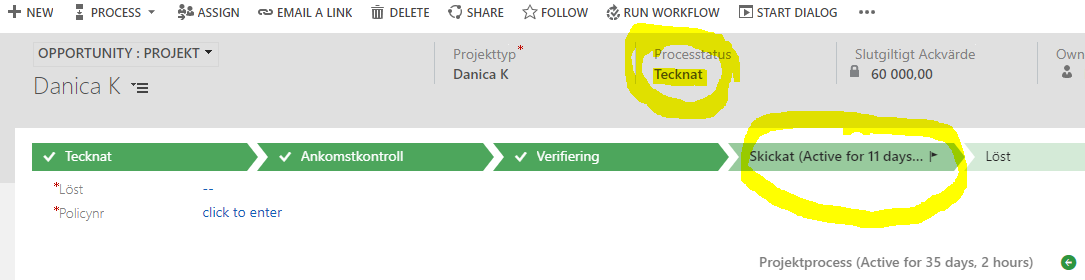
For some reason, the opportunity status no longer sync with the corresponding business process status.

In the screenshow below you can see the opportunity process is "tecknat" and the business flow status is "skickat".

The correct should be that the opportunuty process also is "skickat".

We think this out of sync issuse happened with the recent upgrade to version 9 of dynamics 365 for sales (online).

Any suggestions on how to solve this issue? Thank you.
dynamics_2D00_error20181022.PNG

I have the same question (0)
  • Suggested answer
    Shidin Haridas Profile Picture
    3,499 on at

    Are those the OOB fields which are supposed to be in sync?

    If yes, is/was there any custom logic which were setting those fields?

    If no, raise a ticket with Microsoft for this issue.

    To raise a ticket, https://admin.powerplatform.microsoft.com/

    If my answer helps you, please mark it as verified.

  • Suggested answer
    RaviKashyap Profile Picture
    55,410 Moderator on at

    Hi,

    There are some changes in the v9 due to which some process stage field have stopped updating. If you need this functionality, you need to create your own workflow which triggers on stage change of BPF and Sets the currect stage in your field.

    Hope this helps.

  • Verified answer
    LuHao Profile Picture
    40,892 on at

    Hi partner,

    As the one mentioned above, you could create one Synchronous workflow with five check conditions or have five Synchronous workflows with one check condition each.

    In the Synchronous workflow select the field "Pipeline Phase" on change of which the workflow will be executed.

    You can refer to these two articles:

    https://community.dynamics.com/crm/b/lostinthoughtsofcrm/archive/2018/02/28/how-to-check-for-opportunity-business-process-stage-changes-in-a-dynamics-365-version-9-workflow

    https://community.dynamics.com/crm/f/117/t/272877

    Hope this helps.

    Best Regards,

    Lu Hao

Under review

Thank you for your reply! To ensure a great experience for everyone, your content is awaiting approval by our Community Managers. Please check back later.

Helpful resources

Quick Links

November Spotlight Star - Khushbu Rajvi

Congratulations to a top community star!

Forum Structure Changes Coming on 11/8!

In our never-ending quest to help the Dynamics 365 Community members get answers faster …

Dynamics 365 Community Platform update – Oct 28

Welcome to the next edition of the Community Platform Update. This is a status …

Leaderboard > Sales

Last 30 days Overall leaderboard

Featured topics

Product updates

Dynamics 365 release plans



