web
You’re offline. This is a read only version of the page.
close
Skip to main content

Announcements

No record found.

News and Announcements icon
Community site session details

Community site session details

Session Id :
Finance | Project Operations, Human Resources, ...
Unanswered

Upload File to FTP Error

(0) ShareShare
ReportReport
Posted on by 1,214

Hi,

i was referring this article to write a file into FTP server. I run the logic from a button clicked method in a custom form.

From original code in the article, I only changed the ftp server and file name. Here's my code:

public void clicked()
{
    TextStreamIo textStreamIO = TextStreamIo::constructForWrite();
    System.Text.Encoding getUTF8;
    System.IO.StreamReader streamReader;
    System.Byte[] bytes;
    System.Object request,response,credential;
    System.Net.FtpWebRequest ftpRequest;
    //System.Net.IWebProxy;
    System.IO.Stream requestStream;
    System.Net.FtpWebResponse ftpResponse;
    Str1260 ftpFileName = "ftp://ftp.dlptest.com"   @"/"   "hairulFileName.txt";
    System.IO.StreamReader reader;
    System.Char[] chars;
    container con;
    System.IO.Stream stream;
    ;


    textStreamIO.writeExp(['Started']);
    textStreamIO.writeExp(['This Is Test', ' For Barcode']);
    textStreamIO.writeExp(['End']);

    stream = textStreamIO.getStream();
    stream.Position = 0;
    reader = new System.IO.StreamReader(stream);
    getUTF8 = System.Text.Encoding::get_UTF8();
    bytes = getUTF8.GetBytes(reader.ReadToEnd());
    request = System.Net.WebRequest::Create(new System.Uri(ftpFileName));
    ftpRequest = request;
    credential = new System.Net.NetworkCredential("dlpuser", "rNrKYTX9g7z3RgJRmxWuGHbeu");
    ftpRequest.set_Credentials(credential);
    ftpRequest.set_ContentLength(bytes.get_Length());
    ftpRequest.set_Method("STOR");
    ftpRequest.set_Proxy(null);
    requestStream = ftpRequest.GetRequestStream();
    requestStream.Write(bytes,0,bytes.get_Length());
    requestStream.Close();
    response = ftpRequest.GetResponse();
    ftpResponse = response;
    info('Processed.');
}

However, when building the code, I get Reference error like following:
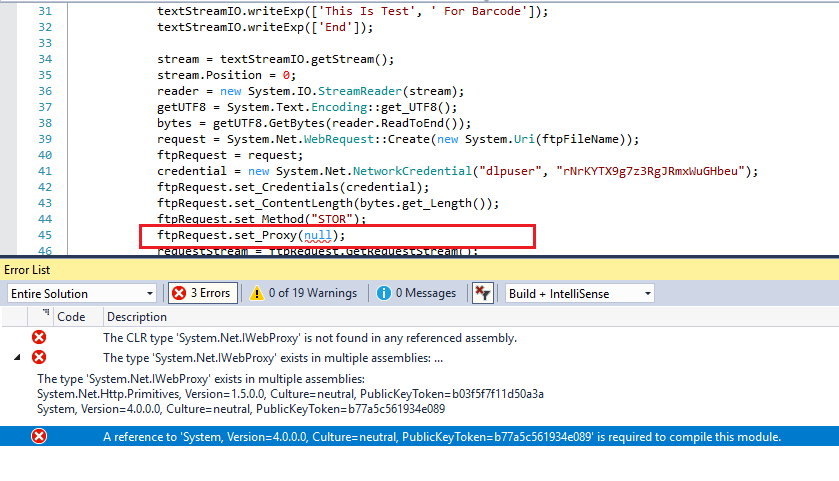
webproxy.png

How can i resolve this reference? Thank you.

I have the same question (0)
  • WillWU Profile Picture
    22,363 on at

    Hi HAIRUL HAZRI,

    What is the version of your .net?

  • HAIRUL HAZRI Profile Picture
    1,214 on at

    Hi Will,

    I created the Visual Studio Project with .Net Framework 4.6.1.

  • Martin Dráb Profile Picture
    239,040 Most Valuable Professional on at

    Did you add any refences to .NET assemblies?

    What if you try just the following code?

    System.Net.IWebProxy test;

    Does it fail as well?

    By the way, you should place your code to a class method with an intent-revealing name, instead of doing everyhing in clicked() method of the form.

  • HAIRUL HAZRI Profile Picture
    1,214 on at

    Hi Martin,

    System.Net.IWebProxy is not recognized. I tried to add .Net reference but could not find it. How else can I add the reference?

    iwebproxy-not-found.png

    This is cloud hosted DEV environment on version 10.0.17 PU41, if that helps.

  • Martin Dráb Profile Picture
    239,040 Most Valuable Professional on at

    All right, so we can ignore all the other code; this single line is all what's needed.

    No, I don't think you should add any references. On the contrary, I asked if you didn't add any before, because the error message complains about finding this type in multiple assemblies.

    I can declare System.NetIWebProxy variable without any problem; something seems to be wrong with your development environment.

    If I check the version of System.Net.Http.Primitives in the bin folder of my F&O environment, it's 4.2.22.0. Your error message suggests that you has the version 1.5.0.0 somewhere, which looks wrong to me.

  • Kamil Gwiazdowski Profile Picture
    35 on at

    Hi,

    I think it won't work on self-service environments (T2+).

    Refering this docs and conversation with MS engineer FTP communication is not supported starting from T2 environment type. In our project we cannot establish communication from self-service to remote on-premise FTP.

Under review

Thank you for your reply! To ensure a great experience for everyone, your content is awaiting approval by our Community Managers. Please check back later.

Helpful resources

Quick Links

Introducing the 2026 Season 1 community Super Users

Congratulations to our 2026 Super Stars!

Meet the Microsoft Dynamics 365 Contact Center Champions

We are thrilled to have these Champions in our Community!

Congratulations to the March Top 10 Community Leaders

These are the community rock stars!

Leaderboard > Finance | Project Operations, Human Resources, AX, GP, SL

#1
Giorgio Bonacorsi Profile Picture

Giorgio Bonacorsi 616

#2
André Arnaud de Calavon Profile Picture

André Arnaud de Cal... 460 Super User 2026 Season 1

#3
Syed Haris Shah Profile Picture

Syed Haris Shah 331 Super User 2026 Season 1

Last 30 days Overall leaderboard

Product updates

Dynamics 365 release plans
