web
You’re offline. This is a read only version of the page.
close
Skip to main content

Notifications

Announcements

No record found.

Community site session details

Community site session details

Session Id :
Customer experience | Sales, Customer Insights,...
Answered

Enhancements to roll-up views in Unified Interface

(0) ShareShare
ReportReport
Posted on by 11

Hello world,

I have one challenge that is closed related to one announcement that made by microsoft since the October 2018 release note : "Enhancements to roll-up views in Unified Interface".

Currently I wasn't been able to create this kind of views. 
Here is my customer requirement : 

I have a Household custom entity that has a 1 : N relationship to Contact. 
Contact has a 1:N relationship to Case entity. 

From the Household point of view, I would like to see all cases from the Household's related contacts. 

Can you help ? 

Best regards, 

Florent 

I have the same question (0)
  • Suggested answer
    meelamri Profile Picture
    13,216 User Group Leader on at

    Roll-up views works besides activities. You need some unsupported JavaScript or c# plugin to resolve your challenge

    medium.com/.../show

  • LuHao Profile Picture
    40,892 on at

    Hi Florent,

    We will use Advanced Find to search out such views.

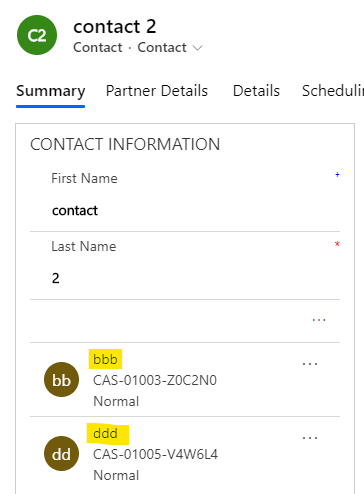
    I simulated your environment.

    Household 1 has two related contacts. They each have two related cases.

    Here the lookup field for the relationship between Household and Contact is "Household", which will be used in advanced find.

    1715.pastedimage1581049902252v1.png

    7801.pastedimage1581050066893v2.png        8623.pastedimage1581050091676v3.png

    For Household 1, I should be able to search out these 4 cases.

    Open the Advanced Find, Look for Cases. First select (Related) Contact, then select the (lookup field) Household, then select the Household record you want to view.

    0336.pastedimage1581050249600v4.png        2703.pastedimage1581050486598v5.png

    Click Result button, you will see all related cases.

    3426.pastedimage1581050544819v6.png

    Save this view. Note that this view is a view of case, not a view of Household.

    0511.pastedimage1581050705416v7.png

    The next time you want to see related cases of another Household, you just need to modify the Household record after "Equals" in the filter.

    After opening the saved view, open Advanced Find, change the Household record directly, and then save this view. Return to the view and refresh to see the new Household related cases.

    6505.pastedimage1581050880684v8.png        3681.pastedimage1581051006863v10.png

  • Florent_FIR Profile Picture
    11 on at

    Hi Hao,

    Thank you for your response but I would like to see all cases of a Household in a contextualized way.

    Meaning, I'm on a case, I would like to see all case of my Customer's household's contacts.

    I created the view based on Case entity, but there the value "Contact" or House is static in the advanced find.

    What I would like is the vieuw/subgrid to be dynamic based on the value in the "Customer"/ contact field on my case. 
    pastedimage1581355764030v2.png

    If I take the xml file of this advanced find here is where the record should be dynamic instead of static : 

    pastedimage1581355819269v3.png

    Hope it is more clear and you will ideas that I can explore :) 

  • Verified answer
    LuHao Profile Picture
    40,892 on at

    Hi Florent,

    Please refer to this article: hulshof.eu/.../

  • Florent_FIR Profile Picture
    11 on at

    Thank you Hao,

    I was close to this conclusion but I wasn't sure it was a good idea to create new relationships but it seems to be the cleanest way.

    Best regards,

    Florent

Under review

Thank you for your reply! To ensure a great experience for everyone, your content is awaiting approval by our Community Managers. Please check back later.

Helpful resources

Quick Links

Responsible AI policies

As AI tools become more common, we’re introducing a Responsible AI Use…

Neeraj Kumar – Community Spotlight

We are honored to recognize Neeraj Kumar as our Community Spotlight honoree for…

Leaderboard > Customer experience | Sales, Customer Insights, CRM

#1
Tom_Gioielli Profile Picture

Tom_Gioielli 170 Super User 2025 Season 2

#2
#ManoVerse Profile Picture

#ManoVerse 61

#3
Gerardo Rentería García Profile Picture

Gerardo Rentería Ga... 52 Most Valuable Professional

Last 30 days Overall leaderboard

Product updates

Dynamics 365 release plans