web
You’re offline. This is a read only version of the page.
close
Skip to main content

Notifications

Announcements

No record found.

Community site session details

Community site session details

Session Id :
Microsoft Dynamics AX (Archived)

Bill of Material has not been approved

(0) ShareShare
ReportReport
Posted on by 2,075

Dear All,

I cant create production order from Sales Order,

the message is Bill of Material has not been approved,

but I check at BOM, its already approved and activated.

but we still have this issue.

please help.

Thank in advance
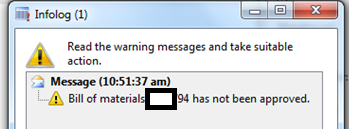
Bill-of-Materials-has-not-been-approved.png

*This post is locked for comments

I have the same question (0)
  • Verified answer
    Ludwig Reinhard Profile Picture
    Microsoft Employee on at

    Hi benjamin84,

    There are two places/things that you need to approve

    1. the BOM itself

    2. the BOM Version

    Please have a look at the following screen as a reference.

    2438.bom.png

  • benjamin84 Profile Picture
    2,075 on at

    Hi Ludwig,

    could you advice where is the location/menu for point # 2,

    I only knew BOM like picture you attached .

    Thank you

  • benjamin84 Profile Picture
    2,075 on at

    Here's my screenshoot.

    could you advice  another location/menu I need to check for point # 2.

    THank you

    Approved-BOM.png

  • Verified answer
    Ludwig Reinhard Profile Picture
    Microsoft Employee on at

    Hi benjamin84,

    The upper screen shows your BOM and the lower part your BOM version.

    This setup seems actually ok to me.

    Do you still get the error message if you use this BOM?

    Best regards,

    Ludwig

  • Verified answer
    Mahmoud Hakim Profile Picture
    17,887 on at

    For point 2 ,

    just select your item from released product and select engineer tab as the following

    7026.14.png

  • Verified answer
    benjamin84 Profile Picture
    2,075 on at

    Hi Ludwig,

    found the root-cause.

    its because its approved without ID approval.

    Thank you for your help.

    Approved-without-ID-Approver-_2D00_.png

  • benjamin84 Profile Picture
    2,075 on at

    Hi Mahmoud,

    Thank you.

  • benjamin84 Profile Picture
    2,075 on at

    Hi Ludwig,

    turn out, user id blanked for approved BOM.

    once filled, run normally.

    danke.

Under review

Thank you for your reply! To ensure a great experience for everyone, your content is awaiting approval by our Community Managers. Please check back later.

Helpful resources

Quick Links

Responsible AI policies

As AI tools become more common, we’re introducing a Responsible AI Use…

Neeraj Kumar – Community Spotlight

We are honored to recognize Neeraj Kumar as our Community Spotlight honoree for…

Leaderboard > 🔒一 Microsoft Dynamics AX (Archived)

#1
Martin Dráb Profile Picture

Martin Dráb 4 Most Valuable Professional

#1
Priya_K Profile Picture

Priya_K 4

#3
MyDynamicsNAV Profile Picture

MyDynamicsNAV 2

Last 30 days Overall leaderboard

Featured topics

Product updates

Dynamics 365 release plans
