web
You’re offline. This is a read only version of the page.
close
Skip to main content

Notifications

Announcements

No record found.

Community site session details

Community site session details

Session Id :
Customer experience | Sales, Customer Insights,...
Suggested Answer

Can we add HTML Web Resource in between Entity Form Header and Body in Dynamics 365 CRM

(0) ShareShare
ReportReport
Posted on by 110

Hi ,

I want to add custom HTML Web Resource in between Entity Form Header and Body in Dynamics 365 CRM.

I have created one custom entity and On its form , i have added some tabs in its Body.

But i want to show record overall summary in custom HTML web source . So i want to add it in Header Section of Form so that its visible all the time when user switch different Tabs in Form body.

Basically this Summary should be visible all time with some stats for that record.

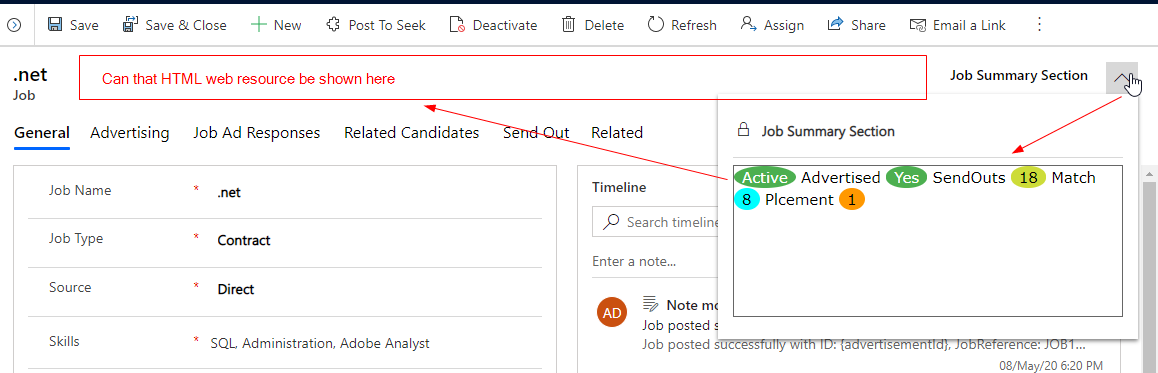
I tried to add web resource in Form header but its shifted to drop button inside Header . Its not coming fully on Header.

Also if that not possible on header then can i add in between Form Header and Form Body.

I went through some URL to customize Form XML using C# code as explained in below URL 

https://crmdynamicsblog.wordpress.com/2015/12/26/add-form-library-on-crm-form-using-c-or-javascript/

So these type of things are possible in Dynamics 365 unified Interface ?

Check below screenshot to see how my web source currently coming in header
pastedimage1590744975124v1.png

Is there any other possible solution so that such summary visible on header all the time 

Thanks

I have the same question (0)
  • Suggested answer
    Alejandro Serdan Profile Picture
    on at

    Hi! 

    With less steps or complications you can edit the FormXML and re-import it into D365 by creating a solution and including the entity form. 

    Now, adding the web resource between header and body is not supported. 

    Unfortunately, such a requirement will need non-supported customizations. 

  • Dynamics 365 Sumit Thakran Profile Picture
    110 on at

    Hi Alex,

    Thanks for your input.

    Can you share any helpful URL or blog for editing FormXML and reimporting it into D365 CRM.

    Also you mentioned that adding Web Resource b/w Header and body is not supported. Thats fine.

    If web resource is visible on header also instead of coming in drop down section in header. That will also be sufficient for our requirement.

    If you can provide any thought on that .

    Thanks

  • Alejandro Serdan Profile Picture
    on at

    Hi!

    The behavior of the header forcing the dropdown can't also be modified in a supported way.

    Here is the documentation of the FormXml to help understand the nodes in it:

    Understand dashboards: Dashboard components and FormXML

    docs.microsoft.com/.../understand-dashboards-dashboard-components-formxml

    You can try the following third-party tool to edit the FormXML:

    FormXml Manager

    www.xrmtoolbox.com/.../

    If you prefer to edit the form with no third-party tools, you can create a solution and include the form.

    Then, export the solution and extract the solution zip file.

    Edit the customizations.xml file, inside the file you'll find the FormXML within the entity node.

    After doing your changes and saving them, you should select all ziped content files and zip them again so you can import it back into CRM.

    Regards.

  • Dynamics 365 Sumit Thakran Profile Picture
    110 on at

    Hi Alex,

    Thanks i will check by customizing FormXML .

    But one more thing to clarify that what type of customizations can be done in FormXML.

    Can we customize FormXML to such extent that we can add webresource b/w Header and Body

    Or We can customize only Header component where our webresource can be seen static not in dropdown.

    Also Customizing FormXML , these things can be done in UCI Mode too.

    Thanks

  • Suggested answer
    Alejandro Serdan Profile Picture
    on at

    Hi!

    That is correct, you can edit the FormXml with no tools or UI, just editing the XML; however, unsupported customizations behavior won't change. This means that adding the web resource is possible but not between the header and body nor keeping it static in the header.

    Regards.

  • Dynamics 365 Sumit Thakran Profile Picture
    110 on at

    Hi Alex,

    Thanks for clarification. i will try to use supported customization for it.

    Thanks

  • Suggested answer
    Carlo Velasco Profile Picture
    787 on at

    Adding the following documentation for reference.

    https://docs.microsoft.com/en-us/dynamics365/customerengagement/on-premises/customize/customizations-supported

Under review

Thank you for your reply! To ensure a great experience for everyone, your content is awaiting approval by our Community Managers. Please check back later.

Helpful resources

Quick Links

Responsible AI policies

As AI tools become more common, we’re introducing a Responsible AI Use…

Neeraj Kumar – Community Spotlight

We are honored to recognize Neeraj Kumar as our Community Spotlight honoree for…

Leaderboard > Customer experience | Sales, Customer Insights, CRM

#1
Tom_Gioielli Profile Picture

Tom_Gioielli 70 Super User 2025 Season 2

#2
Gerardo Rentería García Profile Picture

Gerardo Rentería Ga... 43 Most Valuable Professional

#3
Daniyal Khaleel Profile Picture

Daniyal Khaleel 32 Most Valuable Professional

Last 30 days Overall leaderboard

Product updates

Dynamics 365 release plans



