web
You’re offline. This is a read only version of the page.
close
Skip to main content

Notifications

Announcements

No record found.

Community site session details

Community site session details

Session Id :
Microsoft Dynamics AX (Archived)

Show xml in Dynamics 365 for Operations Browser tab

(0) ShareShare
ReportReport
Posted on by 1

Hi there,

I have a table in which I store incoming xml strings (from an external source). After processing of the xml, I want the user to be able to view the processed xml, and I want to do that in a new Tab of the browser I'm running Dynamics 365 for Operations in. Yes, I can download the xml file itself, which can be a nice workaround, but I'd really like to show the xml in the user interface.

I have the following code, which did work at some point, but now gives an error message in the browser tab. Here's the error message (in Chrome) and the (simplified) code:
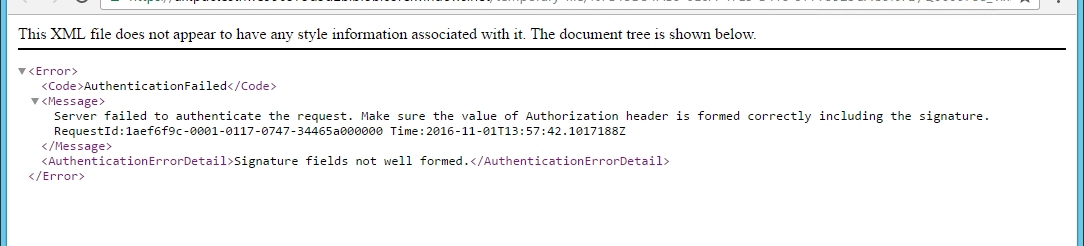
8688.Image1.jpg


void show(str _xml)
{
       System.IO.MemoryStream xmlStream;
       System.Byte[] byteArray;

// convert string to stream
byteArray = System.Text.Encoding::UTF8.GetBytes(_xml);
xmlStream = new System.IO.MemoryStream(byteArray);
FileUploadTemporaryStorageResult result = File::SendFileToTempStore_GetResult(xmlStream, “XMLView.xml”) as FileUploadTemporaryStorageResult;
if (result && result.getUploadStatus())
{
       url = result.getDownloadUrl();
       new Browser().navigate(url,true);

}

}

Any suggestions?

*This post is locked for comments

I have the same question (0)
  • Martin Dráb Profile Picture
    237,990 Most Valuable Professional on at

    For reference, the error is thrown from navigate() (I know it from a discussion elsewhere).

    You mentioned that you get the error in Chrome. Does it mean that you don't get it in other browsers?

  • Jos Litjens Profile Picture
    1 on at

    I just checked, I get it in IE as well, so it's not browser specific

  • Martin Dráb Profile Picture
    237,990 Most Valuable Professional on at

    First of all, let's try to simplify the solution. Can't you simply call File::SendFileToUser(xmlStream, "XMLView.xml")?

  • Jos Litjens Profile Picture
    1 on at

    That's actually exactly how I've implemented it at the moment, but that's a workaround and not exactly what I want. I want it to open directly in a browser window (which should be possible, because xml is formatted well in a browser).

  • Martin Dráb Profile Picture
    237,990 Most Valuable Professional on at

    It calls exactly the same navigate() method as you do, so what difference do you expect from your code? You merely added the handling of file upload result; the rest is the same.

  • Jos Litjens Profile Picture
    1 on at

    Well, as I see it, I need a url if I want to display the xml in a browser. The only way to do that is to upload it to TempStorage, get the url of that file and navigate to it. Unless there's another way?

  • Martin Dráb Profile Picture
    237,990 Most Valuable Professional on at

    I never said you don't need a resource locator (URL) to access the resource. I'm saying that if your code worked, I believe it would do the same thing as File::SendFileToUser(). Either you make me to change my opinion, or we should forget your code and the error and start talking about how to achieve your actual requirement (to open the file directly in browser instead of getting the download dialog).

  • Jos Litjens Profile Picture
    1 on at

    I think you've got a point there. Let's forget my code and start over. What do you suggest?

  • Martin Dráb Profile Picture
    237,990 Most Valuable Professional on at

    I think you get it for download instead of opening in browser it's because the HTTP response from AX contains Content-Type application/octet-stream. You would have to somehow tell the browser that the blob contains text/xml or something like that. I don't know yet how and if it's possible; I'll have to do some research when I'm not in a meeting. :-)

  • Martin Dráb Profile Picture
    237,990 Most Valuable Professional on at

    As I understand, you would have to ContentType of the Azure blob (in Properties).

    After a brief look into FileUploadTemporaryStorageResult class, I think it's not supported by the current framework. You can either implement a different way of storing the file (with a support for ContentType), or send a feature request to Microsoft.

Under review

Thank you for your reply! To ensure a great experience for everyone, your content is awaiting approval by our Community Managers. Please check back later.

Helpful resources

Quick Links

Responsible AI policies

As AI tools become more common, we’re introducing a Responsible AI Use…

Neeraj Kumar – Community Spotlight

We are honored to recognize Neeraj Kumar as our Community Spotlight honoree for…

Leaderboard > 🔒一 Microsoft Dynamics AX (Archived)

#1
Priya_K Profile Picture

Priya_K 4

#1
Martin Dráb Profile Picture

Martin Dráb 4 Most Valuable Professional

#3
MyDynamicsNAV Profile Picture

MyDynamicsNAV 2

Last 30 days Overall leaderboard

Featured topics

Product updates

Dynamics 365 release plans



