web
You’re offline. This is a read only version of the page.
close
Skip to main content

Announcements

News and Announcements icon
Community site session details

Community site session details

Session Id :
Dynamics 365 Community / Forums / Finance forum / Financial Dimension of...
Finance forum

Financial Dimension of Item (BYOD)

(0) ShareShare
ReportReport
Posted on by 150

Using BYOD and exporting the Financial dimension values ( [dbo].[FinancialDimensionValueEntityStaging] ) I get all the dimension values and the descriptions. I would like to pair them to items (Released Product Details). How do I achieve this?


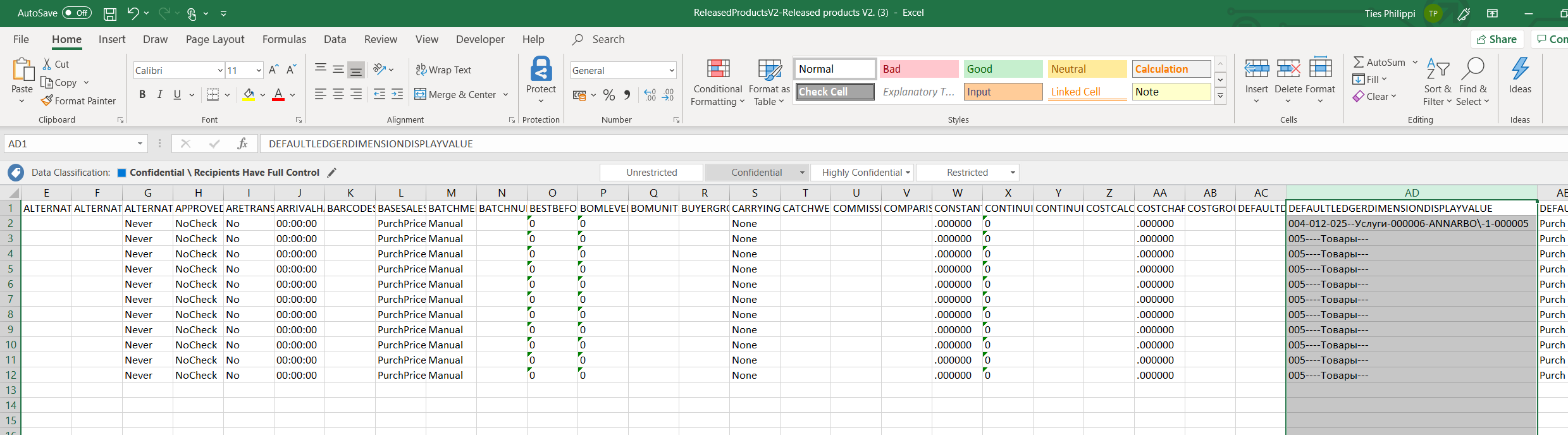
I know there is a "DEFAULTLEDGERDIMENSIONDISPLAYVALUE" column in Released Products V2 entity ( [dbo].[EcoResReleasedProductV2Staging] ) but it shows it with a bunch of lines inserted "-----2041-"

Any better way to achieve this?

Categories:
I have the same question (0)
  • Ludwig Reinhard Profile Picture
    Microsoft Employee on at

    Hello agneum,

    What is it that you want to do exactly?

    To you want to associate each item with a findim in D365FO?

    Best regards,

    Ludwig

  • André Arnaud de Calavon Profile Picture
    306,873 Super User 2026 Season 2 on at

    Hi Agneum,

    Can you explain your question by providing some more details? Like Ludwig, I'm not able to understand your issue or what you want to achieve.

  • agneum Profile Picture
    150 on at

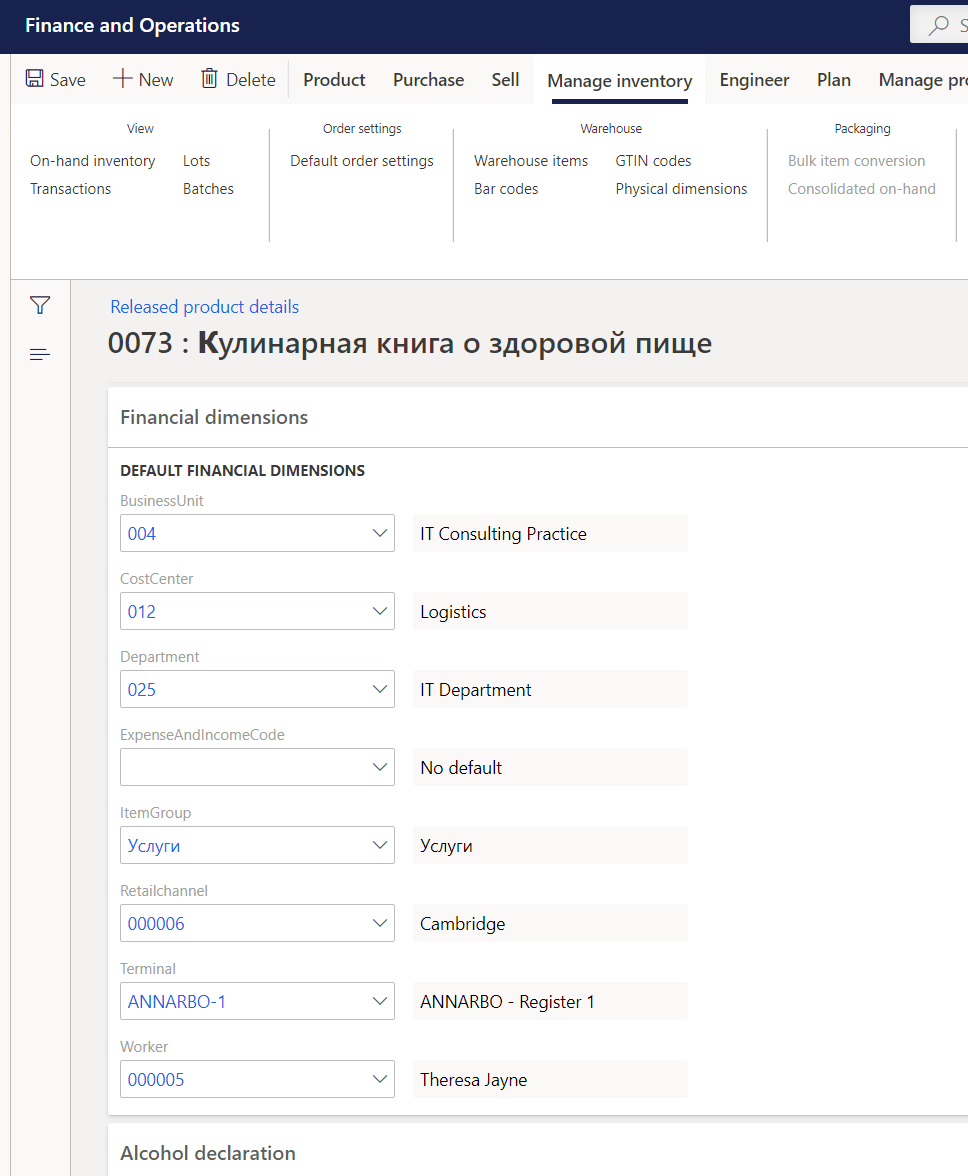
    I'd like to export the default financial dimensions for all products. Namely those found in "Released Product details" in D365FO.

    The entity  "Released products V2" export gives me a column called "DEFAULTLEDGERDIMENSIONDISPLAYVALUE". Financial dimensions entity gives me all the dimension values.

    Obviously I can not join on the displayvalue.

    In AX09 you could right click on any field and easily get more information in regards to the database. It's much more difficult in D365. If I could get the entities used from a form name for instance that would really help out.

  • Verified answer
    Ties Philippi Profile Picture
    962 on at

    Hi Agneum,

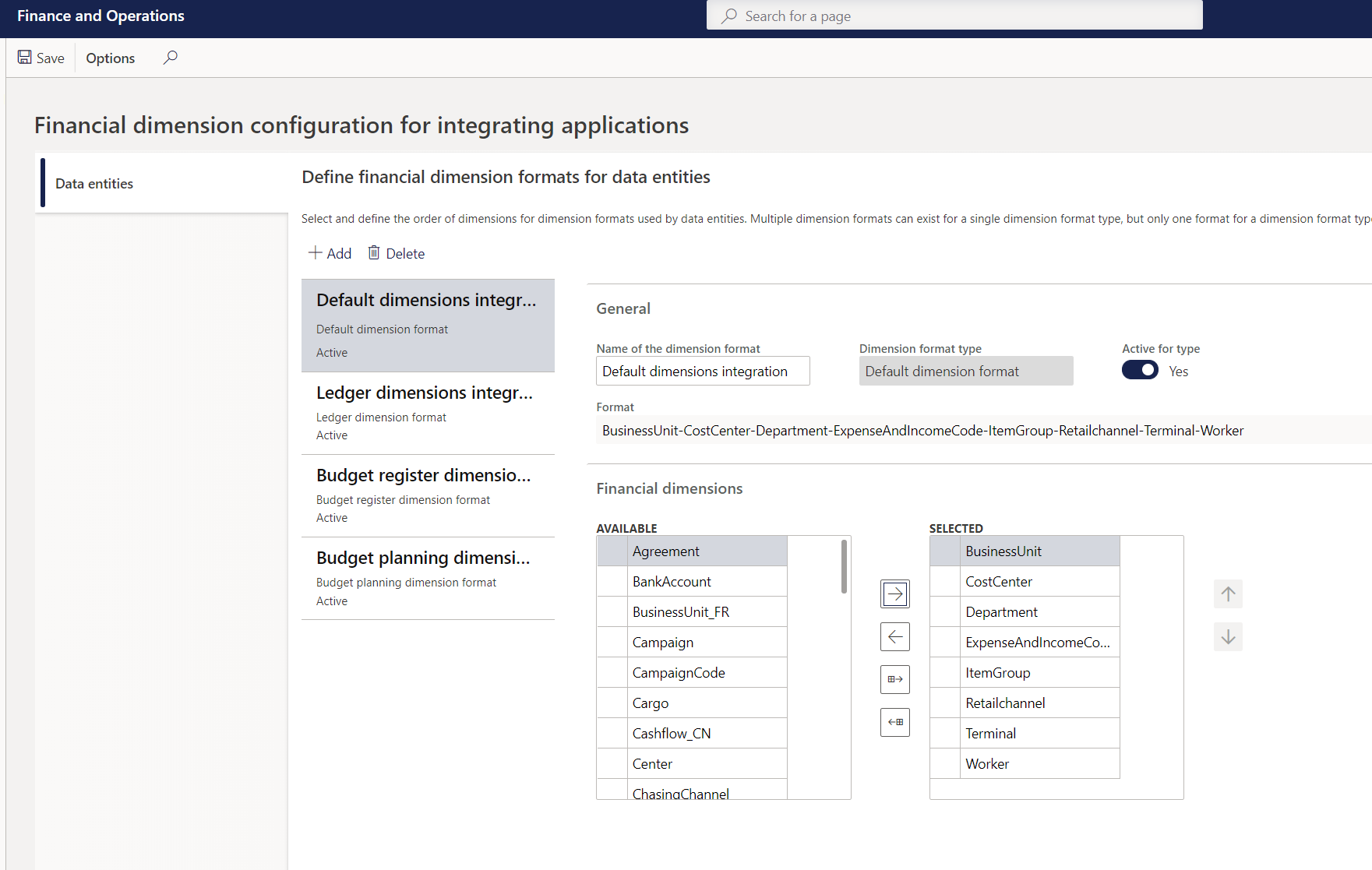
    To configure this go to the following menu General Ledger --> Chart of Accounts --> Dimensions --> Financial dimension configuration for integrating applications. In here you can configure 4 options:

    * Default dimensions format, dimension layout used for default dimensions (like you set up on customers / vendors / items / etc)

    * Ledger dimension format, dimension lay out used for general ledger postings

    * Budget register dimension format, dimension lay out used for budget register entries

    * Budget planning dimension format, dimension lay out used for budget planning

    As you can have different set up of dimension formats in your account structure, you need to tell D365 how to handle this while exporting / importing. Since you can only define one setup per options, in general you would create one big string in an order of your choosing containing all the relevant dimensions for your company, however you are completely free in doing this. This will give you the flexibility of hiding dimensions in exports as well (like the personnell number for example).

    Please see the screenshots below for extra reference.
    Default-dimension-setup.pngItemSetup.pngResults.png

  • agneum Profile Picture
    150 on at

    Yes, this helps of course. Any way to specify a particular format to be used for an export project to Azure SQL? The issue of course, is that I would still have to unnest/split the displayvalue string into seperate rows to be able to join other tables.

  • Ties Philippi Profile Picture
    962 on at

    Hi Agneum,

    As far as I know it is only 1 general template you can setup for dimensions.  So creating a specific one for Azure SQL is not possible.

    Best regards,

    Ties

  • agneum Profile Picture
    150 on at

    Thanks for the quick reply. I will take the default fields and use string splitting function.

Under review

Thank you for your reply! To ensure a great experience for everyone, your content is awaiting approval by our Community Managers. Please check back later.

Helpful resources

Quick Links

November Spotlight Star - Khushbu Rajvi

Congratulations to a top community star!

Forum Structure Changes Coming on 11/8!

In our never-ending quest to help the Dynamics 365 Community members get answers faster …

Dynamics 365 Community Platform update – Oct 28

Welcome to the next edition of the Community Platform Update. This is a status …

Leaderboard > Finance

Last 30 days Overall leaderboard

Featured topics

Product updates

Dynamics 365 release plans