web
You’re offline. This is a read only version of the page.
close
Skip to main content

Notifications

Announcements

No record found.

Community site session details

Community site session details

Session Id :
Microsoft Dynamics AX (Archived)

Report: The Hidden expression contains an error

(0) ShareShare
ReportReport
Posted on by 1,559

Hi Friends,

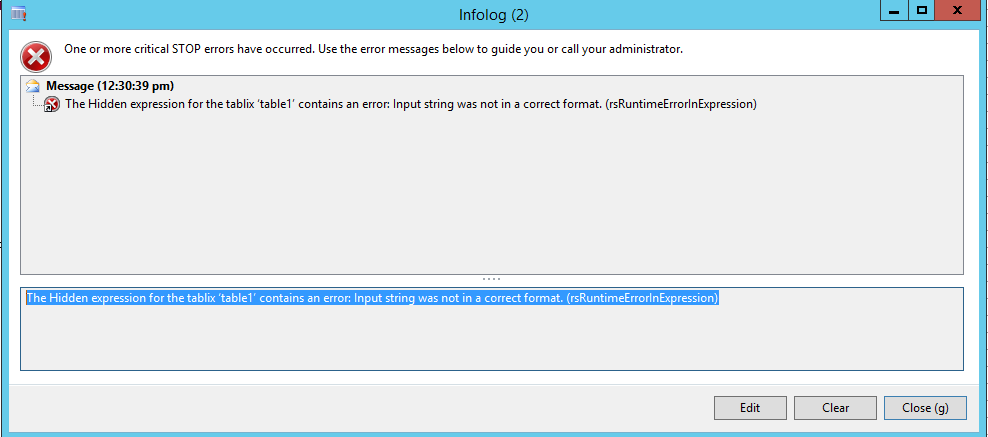
Got a weird error, I need to add two new fields to report. So, I created two new fields in temp table. but, not even showing them in report, just add to dataset. I got this error:

"The Hidden expression for the tablix ‘table1’ contains an error: Input string was not in a correct format. (rsRuntimeErrorInExpression)"

Report is WMSPickingList_OrderPick. table is WMSPickingList_OrderPickTmp.

Any hint is greatly appreciated.

River
*This post is locked for comments

I have the same question (0)
  • Suggested answer
    Sohaib Cheema Profile Picture
    49,438 User Group Leader on at

    The issue seems straight forward. Select your table which is on report design go to properties, go to visibility and check the expression of viability. Either remove it or try to fix it.


  • Ganriver1 Profile Picture
    1,559 on at

    I looked at it. Hidden property has no expression. It's 'false'.

  • Suggested answer
    Sohaib Cheema Profile Picture
    49,438 User Group Leader on at

    see here

    1) right click the corner of your whole table and click properties

    6825.6.jpg

    now go to Visibility Tab and either remove expression and select option of show. or fix your expression

  • Ganriver1 Profile Picture
    1,559 on at

    Hi Sohaib,

    We don't have expression there. It's exact what you show here.

    River

  • Sohaib Cheema Profile Picture
    49,438 User Group Leader on at

    By error message, it seems the issue of wrong expression.

    If that is not the case, as you said, then I am not sure about other reasons unless you specify some more details. Like, was this report working fine, before you added fields? if you delete customization of this report, is it behaving correctly? have you refreshed DS after adding new fields. have you restarted reporting services after adding new fields. all these points need consideration to know exact matter

  • Ganriver1 Profile Picture
    1,559 on at

    Yes, report works fine before. Only after I add new fields to dataset. Not even showing new fields on report. And new fields got data as I debugged. Everything you mentioned I have checked. That's why it's so weird.

  • Suggested answer
    Sohaib Cheema Profile Picture
    49,438 User Group Leader on at

    when you re-select Dataset (DP class), on VS level, does these new fields appear under Dataset on visual studio???

  • Ganriver1 Profile Picture
    1,559 on at

    yes, they are there.

  • Sohaib Cheema Profile Picture
    49,438 User Group Leader on at

    may be restart to AOS can resolve the issue. sometimes a restart to AOS had fixed such issues with me in past.

  • Ganriver1 Profile Picture
    1,559 on at

    already tried. no help.

Under review

Thank you for your reply! To ensure a great experience for everyone, your content is awaiting approval by our Community Managers. Please check back later.

Helpful resources

Quick Links

Responsible AI policies

As AI tools become more common, we’re introducing a Responsible AI Use…

Neeraj Kumar – Community Spotlight

We are honored to recognize Neeraj Kumar as our Community Spotlight honoree for…

Leaderboard > 🔒一 Microsoft Dynamics AX (Archived)

#1
Martin Dráb Profile Picture

Martin Dráb 4 Most Valuable Professional

#1
Priya_K Profile Picture

Priya_K 4

#3
MyDynamicsNAV Profile Picture

MyDynamicsNAV 2

Last 30 days Overall leaderboard

Featured topics

Product updates

Dynamics 365 release plans



