web
You’re offline. This is a read only version of the page.
close
Skip to main content

Notifications

Announcements

No record found.

Community site session details

Community site session details

Session Id :
Finance | Project Operations, Human Resources, ...
Answered

How to know whether a control already performs lookup method?

(0) ShareShare
ReportReport
Posted on by

Hi,

In my project,  I need to let all controls that don't perform lookup form originally of a form perform a certain lookup form by code.

I thought I can do this by adding an event handler to OnLookup event of these controls. In the event handler there could be logic to let the control perform a lookup form.

Till now I can get all controls of a form. At the beginning, I tried to add the event handler to all of them. However, I found it will raise error when I click the lookup button of controls that originally perform lookup form, because two lookup forms are called by a control at once.

So I think that I should know whether a control already has the logic to perform a lookup form in its lookup method. If yes, nothing should be done. Otherwise, I can add my event handler to it.

However, I cannot find how to determine whether a control already has logic to perform a lookup form in its lookup method. Can you give me some suggestions on this? 

Thanks,

Luca

I have the same question (0)
  • nmaenpaa Profile Picture
    101,162 Moderator on at

    Do you really want to add your custom code to the tens of thousands of places where x++ lookup method is not used? Could you tell us what is the business reason behind this?

    Or did I not understand correctly?

  • nmaenpaa Profile Picture
    101,162 Moderator on at

    By the way, is your question about Dynamics AX (2012) or Dynamics 365 for Finance / Supply Change Management?

  • Luca Ma Profile Picture
    on at

    Hi Nikolaos,

    Thank you for your reply. In fact, there are only few controls for me to deal with. I already knew that if I override their lookup method manually in code, everything works fine. However, for some reason I have to do this at runtime by code.

    Sorry for that I didn't describe my question clearly. My question is about D365 F&O.

    Luca

  • nmaenpaa Profile Picture
    101,162 Moderator on at

    Moved to D365 Finance forum.

    Why do you need to know it in runtime? A developer can see it in development time.

  • Luca Ma Profile Picture
    on at

    Hi Nikolaos,

    In my project I am supposed to not hard code anything. So I have to find a way to find controls that I need at run time and modify them by code.

    Luca

  • nmaenpaa Profile Picture
    101,162 Moderator on at

    I'm afraid I don't understand you.

    Usually "hard coding" means coding some "setup" inside your code. For example if some process should be enabled for some customers, you could hard code those customer ids in your code. This is of course wrong, instead you should add some field to customer table so that the functionality can be enabled/disabled by changing the setup.

    But a lookup method is always "hard coded" to specific form control. Adding logic to the system is always hard coding. You can then steer the logic based on data. But a form field either has your lookup method or it doesn't.

    Could you try to explain your business requirement once more? Thanks!

  • Luca Ma Profile Picture
    on at

    Hi Nikolaos,

    Sorry for making you confused. Here I will try to describe what I have done what I want to do in detail.

    I am trying to give user some suggestions when they try to input in some controls. I have written a function that can get the suggestions that I need to present to the user. add an event handler to the By executing this event handler, I can

    Because there are more than one suggestions for user to select, the controls needs to allow user to select. So I thought that I can take advantage of lookup form of the controls. So I wrap the method I wrote as an event handler and add it to the OnLookup event of all controls that I want to modify (their types are among FormRealControl, FormStringControl, FormIntControl and FormInt64Control). At this point, each time I click the lookup button of a control, the event handler will be executed and the suggestion will be given. So the next step is to show the suggestions on the lookup tables of the control.

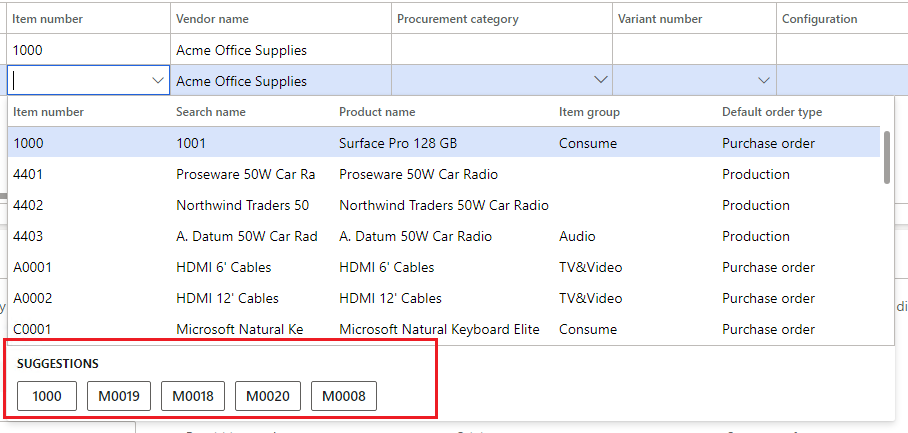
    I found that all lookup forms extend the class "FormRun", so I use COC to hack into the init method of FormRun to add some buttons, each one of which represents a suggestion, on the form if it is displayed as a lookup table. This solutions works well as the following picture shows. The area in red rectangle is what I add to the original lookup form of the control.
    pastedimage1597735566459v1.png

    However, this solutions only modified the lookup form rather than controls. So for the controls that originally performs a lookup form, it works well. If a control does not perform a lookup form, the button that I want will certainly not appear because there is no lookup form at all. So I thought that if I could let these controls perform an empty lookup tables, things will be done.  

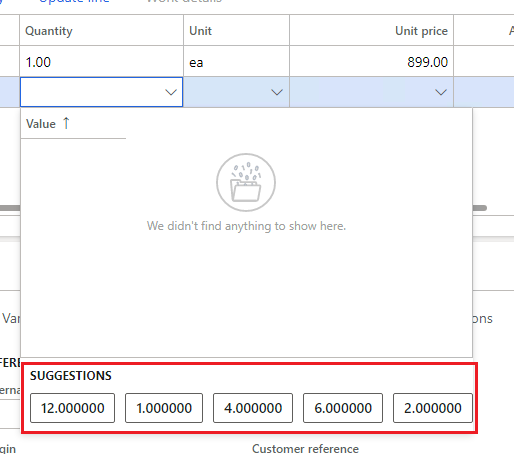
    Now I can override the "lookup" method of a control that doesn't perform a lookup form manually to let it perform a lookup table. By doing this, the suggestions that I generate are able to be placed at the newly performed lookup form, as the following picture shows.
    pastedimage1597736408071v2.png

    It is clear that by doing the same thing as above on every controls that doesn't perform a lookup form (this is what I called "hard code"), I can achieve my goal. However, as my solution is supposed to be adapted on many controls in different scenarios, I am not able to determine the number of the controls that would be modified. In fact, this number depends on different scenarios. So I have to do this dynamically at run time.

    Sorry again for not describing things clearly. 

    Luca

  • Suggested answer
    nmaenpaa Profile Picture
    101,162 Moderator on at

    I think that another user was recently working on some prediction engine, but now you seem to have exactly the same case. Did you perhaps create a second user account? Or was your colleague asking the earlier questions? :)

    All lookups use some kind of lookup form / dialog. So you just need to enhance all those base lookup forms / dialogs.

    Just check all classes and forms where name starts SysLookup and you should find all/most of the relevant objects.

    So rather than customizing the forms that call the lookup, I think you need to customize the lookups.

    If you feel I'm misunderstanding you, don't hesitate to share more details about your implementation. Such as any code that you have developed.

  • Luca Ma Profile Picture
    on at

    Hi Nikolaos,

    I didn't know there is someone facing the same problem as mine before. It is a real coincidence :)

    I thought that I should further describe my problem:

    I did do customization on the lookups rather than the controls. However, there are some controls that don't perform lookups. And I have to let these controls perform an empty lookup so that the suggestions could be displayed on it. I knew that I could do this by override the controls' "lookup" method for each of them manually at development time. However, for the reason I have mentioned above, I need to do this at run time. If I simply add the function to perform an empty lookup to all controls at the runtime, the controls that already perform a lookup will meet error because a control cannot perform two lookups at once. So I have to find the controls that don't perform a lookup, and only make them to perform an empty lookup.

    Luca

  • Suggested answer
    nmaenpaa Profile Picture
    101,162 Moderator on at

    When you say "controls that don't perform lookups" do you mean fields that are not related to any other table. Such as name or quantity?

    I think you could theoretically find out these fields in runtime, based on the field and data type properties. If the field has no relation (in table relations) to another table, and if it's not such data type that has an EDT relation (a legacy feature), then there's no lookup.

    Base enums don't use "lookup" either, but not sure how the "enum lookup" is implemented and if you can hook into that code.

Under review

Thank you for your reply! To ensure a great experience for everyone, your content is awaiting approval by our Community Managers. Please check back later.

Helpful resources

Quick Links

Responsible AI policies

As AI tools become more common, we’re introducing a Responsible AI Use…

Neeraj Kumar – Community Spotlight

We are honored to recognize Neeraj Kumar as our Community Spotlight honoree for…

Leaderboard > Finance | Project Operations, Human Resources, AX, GP, SL

#1
André Arnaud de Calavon Profile Picture

André Arnaud de Cal... 449 Super User 2025 Season 2

#2
Martin Dráb Profile Picture

Martin Dráb 422 Most Valuable Professional

#3
BillurSamdancioglu Profile Picture

BillurSamdancioglu 239 Most Valuable Professional

Last 30 days Overall leaderboard

Product updates

Dynamics 365 release plans



