web
You’re offline. This is a read only version of the page.
close
Skip to main content

Notifications

Announcements

No record found.

Community site session details

Community site session details

Session Id :
Customer experience | Sales, Customer Insights,...
Answered

How to Add the same hyperlink to all new opportunity records?

(0) ShareShare
ReportReport
Posted on by 329

I have a request to add a hyperlink to a Google Doc on our opportunity form. The link would be the same on every record, and is a static link that I don't want editable, but do want it to be clickable. I'd like it to automatically show up on all opportunity records using this form. I've played around with business rules and can't get it to work quite right. I could use some help/direction.

Thank you!

I have the same question (0)
  • Verified answer
    Wahaj Rashid Profile Picture
    11,321 on at

    Hi,

    Thank you for your query.

    I will recommend following approaches depending on the scenario:

    1 - If you only need to display this hyperlink and do not need to store as data, you can create an HTML Web Resource and display it in the form. Here are steps to follow:

    • Go to Advanced Settings > Customization -> Solutions.
    • Create a new Solution or you can use Existing one. You can also do this in Default solution.
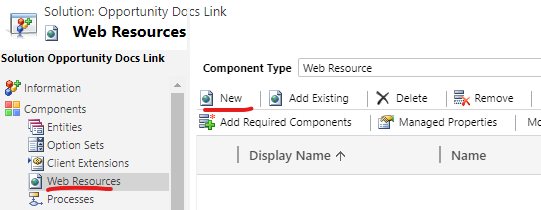
    • Click on Web Resources and create a new Web Resource with following properties:
      • Name: <type an appropriate name>
      • Display Name: <type description>
      • Type: Webpage (Html) 

    pastedimage1617655515151v1.png


    • Then click on Text Editor, here you can design your page as per your needs. Or you can simply create a Hyperlink using GUI features (choose External Resource). Here is a sample HTML:
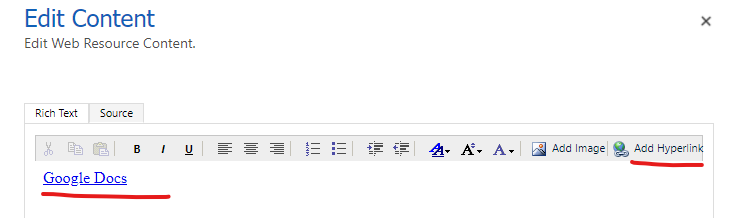
    pastedimage1617655943792v2.png


    Google Docs

    Please note, target="_blank" in the following line will open the link in the new tab.

    <a href="">https://google.com" target="_blank">Google Docs</a>

    • Save the Web Resource and click on Publish.
    • Now, Click on Entities then Add Existing and choose Opportunity entity, and under sub-components choose the form you use.
    • Open the form and add the Web Resource control from the ribbon (if you do not see Web Resource option, maximize the form designer window), type a name for the control and choose the Web Resource created. In the Formatting tab, you can choose the appropriate number of rows, for this requirement 1 row should be fine.
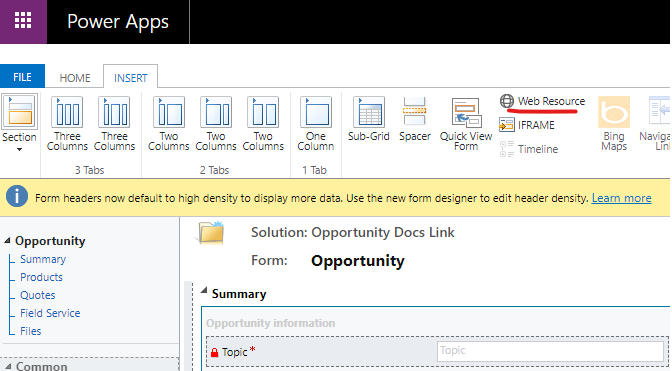
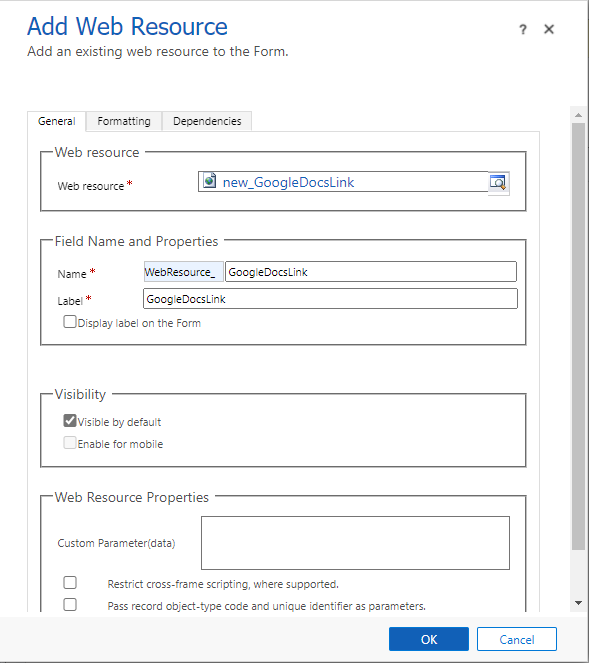
    pastedimage1617656296314v3.png

    pastedimage1617656436183v4.png

    • Save and Publish the form.

    2 - If you need to store this link with Opportunity data (for reporting or other purposes):

    • Create a Field in opportunity entity with following properties:
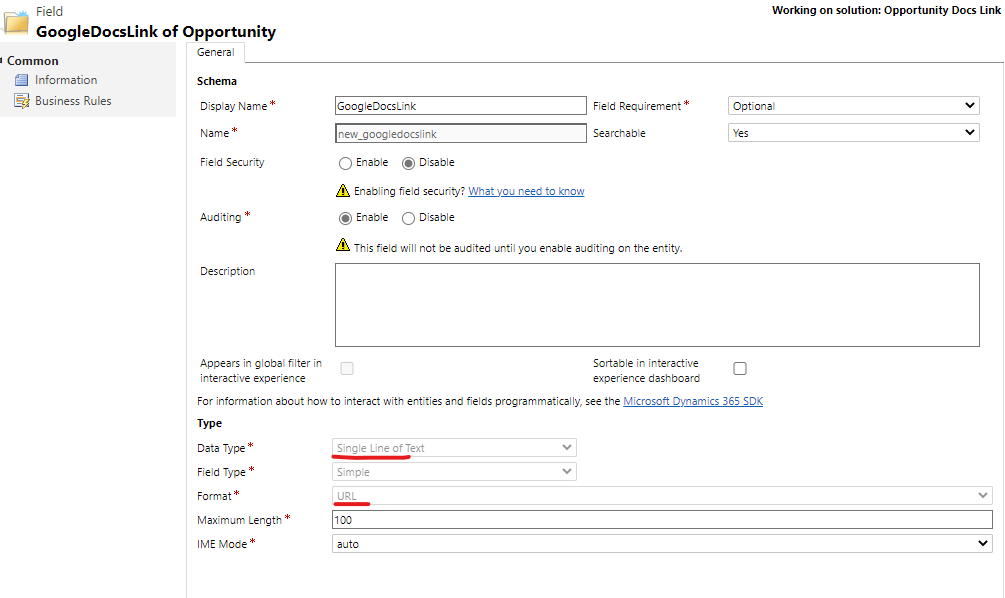
    pastedimage1617656919299v5.png

    • Add the field to the form, and click on Business Rules.
    • Add a new Business Rule, change scope to Entity, this will make sure Business Rule is executed on all forms and all sources (Web, API).
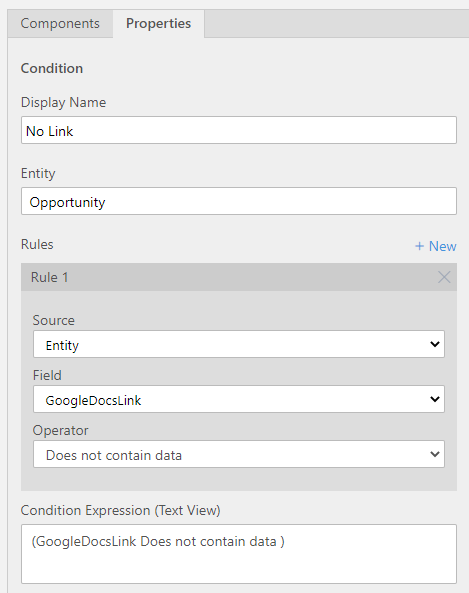
    • Add the following condition:

    pastedimage1617657139264v6.png

    • Then on the True (checked) path of the condition add Set Field Value Action:
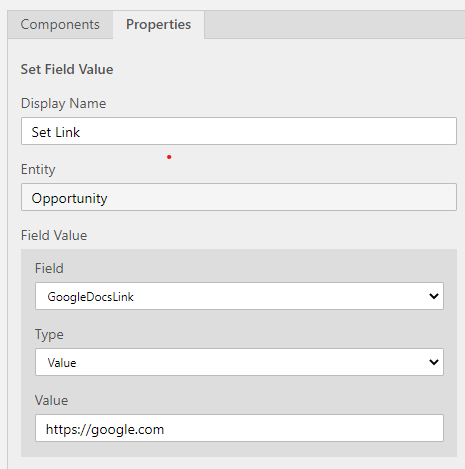
    pastedimage1617657225387v7.png

    Here is the final look of the Business Rule:
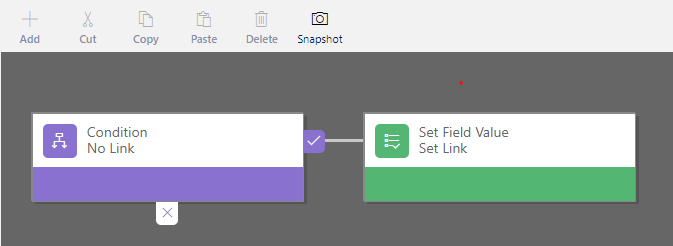
    pastedimage1617657339229v8.png

    • Save, Validate and Activate the Business Rule.
    • Save and Publish the form.

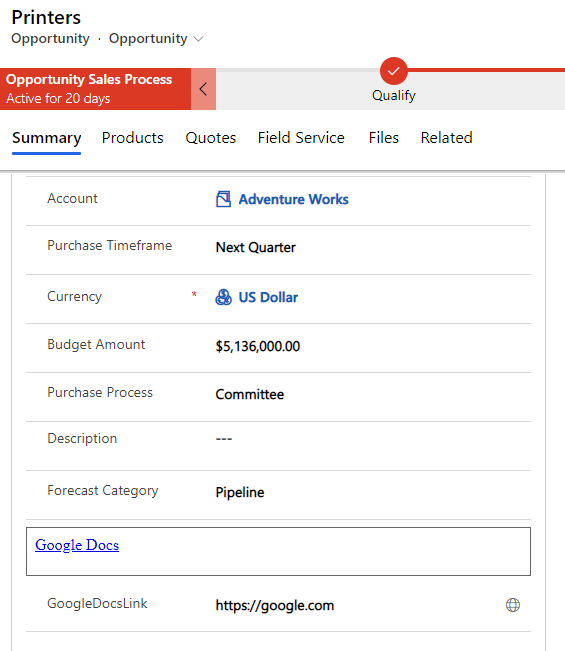
    pastedimage1617657373428v9.png

    The first link is using Web Resource and other is using field and a Business Rule.

    Please note, you can also create a rea-time workflow to update the existing records with link value (for the second approach). This workflow can be executed on demand.

  • LCRMAdminG Profile Picture
    329 on at

    Thank you so much Wahaj! This was incredibly helpful. I'm going to give your blog a follow! I really appreciate it!

  • Wahaj Rashid Profile Picture
    11,321 on at

    You are welcome.

    Glad it helped :)

  • MalikDanish  Profile Picture
    70 on at

    Hi WAHAJ thanks for the help , I want to put a button which when click open up my pdf file , for that I add a web resource as html and write the below code , the link get created but on click on it nothing happens

    <html>

    <head></head>

    <body>

    <a href="file://///172.23.123.11/fdgfd/ANNX_20201123124417_B.pdf">Link 1</a>

    </body>

    </html>

  • MalikDanish  Profile Picture
    70 on at

    Hi Wahaj this works fine for http://www.google.com but when I want to open up a file on new tab and in href i give "file://///192.12.31.1/Myfiles/Document1.pdf" it did nothing and on console i see

    "Security Error: Content at 172.12.33.5/.../ist_Test12 may not load or link to file://///172.12.33.5/Myfiles/Button_b.pdf.

Under review

Thank you for your reply! To ensure a great experience for everyone, your content is awaiting approval by our Community Managers. Please check back later.

Helpful resources

Quick Links

Responsible AI policies

As AI tools become more common, we’re introducing a Responsible AI Use…

Neeraj Kumar – Community Spotlight

We are honored to recognize Neeraj Kumar as our Community Spotlight honoree for…

Leaderboard > Customer experience | Sales, Customer Insights, CRM

#1
Tom_Gioielli Profile Picture

Tom_Gioielli 70 Super User 2025 Season 2

#2
Gerardo Rentería García Profile Picture

Gerardo Rentería Ga... 43 Most Valuable Professional

#3
Daniyal Khaleel Profile Picture

Daniyal Khaleel 32 Most Valuable Professional

Last 30 days Overall leaderboard

Product updates

Dynamics 365 release plans