web
You’re offline. This is a read only version of the page.
close
Skip to main content

Notifications

Announcements

No record found.

Community site session details

Community site session details

Session Id :
Finance | Project Operations, Human Resources, ...
Answered

Create report with toggle visibility

(0) ShareShare
ReportReport
Posted on by

Hi all,

I'm not sure I can describe clearly on one of my issue, but let me try. So basically I need to create a report with ability to hide or show based on the report parameters, How to achieve that ?

In rough design is something like this :
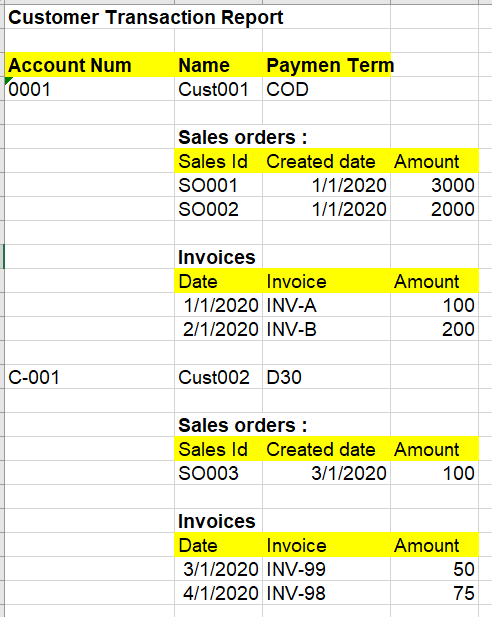
7762.Capture1.PNG

So basically I already have one Dataset with records contains as needed, but now I'm confuse, do I need to have dataset for each (1 for the base data, 1 for Sales Order, and 1 for Sales invoices) or just one ?

And in my report, there is a parameter :

- Show Sales

- Show Invoices

Which I hope, user can just choose whether want to display Sales Order transactions or not, same as Invoices data.

I understand I need to create Precision Design, but how actually we can handle the toggle and hide the Sales rows or Invoices rows if user don't want to see it.

Is it possible ?

I tried to google for some sample, but I always got the one that only showing level grouping or drill down which is not what I want my report to be.

Any good references for this ?

Thanks,

I have the same question (0)
  • Suggested answer
    Sergei Minozhenko Profile Picture
    23,093 on at

    Hi WWwong,

    SSRS reports are quite flexible in that, you can hide controls (text boxes, tablix, and so on) or rows or columns in tablix based on expression.

    How you report is designed? Are sales and invoice section are separate tablix controls?

    Some docs docs.microsoft.com/.../hide-an-item-report-builder-and-ssrs

  • Community Member Profile Picture
    on at

    Hi Sergei,

    Actually that is my confusion, do I need to have separate Tablix ? If it is separate, how or where I put the 2nd and 3rd Tablix ? and also do I need to have separate Dataset as well ?

    Any existing report for my reference ?

    Thanks,

  • Verified answer
    Sergei Minozhenko Profile Picture
    23,093 on at

    Hi WWwong,

    But how your report is designed now? Maybe the easiest solution is to add an indicator if it's invoice row or sales row and hide row based on these criteria. If you use one table to store data for both types (sales and invoice) you can try to skip record insert for certain types in data provider class instead of hiding in the report.

    SalesInvoice report has visibility expression on row level

    pastedimage1589225686704v1.png

  • Community Member Profile Picture
    on at

    Hi Sergei,

    Currently I only have 1 query (1 dataset) contains all the fields, so it's like :

    7345.Capture2.PNG

    and I put in 1 Tablix only, whilst the customer base date is put under same row, and then added another row for Sales data an Invoice Data which I thought I can show or hide using that Row Visibility. But I guess this is wrong.

    Should I have separate Tablix then ?

    Thanks,

  • Sukrut Parab Profile Picture
    71,710 Moderator on at

    I would go with Sergei's suggestion of adding indicator to identify if its a invoice or sales order record . The  it would be easy for you to toggle based on a parameter.

  • Community Member Profile Picture
    on at

    Ok,

    For the recordset, actually I have 1 column for setting show or hide based on "is the record is base data / sales / invoice", named "LineType"

    So now I created 2 Tablix like below :

    0081.Capture.PNG

    So I added Row Visibility on the row of each Tablix. For the 1st one it's added in expression =

    =IIF(Fields!LineType.Value = "Base", True, False)

    and for the 2nd Tablix in Row visibility :

    =IIF(Fields!LineType.Value = "Sales", True, False)

    But after Build and Deploy, the report didn't show me anything. The Data is there.

    Thanks,

  • Suggested answer
    Sergei Minozhenko Profile Picture
    23,093 on at

    Hi WWwong,

    In SSRS you set up an expression for Hidden property (not to Visible), so in first tablix you hide "Base" records and in second "Sales" records. Do you want this behavior? Or you want to show records instead? In this case, you need to return False if you want to Show record.

Under review

Thank you for your reply! To ensure a great experience for everyone, your content is awaiting approval by our Community Managers. Please check back later.

Helpful resources

Quick Links

Responsible AI policies

As AI tools become more common, we’re introducing a Responsible AI Use…

Neeraj Kumar – Community Spotlight

We are honored to recognize Neeraj Kumar as our Community Spotlight honoree for…

Leaderboard > Finance | Project Operations, Human Resources, AX, GP, SL

#1
Martin Dráb Profile Picture

Martin Dráb 660 Most Valuable Professional

#2
André Arnaud de Calavon Profile Picture

André Arnaud de Cal... 549 Super User 2025 Season 2

#3
Sohaib Cheema Profile Picture

Sohaib Cheema 307 User Group Leader

Last 30 days Overall leaderboard

Product updates

Dynamics 365 release plans
Liquid error: parsing "/globalsearch/?q=%2F.++6" - Nested quantifier +.
