web
You’re offline. This is a read only version of the page.
close
Skip to main content

Notifications

Announcements

No record found.

Community site session details

Community site session details

Session Id :
Microsoft Dynamics 365 | Integration, Dataverse...
Answered

Integrating Dynamics 365 F&O and Power Platform: Feedback on Proposed Architecture

(7) ShareShare
ReportReport
Posted on by 79

Hello community,

I am reaching out for your advice and insights regarding the architecture I intend to propose for integrating Dynamics 365 Finance & Operations (FNO) with the Power Platform (PPF).

My organization is currently migrating from Dynamics AX to Dynamics 365 FNO. The Dynamics team uses a classic ALM cycle with multiple environments (DEV, TEST, PROD) to validate their changes, especially structural ones, on the core Dynamics system.

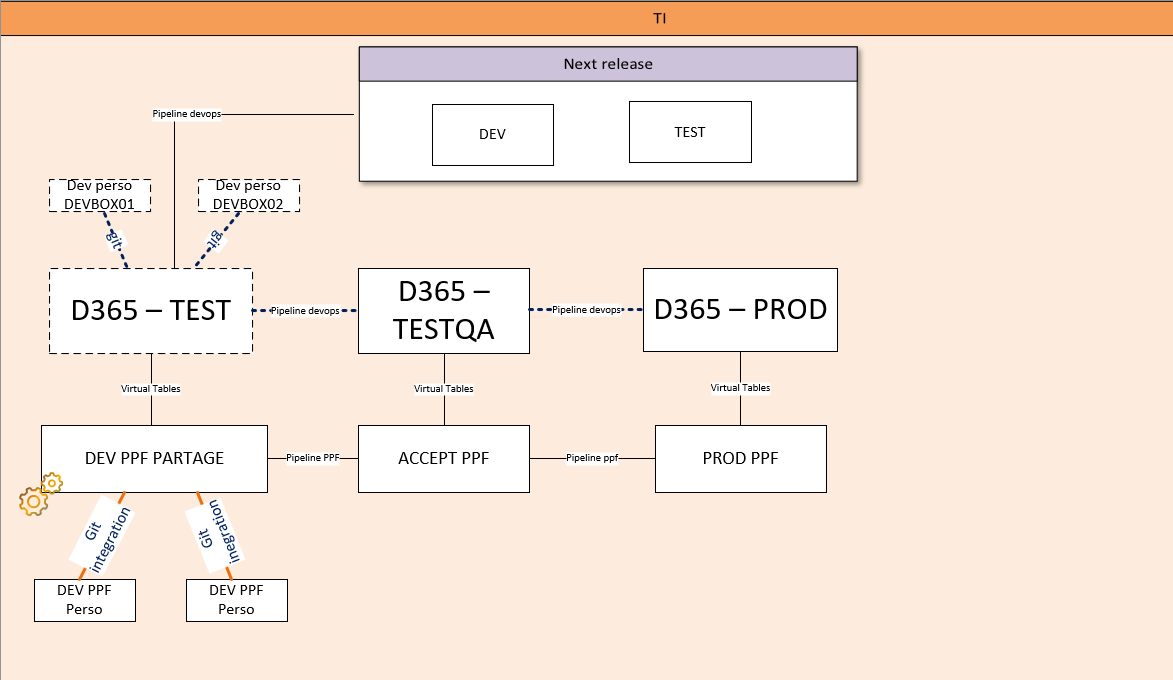
I've been tasked with defining an appropriate architecture for the Power Platform team, whose role will be to create applications and flows leveraging the data available in Dynamics FNO. As I'm not fully familiar with the FNO ecosystem, I proposed an architecture based on distinct environments (separate environments for PPF and FNO) to prevent potential conflicts.

To access FNO data, I've considered using Virtual Tables. I don't see the necessity of having Dynamics FNO installed directly within the Power Platform environments, but I would appreciate your feedback based on your experiences.

Does using Virtual Tables with separate environments seem appropriate to you?
Have you encountered any particular challenges with Power Platform pipelines in a similar architecture?

Thank you in advance for your valuable insights!

Below is a diagram of the proposed architecture to better contextualize my query.

thank you


I have the same question (0)
  • Verified answer
    André Arnaud de Calavon Profile Picture
    300,915 Super User 2025 Season 2 on at
    Hi ALP2,

    With the latest efforts from Microsoft, once you deploy a Dynamics 365 F&O environment, it also now always creates a linked Power Platform environment. The Virtual tables will be setup per linked environment. So distinct environments aren't complying with the current architecture from Microsoft. 
     
    Also note that it is now possible to deploy Unified Development Environments where a developer can build solutions across F&O and Power Platform. This can be handled in a single GIT and build + release pipelines.
     
    The use of virtual tables is a good choice, depending on the exact use cases.
     
    I would suggest changing the diagram to use always linked environments and a single deployment pipeline to have possible customizations applied to both F&O and the Power Platform in one single go.
  • ALP2 Profile Picture
    79 on at

    Hello,


    Thank you very much for your feedback, it's very helpful!


    I updated my architecture according to your recommendations, and I want to make sure I fully understand your point.


    Currently, our Dynamics team uses DevOps pipelines for their deployments, while the Power Platform team leverages the native Power Platform pipelines. Their deployment processes are slightly different, and they work on separate tasks.


    Could having these two distinct deployment approaches (Dynamics using DevOps pipelines, and the Power Platform team using native Power Platform pipelines) cause any particular difficulties in solution migration, given that the two teams won't work on the same elements?


    Also, regarding Virtual Tables, you mentioned that each Dynamics F&O environment automatically creates a linked Power Platform environment. In this scenario, is it still necessary to create an Azure App registration to configure Virtual Tables? Or is this now simplified?

    Setting up Virtual Entities for Microsoft Dynamics 365 Finance and Operations in the Common Data Service

    While awaiting your response, I’m diving into these great resources:


    Looking forward to your insights!


    Looking forward to your insights!


  • ALP2 Profile Picture
    79 on at
    @André Arnaud de Calavon Thank you for your help. I tried to set up the virtual tables this day. It was simpler than I thought. Luckily, my F&0 environment was already linked to dataverse. I just needed to enable the "visible" attribute on the desired table. Synchronization and CRUD operations work wonderfully. The same is true with ALM. 

    Still, for the moment I'm going to use 2 pipelines, one for devops dev who prefer to go through DEVOPS and 1 for PPF devs who prefer to go through native pipelines. 

    Don't hesitate to come back to me
  • André Arnaud de Calavon Profile Picture
    300,915 Super User 2025 Season 2 on at
    Hi ALP2,

    In case you have a valid reason for multiple pipelines, of course you can do that.

Under review

Thank you for your reply! To ensure a great experience for everyone, your content is awaiting approval by our Community Managers. Please check back later.

Helpful resources

Quick Links

Responsible AI policies

As AI tools become more common, we’re introducing a Responsible AI Use…

Neeraj Kumar – Community Spotlight

We are honored to recognize Neeraj Kumar as our Community Spotlight honoree for…

Leaderboard > Microsoft Dynamics 365 | Integration, Dataverse, and general topics

#1
Siv Sagar Profile Picture

Siv Sagar 93 Super User 2025 Season 2

#2
#ManoVerse Profile Picture

#ManoVerse 76

#3
Martin Dráb Profile Picture

Martin Dráb 64 Most Valuable Professional

Last 30 days Overall leaderboard

Product updates

Dynamics 365 release plans
