web
You’re offline. This is a read only version of the page.
close
Skip to main content

Notifications

Announcements

No record found.

Community site session details

Community site session details

Session Id :
Service | Customer Service, Contact Center, Fie...
Unanswered

Invalid Character error when converting 'documentbody' field of Notes entity using base64ToBinary() function

(0) ShareShare
ReportReport
Posted on by

We have used base64ToBinary() so as to avoid attachment corruption.
It was working fine till 17th of April 21, but suddenly now its throwing error and not able to create notes.


Error Message:

"error": {
"code": "0x80040278",
"message": "Invalid character in field 'documentbody': '\u001a', hexadecimal value 0x1A, is an invalid character.",
"@Microsoft.PowerApps.CDS.ErrorDetails.ApiExceptionSourceKey": "Plugin/Microsoft.Crm.ObjectModel.AnnotationService",
"@Microsoft.PowerApps.CDS.ErrorDetails.ApiStepKey": "753b8615-ecd8-db11-b397-0019b9204da9",
"@Microsoft.PowerApps.CDS.ErrorDetails.ApiDepthKey": "1",
"@Microsoft.PowerApps.CDS.ErrorDetails.ApiActivityIdKey": "a59d9bba-9b9b-48e2-a439-63fb63d3e1b1",
"@Microsoft.PowerApps.CDS.ErrorDetails.ApiPluginSolutionNameKey": "System",
"@Microsoft.PowerApps.CDS.ErrorDetails.ApiStepSolutionNameKey": "System",
"@Microsoft.PowerApps.CDS.ErrorDetails.ApiExceptionCategory": "ClientError",
"@Microsoft.PowerApps.CDS.ErrorDetails.ApiExceptionMesageName": "InvalidCharactersInField",
"@Microsoft.PowerApps.CDS.ErrorDetails.ApiExceptionHttpStatusCode": "400",
"@Microsoft.PowerApps.CDS.InnerError.Message": "Invalid character in field 'documentbody': '\u001a', hexadecimal value 0x1A, is an invalid character."
}


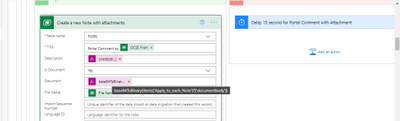
Flow in edit mode:
testsetst.png


Any Leads why is this happening all of sudden? Were any updates pushed?

Process details of flow:
The flow triggers when there is a portal comment from dynamics portal. It fetches all the related attachment to portal comment & then creates a new note for the related case.

I have the same question (0)
  • Community Member Profile Picture
    on at

    Hi Pratiksha,

    Can you provide clear screenshots, your previous ones are blurry.
    If possible, can you provide a more detailed step-by-step process without private information, so that I can revert your error?

    Regards,

    Leah Ju

  • Pratiksha Panchbhai Profile Picture
    on at

    Process of how flow triggers:

    1. Open Case 'A' on dynamics portal & add a comment with attachment. Attach any file.

    2. Portal comment is added for the case 'A'.

    3. To view this on timeline of CRM for agents as note we have a flow which retrieves all the attachment & create a notes(annotation entity) for case 'A'.

    To avoid the attachment from being corrupted we have added base64ToBinary() expression for documentbody field.

    This expression was working as expected from past 1 year. But all of sudden from 18th April,21 the flow started failing while using the  base64ToBinary() for conversion.

    Snapshot of Step/Action where its failing:

    pastedimage1618903799586v1.png

    The Workaround for it is to remove the base64ToBinary() expression and it works well.

    But I wanted to understand the root cause for that like why its happening all of sudden. There were few updates on 17th and 18th on the org but unable to find if that has caused any issue for base64ToBinary() or issue is with the Microsoft Dataverse connector itself.

    When I tried to use compose and check the output and pass that to microsoft dataverse connector it works well!!
    It seems the issue is with the new Microsoft Dataverse connector

  • Community Member Profile Picture
    on at

    Hi Pratiksha,

    Through my test, I meet the same error when I use base64ToBinary() function.

    pastedimage1618985437405v1.png

    Then i remove the function, use document directly, it runs successfully.

    pastedimage1618985746799v2.png pastedimage1618985752478v3.png

    Test:

    The note has added to the case timeline, the attachment can download and open successfully and document content isn't corrupted.

    pastedimage1618985834419v4.png

    Regards,

    Leah Ju

    Please mark as verified if the answer is helpful. Welcome to join hot discussions in Dynamics 365 Forums.

  • Pratiksha Panchbhai Profile Picture
    on at

    Yes that's the workaround we also found out, but this used to work initially with base64ToBinary() expression.

    I want to understand why it started failing now, and worked initially!!

Under review

Thank you for your reply! To ensure a great experience for everyone, your content is awaiting approval by our Community Managers. Please check back later.

Helpful resources

Quick Links

Responsible AI policies

As AI tools become more common, we’re introducing a Responsible AI Use…

Neeraj Kumar – Community Spotlight

We are honored to recognize Neeraj Kumar as our Community Spotlight honoree for…

Leaderboard > Service | Customer Service, Contact Center, Field Service, Guides

#1
Tom_Gioielli Profile Picture

Tom_Gioielli 61 Super User 2025 Season 2

#2
Siv Sagar Profile Picture

Siv Sagar 52 Super User 2025 Season 2

#3
Daniyal Khaleel Profile Picture

Daniyal Khaleel 42 Most Valuable Professional

Last 30 days Overall leaderboard

Featured topics

Product updates

Dynamics 365 release plans



