web
You’re offline. This is a read only version of the page.
close
Skip to main content

Notifications

Announcements

No record found.

Community site session details

Community site session details

Session Id :
Finance | Project Operations, Human Resources, ...
Answered

foreign currency revaluation in AP - dimension option NONE

(0) ShareShare
ReportReport
Posted on by 12

Hi all,

I have another question - about foreign currency revaluation in AR/AP Modules.

In AR module it is working correctly in both cases, whether I chose the dimension option NONE or POSTING:

7824.dimension.png

But when I am trying to run a revaluation in AP with the Option NONE, I get first a warning
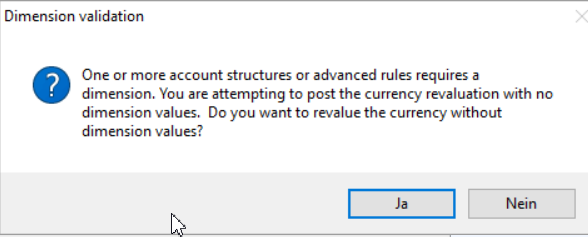
2548.warning.png

which is correct. I click then OK, and get the following error:

Account number for transaction type Exchange rate gain does not exist.

Actually we have the account number for exchange rate gains/losses in the setup:GL-->Setup-->Ledger.

Additionally i set the gain/loss accounts in the GL-->Setup-->Currency revaluation accounts-->for the currency USD.

But somehow the system doesn't find the Exchange rate gain account, when I try dimension option "none". This is strange, because it is working with the same setup in AR module.

(Option "Posting" in AP module works also, but i don't know whether it is the best way for currency revaluation).

What setup should I check else?

Many thanks in advance!

I have the same question (0)
  • Verified answer
    Ludwig Reinhard Profile Picture
    Microsoft Employee on at

    Hi Jule,

    Does it work if you select table or posting?

    In addition, have you checked that the account is not suspended and included in your account structure?

    Best regards,

    Ludwig

  • JuleWergne Profile Picture
    12 on at

    Hi Ludwig,

    thank you, that was correct - the account was not configured in account structure.Now it works.

    I have another two questions:

    1)what is actually the best and more transparent way of revaluation: option None or Posting?

    2)i don't quite understand why the amounts in the column "amount in reporting currency" stand in different rows than amounts in column "amount"?

    In our case: the accounting and reporting currency in this legal entity is EUR, and the test transaction was in USD.

    0042.voucher.png

    Thank you!

  • Suggested answer
    Ludwig Reinhard Profile Picture
    Microsoft Employee on at

    Hi Jule,

    For No 1:

    I once created a blog post with some examples that explain you the different options (none, posting, table). Please see:

    dynamicsax-fico.com/.../

    For No 2:

    The 'shifted' view that you see in the amount column shall represent debits and credits in a more accountant like way. (debit on the left, credit on the right). Personally, I am not a fan of that and prefer the plus/minus (positive/negative) number illustration but that's the way it is.

    Best regards,

    Ludwig

Under review

Thank you for your reply! To ensure a great experience for everyone, your content is awaiting approval by our Community Managers. Please check back later.

Helpful resources

Quick Links

Responsible AI policies

As AI tools become more common, we’re introducing a Responsible AI Use…

Neeraj Kumar – Community Spotlight

We are honored to recognize Neeraj Kumar as our Community Spotlight honoree for…

Leaderboard > Finance | Project Operations, Human Resources, AX, GP, SL

#1
Martin Dráb Profile Picture

Martin Dráb 646 Most Valuable Professional

#2
André Arnaud de Calavon Profile Picture

André Arnaud de Cal... 529 Super User 2025 Season 2

#3
Sohaib Cheema Profile Picture

Sohaib Cheema 285 User Group Leader

Last 30 days Overall leaderboard

Product updates

Dynamics 365 release plans
