I have read the following articles and many more, and the information provided is either incorrect, not applicable, or I am unable to convert and apply the material to my code.
I have a C# Plugin that is running in Post Operation on the Out of Box Quote Entity.
The plugin does many things without incident, but I need to add some functionality to it that requires it to GET the Guid of the opportunityid lookup field that's circled below.
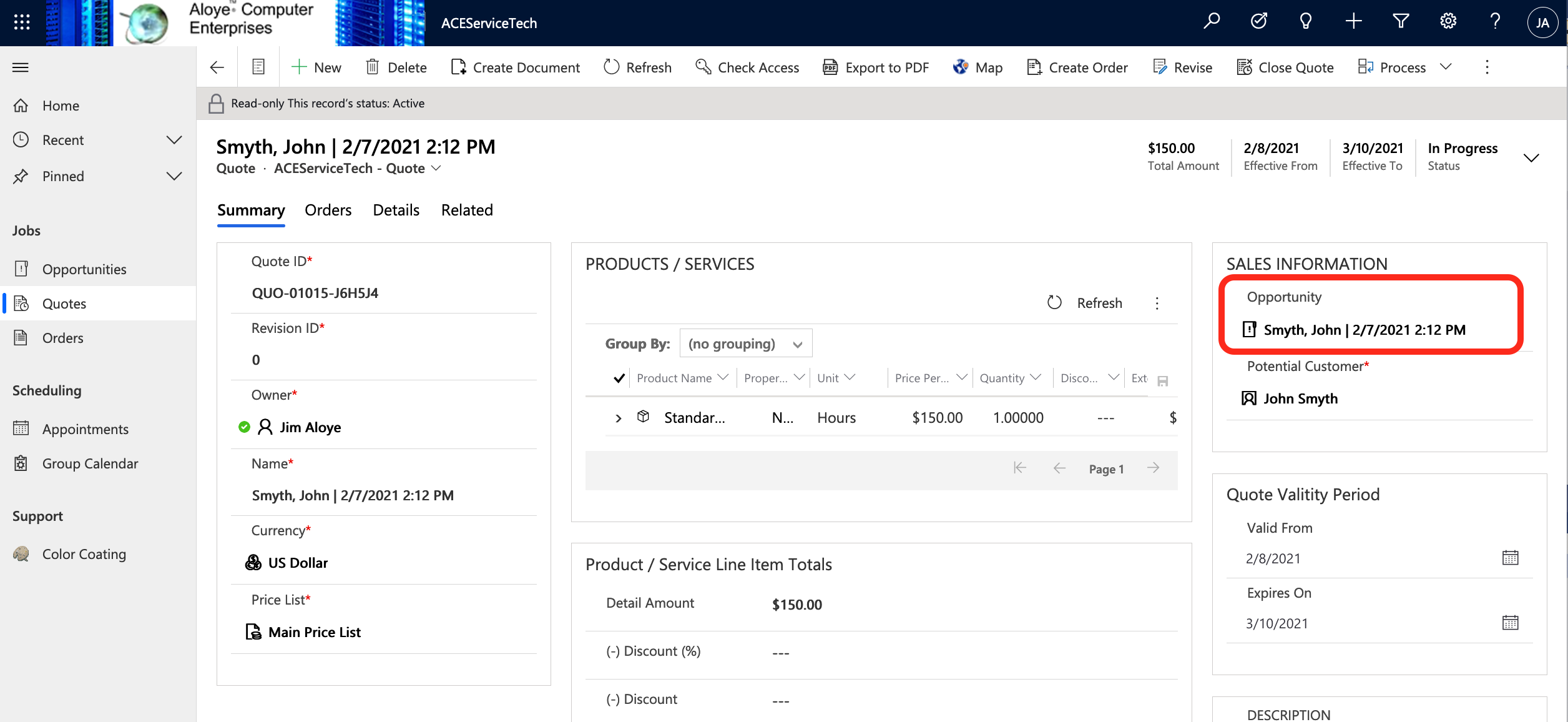
The snippet of code that is relevant to this task is shown below.
if (targetEntity_StateCode == 0 || targetEntity_StateCode == 3)
                            {
                                var OrderRecordsWithSpecifiedquoteid = Get_OrderRecordsWithSpecifiedquoteid(service, TracingSvc, "salesorder", "quoteid", "statecode", targetEnity_GUID, targetEntity_StateCode);

                                TracingSvc.Trace("Opportunity Guid Lookup (BEFORE): "   ((EntityReference)targetEntity.Attributes["opportunityid"]).Id);
                                Guid OpportunityGuid = ((EntityReference)targetEntity.Attributes["opportunityid"]).Id;
                                TracingSvc.Trace("Opportunity Guid Lookup (AFTER): "   OpportunityGuid);


                                if (OrderRecordsWithSpecifiedquoteid != null)
                                {
                                    int DesiredOptionSetValue = 2;
                                    Update_ReturnedOrders(context, service, TracingSvc, localContext, OrderRecordsWithSpecifiedquoteid, "quoteid", DesiredOptionSetValue);
                                }

                            }
I have tried everything taken directly from the knowledge article hyperlinks I have listed at the top of this post, and each time I try anything, the same result occurs which is the plugin fails at the point of executing the code that seeks to access the lookup field.
Here is an example of the error.
Unhandled exception:
Exception type: System.ServiceModel.FaultException`1
[Microsoft.Xrm.Sdk.OrganizationServiceFault]
Message: An unexpected error occurred from ISV code.
(ErrorType = ClientError) Unexpected exception from plug-in
(Execute): ACEQuoteCleanUp.CleanOrdersOnClosedQuotes.
PostOperationquoteUpdate: System.Exception: Error in top level
UPDATE at TRY: The given key was not present in the dictionary.Detail:

32c14caf-2b6c-49fa-9a4e-7eda6104760d
-2147220956


An unexpected error occurred from ISV code.
(ErrorType = ClientError) Unexpected exception from plug-in
(Execute): ACEQuoteCleanUp.CleanOrdersOnClosedQuotes.PostOperationquoteUpdate: System.Exception: Error in top level UPDATE at TRY: The given key was not present in the dictionary.
2021-02-10T03:45:44.7745208Z
false
PluginExecution

PluginExecution

Entered ACEQuoteCleanUp.CleanOrdersOnClosedQuotes.PostOperationquoteUpdate.Execute(), Correlation Id: 32878c45-3779-4004-826f-98afae8d7329, Initiating User: f8a24602-4cce-4bdf-8a90-e628d9f25ff6
Plugin has started.
INSIDE Of UPDATE 001.
INSIDE UPDATE TRY 001.
Successful Registration of targetEntity.
Successful Registration of postEntityImage.
Successful Registration of preEntityImage.
targetEnityGUID: 039c47d6-886a-eb11-a812-002248041c5b
preImage_GUID: 039c47d6-886a-eb11-a812-002248041c5b
postImage_GUID: 039c47d6-886a-eb11-a812-002248041c5b
targetEntity_StateCode: 3
targetEntity_StatusCode: 7
EntityName: salesorder
QuoteGuidFieldValue: 039c47d6-886a-eb11-a812-002248041c5b
OrderStatusFieldOptionSetValue: 3
Number of Returned Orders: 0
Exiting ACEQuoteCleanUp.CleanOrdersOnClosedQuotes.PostOperationquoteUpdate.Execute(), Correlation Id: 32878c45-3779-4004-826f-98afae8d7329, Initiating User: f8a24602-4cce-4bdf-8a90-e628d9f25ff6
I have trace logging every step of the way so its crystal clear that it is failing on the line of code that is seeking to access the lookup field.
There IS always data in the lookup field.
I have the same problem on every entity I have tried this with, even custom entities.
The same problem occurs EVERY time I seek to access a lookup field that has a record in it.
This tells me clearly I am the problem and simply do not understand how to apply the concepts discussed in the three articles above into my code.
I need to extract the Guid of record that is present in the lookup field and use that Guid for the basis of other updates.
So in the example here, I need the Guid of an Opportunity record that is populated on the Quote in the opportunityid lookup field.
In other entities its the exact same thing, be it out of box entities or custom entities.
Any help, suggestions, recommendations, or advice would be greatly appreciated.


