web
You’re offline. This is a read only version of the page.
close
Skip to main content

Notifications

Announcements

No record found.

Community site session details

Community site session details

Session Id :
Microsoft Dynamics AX (Archived)

Issues in hiring an empoyee(form is not working properly)

(0) ShareShare
ReportReport
Posted on by 995

Dear all,

I got an interesting error.

I tried to hire a new worker in payroll module. But when I click on "hire new worker". The button is not getting called. So I clicked on personalize. It showed only one button in Button group
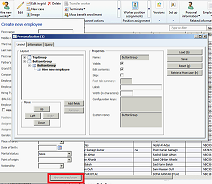
pro1.png

But at form level I have 2 buttons in button group.
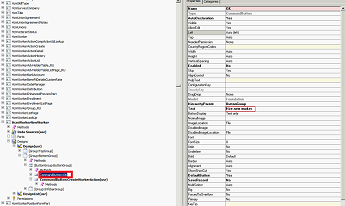
pro2.png

Though all the properties are correct why this form is not working properly(Note:this is client location where we imported some of the XPOs. Compilation, CIL also done)

Please help me out in finding the solution........

*This post is locked for comments

I have the same question (0)
  • Suggested answer
    Community Member Profile Picture
    on at

    Hi!!

    You add one button for this form? You need fill all fields to active the button. Try restart the form default sentting.

  • 5400 Profile Picture
    7,162 on at

    configuration Key ->HcmPersonnelActions should be enabled to execute to continue button.

  • Verified answer
    5400 Profile Picture
    7,162 on at

    This two button are not visible at a time. If "HcmPersonnelActions" configuration key is enabled, hire new worker button won't be visible.  It is vice versa with other button.

    If you want to enable the "Hire new worker", need to disable "HcmPersonnelActions" key.

    Pleas check and confirm.  

  • Karunakaran nainar Profile Picture
    452 on at

    Check the number sequence -Personnel number , to check if the number already exists

  • AX Techie Profile Picture
    995 on at

    Hi Bhaskar,

    I tried what u said. That's not working. Also we are unable to close a form though we click on a employee details form close button.

    pro3.png

    Plz, reply...

  • gyan chand kabra Profile Picture
    380 on at

    Hi,

    Please check the number sequence of EDT HcmPersonnelNumberId or EDT HcmActionId if number sequence is not exists the please create it. the button is disabled because it is not able to find the number sequence against these EDT's.

  • Verified answer
    AX Techie Profile Picture
    995 on at

    System administration-->license--->license configuration-->Human resourceI--> uncheck"personnel actions"

Under review

Thank you for your reply! To ensure a great experience for everyone, your content is awaiting approval by our Community Managers. Please check back later.

Helpful resources

Quick Links

Responsible AI policies

As AI tools become more common, we’re introducing a Responsible AI Use…

Neeraj Kumar – Community Spotlight

We are honored to recognize Neeraj Kumar as our Community Spotlight honoree for…

Leaderboard > 🔒一 Microsoft Dynamics AX (Archived)

#1
Martin Dráb Profile Picture

Martin Dráb 4 Most Valuable Professional

#1
Priya_K Profile Picture

Priya_K 4

#3
MyDynamicsNAV Profile Picture

MyDynamicsNAV 2

Last 30 days Overall leaderboard

Featured topics

Product updates

Dynamics 365 release plans



