web
You’re offline. This is a read only version of the page.
close
Skip to main content

Announcements

News and Announcements icon
Community site session details

Community site session details

Session Id :
Customer experience | Sales, Customer Insights,...
Suggested Answer

On create of field value populate

(0) ShareShare
ReportReport
Posted on by 23

Hi

we have two entity, Opportunity and Install Location. In opportunity there is install location lookup field  and one option set field. And in install Location entity all the location are available there. so when we create opportunity and when i select option set value then based on that option set value lookup filed is automatically populate from install location entity.

I have the same question (0)
  • Suggested answer
    Abdul Wahab Profile Picture
    12,119 Moderator on at

    Hi Rahul Rathore,

    There is a column Option set on the Install location table. The same column Option set exists on the Opportunity table. Am I right?

    In case I am right then What happened when the value of 'Option set 1' is allocated to two records of Install Location? 

    What value for the install location table should be set in the opportunity table?

    For the user interface, You can use xrm-webapi.

    For the server side, You can use:

    1. Power Automate
    2. Workflow 
  • Suggested answer
    Mohamed GRAIB Profile Picture
    2,504 Moderator on at

    If I understand your need, you want to set automatically the lookup field based on value in the option set field ? 

    If this is your need, you can create a business rule in the opportunity table. 

    Your condition is : If the field X = Option X 

    Your action is : Set default Value : and you choose the default value that you want. 

    Tell us if this solution resolve your problem. 

  • Suggested answer
    Eiken Profile Picture
    Microsoft Employee on at

    Hi,

    May I ask that weather there is a option set field on the Install location entity?

    If yes, you can use the Power Automate. The steps are as follows.

         1.Find the row in Install Location entity based on the option set field entered in the Opportunity.
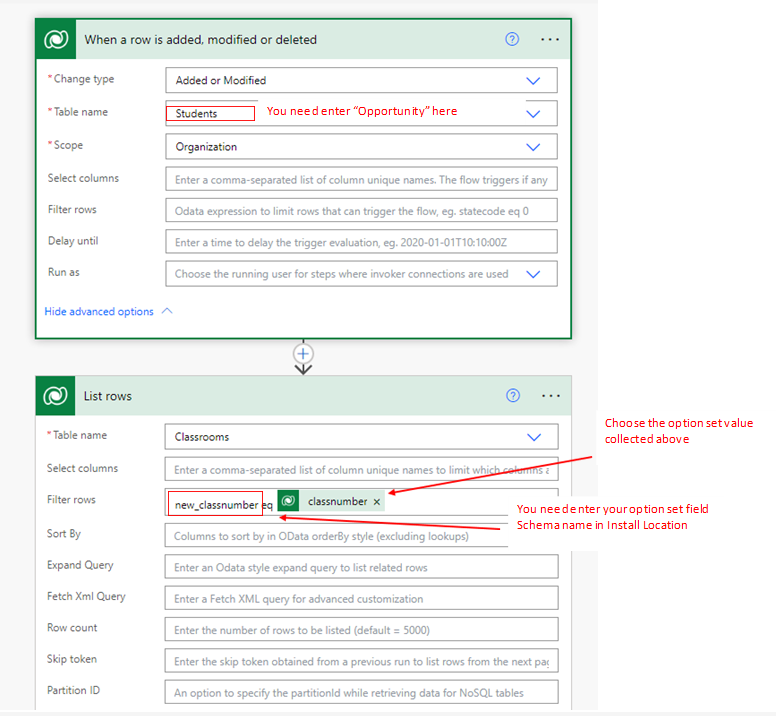
    pastedimage1670916832411v1.png

         2.Update the information in Opportunity
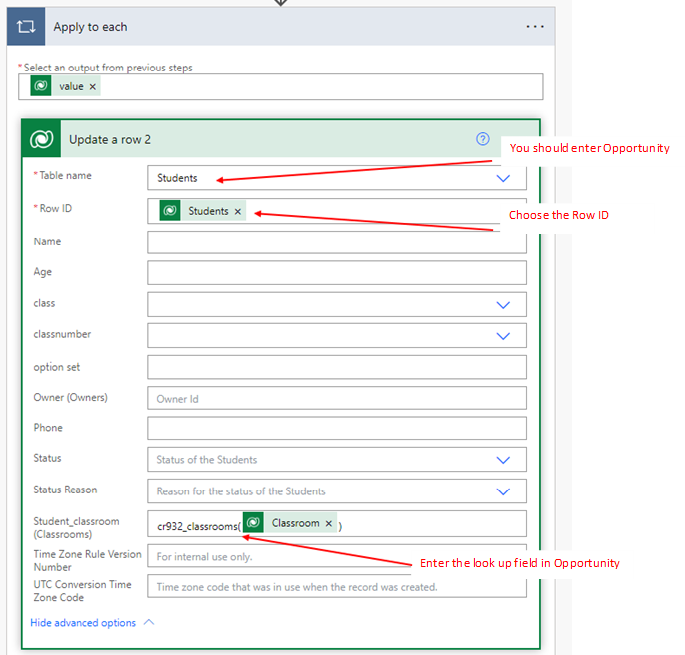
    pastedimage1670916863619v2.png

        3.Then when you add or update one record in Opportuinty, the lookup filed is automatically populated.

    Using the automate flow, the look up field will populate only after clicking the save and refresh.
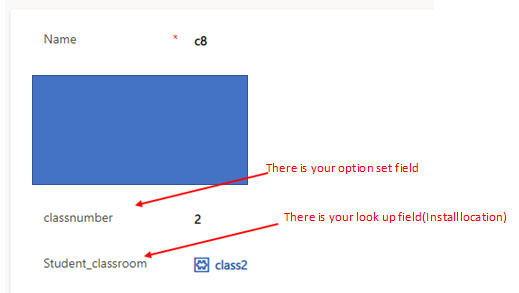
    pastedimage1670916878593v3.png

    If the Install location entity don’t contain the option set field. You can set a business rule.
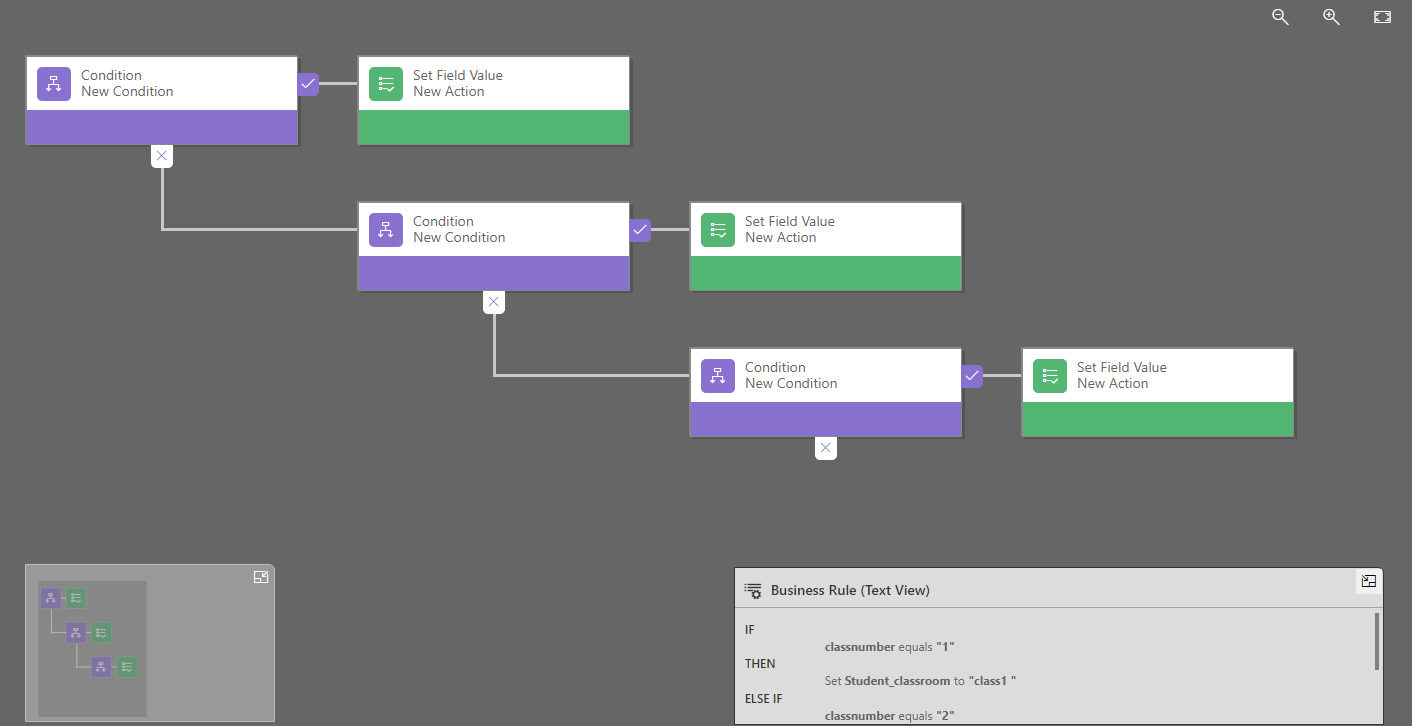
    pastedimage1670916938726v4.png

    The rule is that the look up field will be set as specific value automatically when you enter the option set field.

    But this solution is tedious because you should add each rule manually.

Under review

Thank you for your reply! To ensure a great experience for everyone, your content is awaiting approval by our Community Managers. Please check back later.

Helpful resources

Quick Links

Season of Sharing Community Challenge Launch!

Jump in, show your community spirit, and win prizes!

Women in Power Builds Momentum

Expanding mentorship, skilling, and AI innovation

Congratulations to the May Top 10 Community Leaders

These are the community rock stars!

Leaderboard > Customer experience | Sales, Customer Insights, CRM

#1
Hamza H Profile Picture

Hamza H 140 Super User 2026 Season 1

#2
Nagaraju_Matta Profile Picture

Nagaraju_Matta 128

#3
Abhilash Warrier Profile Picture

Abhilash Warrier 70 Super User 2026 Season 1

Last 30 days Overall leaderboard

Product updates

Dynamics 365 release plans



