web
You’re offline. This is a read only version of the page.
close
Skip to main content

Notifications

Announcements

No record found.

Community site session details

Community site session details

Session Id :
Customer experience | Sales, Customer Insights,...
Suggested Answer

edit privilege for a section

(0) ShareShare
ReportReport
Posted on by 75

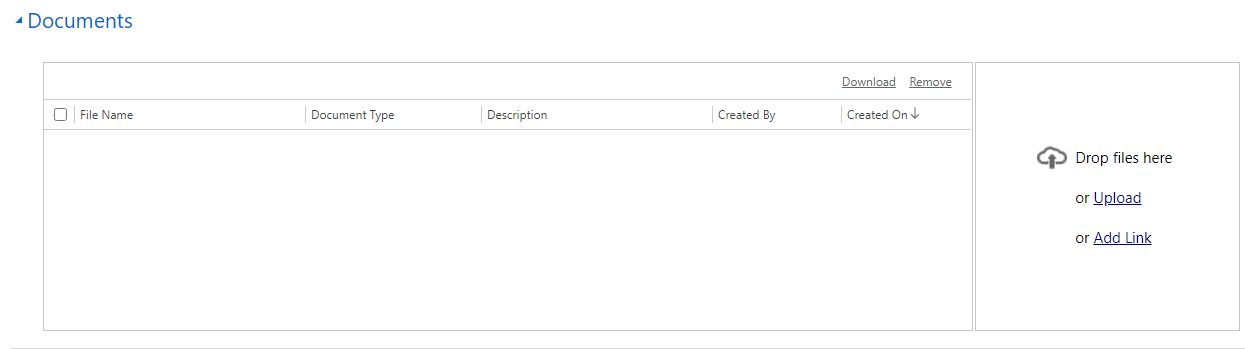
I have a custom entity. In that entity, I have a section called 'documents' as per the below screenshot, this is an Html web resource. For now, only record owner can edit the records and other users have read-only privilege, I want to make other users can edit the documents section and save the record(only documents section, other fields/section should remain as it is(read-only)). This is on-premise

Could anyone please suggest the best way to achieve this. screnshot_2D00_doc.PNG
I have the same question (0)
  • Suggested answer
    a33ik Profile Picture
    84,331 Most Valuable Professional on at

    Hello,

    That doesn't look like it's the OOB grid so it's the custom one and it's either developed by your developers (so you should ask them on how you can implement your scenario) or it's thirdparty and you should ask them if you can do anything here.

    Good luck.

  • Jayaa E Profile Picture
    75 on at

    Hi Andrew,

    Thanks for your response.

    Yes, It is a custom web resource. I am checking, is there a way to control the edit privilege for other users with respect to section.

  • a33ik Profile Picture
    84,331 Most Valuable Professional on at

    It would be required to develop your custom webresource the way you described.

  • Jayaa E Profile Picture
    75 on at

    I am trying to edit the above web resource tab using the below javascript. Not sure why it is not working, maybe because it is a web resource. The same code is working for other tabs and sections. Any suggestions would be helpful.

    function EditTab (tabName, sectionName, flag)

       {

           let section = Xrm.Page.ui.tabs.get(tabName).sections.get(sectionName);

           if (!section)

           {

               return;

           }

           let controls = section.controls.getAll();

           for (let i = 0; i < controls.length; i++)

           {

               try

               {

                   controls[i].setDisabled(flag);

               }

               catch

               {

                   console.log("Couldn't block " + controls[i].getName())

               }

           }

       }

  • Suggested answer
    Bipin D365 Profile Picture
    28,983 Moderator on at

    Hi,

    See below link.

    srmscrm.wordpress.com/.../

    Also, you should not be using Xrm.Page as it is depreciated instead use formcontext.

    docs.microsoft.com/.../clientapi-form-context

    I think better way to find out the culprit is to debug your code. Debugging is so much fun.

    Please mark my answer verified if i were helpful

  • Jayaa E Profile Picture
    75 on at

    Thanks for the link Bipin. My version is 8.2. So I am using xrm.page, I have tried this piece of code.

    But I am getting the error-typeerror: control.setDisabled is not a function.

    function DisableAllControlsInTab(tabControlNo)

    {  

    var tabControl = Xrm.Page.ui.tabs.get(tabControlNo);

       if (tabControl != null)

    {    

         Xrm.Page.ui.controls.forEach

    (

        function (control, index)

    {          

    if (control.getParent().getParent() == tabControl && control.getControlType() != "subgrid")

    {              control.setDisabled(true);  

           }      

    });

         }

    }

  • a33ik Profile Picture
    84,331 Most Valuable Professional on at

    Try to replace the line

    if (control.getParent().getParent() == tabControl && control.getControlType() != "subgrid")

    with line

    if (control.getParent().getParent() == tabControl && control.getControlType() != "subgrid" && control.setDisabled)

  • Jayaa E Profile Picture
    75 on at

    Hi Andrew,

    After adding that condition, I am getting the error- typeerror cannot read property 'getparent' of null

  • a33ik Profile Picture
    84,331 Most Valuable Professional on at

    That's why you should master JavaScript troubleshooting - you will be able to fix the issue yourself without involving anyone else. In your case you can try to replace the same line with following:

    if (control.getParent() && control.getParent().getParent() == tabControl && control.getControlType() != "subgrid" && control.setDisabled)

  • Jayaa E Profile Picture
    75 on at

    This is working for all other fields under that tab, but not for the webresource.

Under review

Thank you for your reply! To ensure a great experience for everyone, your content is awaiting approval by our Community Managers. Please check back later.

Helpful resources

Quick Links

Responsible AI policies

As AI tools become more common, we’re introducing a Responsible AI Use…

Neeraj Kumar – Community Spotlight

We are honored to recognize Neeraj Kumar as our Community Spotlight honoree for…

Leaderboard > Customer experience | Sales, Customer Insights, CRM

#1
Tom_Gioielli Profile Picture

Tom_Gioielli 70 Super User 2025 Season 2

#2
Gerardo Rentería García Profile Picture

Gerardo Rentería Ga... 43 Most Valuable Professional

#3
Daniyal Khaleel Profile Picture

Daniyal Khaleel 32 Most Valuable Professional

Last 30 days Overall leaderboard

Product updates

Dynamics 365 release plans



