web
You’re offline. This is a read only version of the page.
close
Skip to main content

Notifications

Announcements

No record found.

Community site session details

Community site session details

Session Id :
Microsoft Dynamics AX (Archived)

How to Delete Items zero Quantity on hand but has Financial Value, Items are not in use

(1) ShareShare
ReportReport
Posted on by

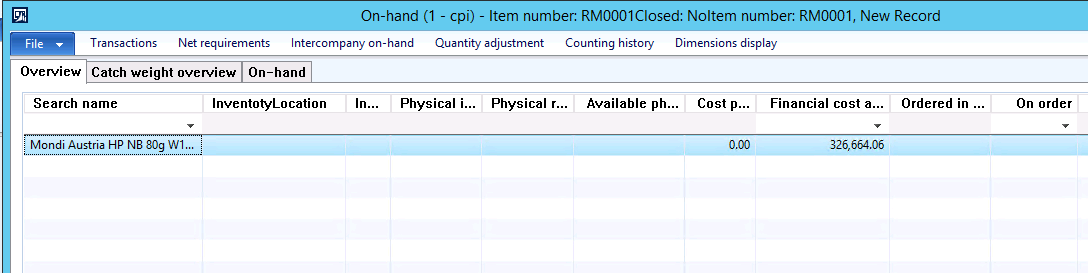
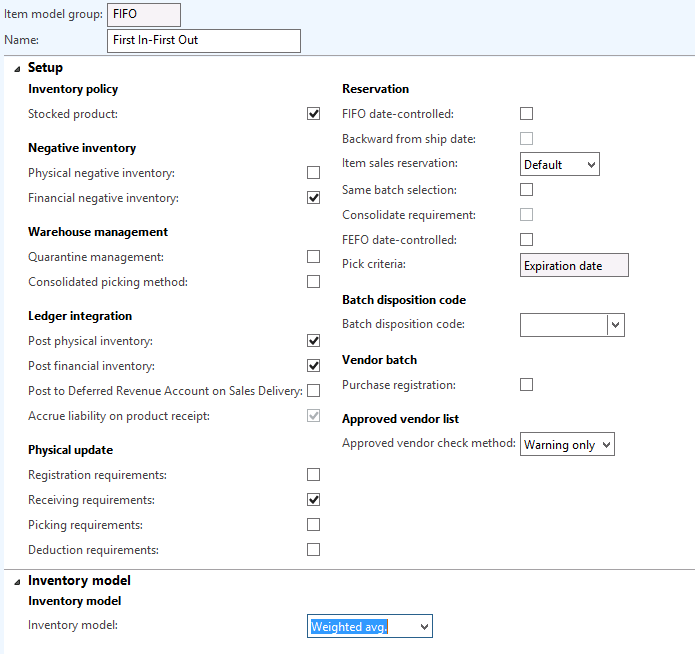
My client is closing inventory on monthly basis. We are facing a serious problem with Average Cost. For example we started Production Order in Nov 2017, done report as finished for partial quantity in Nov 2017, consumption also booked for the partial quantity, then continued the production order in Dec. 2017.  Ended the production order in Dec. 2017.  Due to this the Average cost of raw material exorbitantly gone up.  Some transaction adjustment done for Finished Goods, for remaining raw material, the stock was taken out with high cost and take in with new Product code. While closing, the Zero on-hand qty item was updated with settlement entries, and there is Financial Balance with Zero Qty on hand, this Item is not in use now. We want to delete the Financial amount through table. please help us which table that we need to delete.  Thanks,item_5F00_model_5F00_group.pngzero_5F00_qty_5F00_having_5F00_financialcost.png
*This post is locked for comments

I have the same question (0)
  • Yohann Rolland Axcible Profile Picture
    3,111 on at

    Hi,

    I cannot reproduce your scenario right now but you may try several things:

    - inventory counting journal setup to 0

    or

    - inventory ajustement journal -> You probably need to fill a quantity so setup +1 and then switch to the inventory counting journal to 0 counted.

    Just some ideas you could try on the test environnement first :).

    Regards

  • Guy Terry Profile Picture
    28,924 Moderator on at

    Hi,

    Pretty sure you won't need to delete anything through a table (unless you did something in a table in the lead up to your problem?).

    On the Storage Dimension Group for the item, is 'Use warehouse management processes' ticked?

    On the Storage Dimension Group and Tracking Dimension Group for the item, which lines are ticked for both 'Active' and 'Financial inventory'? Can you revisit the On-hand inquiry and use 'Dimensions display' to enable all those dimensions (but only those dimensions) and share a new screen shot?

  • Community Member Profile Picture
    on at

    Exactly we are trying through movement journal In +1 with zero cost and out -1.  Hope that will fix the Positive Financial Amount.  But some items also have Negative Financial Amount.  What about these items?  Your reply is highly appreciated.

  • Community Member Profile Picture
    on at

    Hi AXSecrets,

    I think there is no need to delete or update records through a table, unless you know any wrong data was introduced through a customization.

    I have heard of some cases where you have no inventory quantities but you have financial value. I would try the following two periodic jobs:

    Inventory Management -> Setup -> Clean Up -> Warehouse Management on-hand entries clean up (use this you are using Advanced Warehouse Management items)

    Inventory Management -> Setup -> Clean Up -> On-hand entries aggregation by financial dimensions

    Here you have a blog where it is very well explained, specially the last job: blogs.msdn.microsoft.com/.../key-clean-up-features-for-inventsum-and-inventdim-tables

    Many records might be cleaned up, so I would strongly advice you to try first on a test environment and to do a back up to compare results.

    Hope that helps.

Under review

Thank you for your reply! To ensure a great experience for everyone, your content is awaiting approval by our Community Managers. Please check back later.

Helpful resources

Quick Links

Responsible AI policies

As AI tools become more common, we’re introducing a Responsible AI Use…

Neeraj Kumar – Community Spotlight

We are honored to recognize Neeraj Kumar as our Community Spotlight honoree for…

Leaderboard > 🔒一 Microsoft Dynamics AX (Archived)

#1
Priya_K Profile Picture

Priya_K 4

#1
Martin Dráb Profile Picture

Martin Dráb 4 Most Valuable Professional

#3
MyDynamicsNAV Profile Picture

MyDynamicsNAV 2

Last 30 days Overall leaderboard

Featured topics

Product updates

Dynamics 365 release plans