web
You’re offline. This is a read only version of the page.
close
Skip to main content

Notifications

Announcements

No record found.

Community site session details

Community site session details

Session Id :
Microsoft Dynamics AX (Archived)

AX 2012 - Project server integration #2

(0) ShareShare
ReportReport
Posted on by

Hello,

After lot of time spent on it, and big help from people around, I am in troubles again - now seems that:

- all components are installed and working

- msmq queues are available, and shown as alive when checking them with mqping

- unfortunately, when trying to setup synchronization, new problem has come (as below):
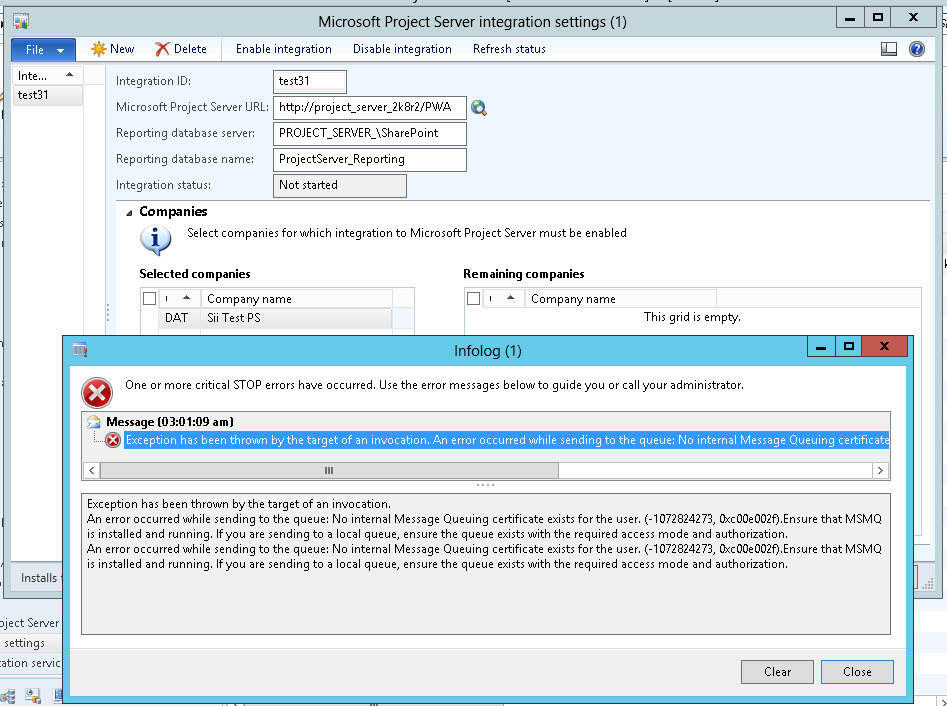
Error is:

===============

Exception has been thrown by the target of an invocation.
An error occurred while sending to the queue: No internal Message Queuing certificate exists for the user. (-1072824273, 0xc00e002f).Ensure that MSMQ is installed and running. If you are sending to a local queue, ensure the queue exists with the required access mode and authorization.

===============

Maybe somebody has seen same problem, and hopefully had it solved? Any advice appreciated.

regards

Tomasz

*This post is locked for comments

I have the same question (0)
  • fsilva-jr Profile Picture
    20 on at

    Was the queue created during the componentes instalation?

  • Community Member Profile Picture
    on at

    yes, it was created during component setup - not any manual creation after, manually I've tried to change permission to queue, but even granting everyone full control did not do tthe job:/

  • fsilva-jr Profile Picture
    20 on at

    Can you try using another user account who is AX System administrator and have local administrative rights in the servers?

  • Community Member Profile Picture
    on at

    tried yesterday - no luck as well; tried with both, administrator and my personal account - error is still same; tried also to reinstall net and synch service - also no luck; I also took from net tools to test msmq - and using these tools I am able to create records in queue (from both, local and remote machine), but AX still complains.. :/

    help :)

  • fsilva-jr Profile Picture
    20 on at

    is the jornal option enabled?


  • Community Member Profile Picture
    on at

    enabled it 2 days ago, however not sure if it would impact setup in any way.. :)

  • fsilva-jr Profile Picture
    20 on at

    using the image above the "Authenticated" option is unchecked, right?!

    If the setup is ok and permissions too, maybe cleaning your system and restarting the server can help you.

    www.piriform.com/ccleaner

  • Community Member Profile Picture
    on at

    Hhas been restarted several times so far, tried also to reinstall componens - none worked; at the moment I am wondering, does it have any meaning where queue is installed? In my case I have:

    - AX on separate server; there is also MSMQ and synch service running

    - PS on other server; there is PS event service and PS queue service running

    considering above, I am thinking that maybe queue service needs to run on same server as PS is - is it true? if anyone has AX/PS and integration between them working, would it be possible to share information where each component is running?

    regards

    Tomasz

  • Community Member Profile Picture
    on at

    ..and I wonder, is 'web services on IIS' necessary component? seems it is not installed in my case

  • fsilva-jr Profile Picture
    20 on at

    Hello Tomek!

    When you have a server running Project server and another server running AX, the Synchronization Proxy must be installed in the Project Server and the Synchronization Service must be installed in the AX server.

    I have this running in production environment without problems.

Under review

Thank you for your reply! To ensure a great experience for everyone, your content is awaiting approval by our Community Managers. Please check back later.

Helpful resources

Quick Links

Responsible AI policies

As AI tools become more common, we’re introducing a Responsible AI Use…

Neeraj Kumar – Community Spotlight

We are honored to recognize Neeraj Kumar as our Community Spotlight honoree for…

Leaderboard > 🔒一 Microsoft Dynamics AX (Archived)

#1
Martin Dráb Profile Picture

Martin Dráb 4 Most Valuable Professional

#1
Priya_K Profile Picture

Priya_K 4

#3
MyDynamicsNAV Profile Picture

MyDynamicsNAV 2

Last 30 days Overall leaderboard

Featured topics

Product updates

Dynamics 365 release plans



