web
You’re offline. This is a read only version of the page.
close
Skip to main content

Notifications

Announcements

No record found.

Community site session details

Community site session details

Session Id :
Finance | Project Operations, Human Resources, ...
Suggested Answer

MS Flow is not working when trying to update a record in d365FO.

(0) ShareShare
ReportReport
Posted on by 95

Hello Everyone,

I have created a flow to update an entity in d365 operations but my flow is failing with a 404 status.(NotFound.) Just to be sure i used a get record action to if if the record exist or not. I can retrieve the record as well as delete the record. I can also insert a new record in the entity. I am only getting this error while trying to update a record. Below is the detai body of the response. Can anyone help me with what am i doing wrong? Thanks in Advance.

{
  "status": 404,
  "message": "NotFound\r\nclientRequestId: 1079a023-7612-4215-8621-4ed8f7e1519e",
  "error": {
    "message": "NotFound"
  },
  "source": "vss-dev32a0275f4649f31a1devaos.cloudax.dynamics.com",
  "errors": []
}
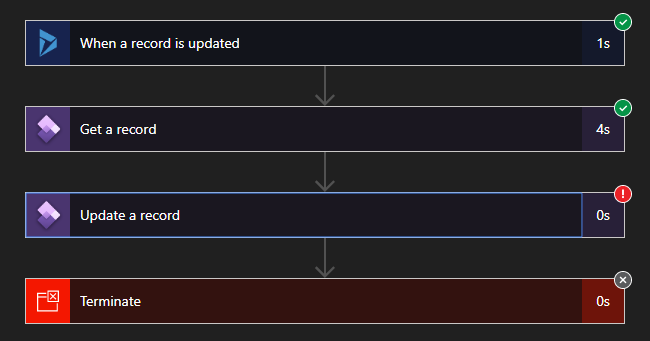
 

6765.Capture31.PNG

I have the same question (0)
  • Suggested answer
    Rahul Mohta Profile Picture
    21,032 on at

    which version of D365FO is being used and which data entity

    is authentication part all good?

  • muttakin Profile Picture
    95 on at

    I am using Microsoft Dynamics 365 for Finance and Operations (10.0.9) Platform: Update 33.

    Data Entity: EcoResProductAttributeEnumerationValueTypeEntity

    I am not sure about the authentication. Where can i check it? It is working gor get,delete,insert. i am using the same configuration. doesn't that mean authentication part is alright?

  • Suggested answer
    André Arnaud de Calavon Profile Picture
    301,109 Super User 2025 Season 2 on at

    Hi Muttakin,

    You have not provided information how you filled the parameters on the update action in Microsoft Power Automate. Have a look at my blog which explains how to find the key field for a table and also ensure that the default company of your user account is the same as in the company you try to update the record: dynamicspedia.com/.../

  • Ludwig Reinhard Profile Picture
    Microsoft Employee on at

    Hello muttakin,

    I currently have a similar issue.

    Are you running this on a tier 1 or tier 2 environment?

    In my case things work fine on a tier 1 system but not on a MS maintained tier2 one.

    Wonder if you can replicate this issue similarly in a tier1/2 system.

    Would be great if you could keep us updated.

    Many thanks and best regards,

    Ludwig

  • muttakin Profile Picture
    95 on at

    Hello Ludwig,

    I am facing this problem both on Tire 1 and Tire 2 environment. Still no idea why am i getting this only for Update action.

  • muttakin Profile Picture
    95 on at

    Hello André

    I have gone through your blog. But i thing the table i am trying to access is not company specific. I dont see any DataAreaId field in the options. Please take a look at the following image

    Capture33.PNG

    Do you have any suggestion?

  • André Arnaud de Calavon Profile Picture
    301,109 Super User 2025 Season 2 on at

    Hi Muttakin,

    This entity is indeed global and does not have the DataAreaId. Have you checked if the Object ID is correct? Are these the fields defining the primary entity key for this entity?

  • muttakin Profile Picture
    95 on at

    Yes Andre. Those are fields that composes the primary key. Please not that I tried to get the record with the same key value and it can retrieve the record perfectly. It's just when I try to update it, I am getting the error. 

  • Suggested answer
    Ludwig Reinhard Profile Picture
    Microsoft Employee on at

    Hello muttakin,

    I would recommend opening a support case with MS.

    Let them have a look at this issue especially for your tier 2 machine.

    Would be great if you could keep us updated how things are going because you are currently not the only one that has such an issue.

    The community would certainly benefit from any feedback provided.

    Many thanks and best regards,

    Ludwig

  • André Arnaud de Calavon Profile Picture
    301,109 Super User 2025 Season 2 on at

    Hi Muttakin,

    I do fully agree with Ludwig to create a support incident for this. Have you also tried if you get an error when you are using the data management features using this entity? If it also gives an error, you might get a more detailed error or better insights what it is causing it.

Under review

Thank you for your reply! To ensure a great experience for everyone, your content is awaiting approval by our Community Managers. Please check back later.

Helpful resources

Quick Links

Responsible AI policies

As AI tools become more common, we’re introducing a Responsible AI Use…

Neeraj Kumar – Community Spotlight

We are honored to recognize Neeraj Kumar as our Community Spotlight honoree for…

Leaderboard > Finance | Project Operations, Human Resources, AX, GP, SL

#1
Martin Dráb Profile Picture

Martin Dráb 451 Most Valuable Professional

#2
André Arnaud de Calavon Profile Picture

André Arnaud de Cal... 428 Super User 2025 Season 2

#3
BillurSamdancioglu Profile Picture

BillurSamdancioglu 239 Most Valuable Professional

Last 30 days Overall leaderboard

Product updates

Dynamics 365 release plans
