web
You’re offline. This is a read only version of the page.
close
Skip to main content

Notifications

Announcements

No record found.

Community site session details

Community site session details

Session Id :
Dynamics 365 Community / Forums / Finance forum / Change description nam...
Finance forum

Change description name of one of values in a financial dimension.

(0) ShareShare
ReportReport
Posted on by 25

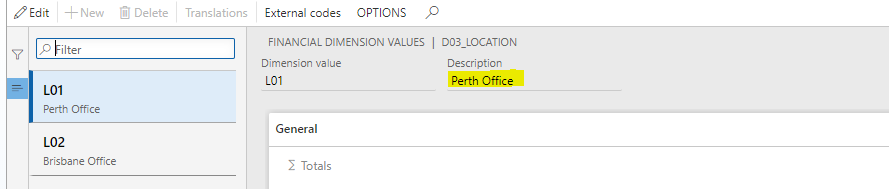
I want to change the description of one of the dimension values on our "Location" financial dimension.

When i go into GL>Financial Dimensions>Location>Dimension Values> and choose the location i want to change name of, and press Edit the description field does not allow editing?

Is this possible another way, permissions problem or just cant be done?
pastedimage1568271704631v2.png

Categories:
I have the same question (0)
  • MATTGUO Profile Picture
    22,349 Moderator on at

    Hi SEW,

    Where does the dimension value come from?

    If it is custom dimension, the value can be changed directly.

    If it is from the other basic data, you need to change the value of basic data.

  • SEW Profile Picture
    25 on at

    No it is not custom. It just wont let me change the name of one of the values.

  • MATTGUO Profile Picture
    22,349 Moderator on at

    Hi,

    Do you mean that only one value can not be changed and other values can be changed on the same one dimension?

  • SEW Profile Picture
    25 on at

    no all of them

  • MATTGUO Profile Picture
    22,349 Moderator on at

    Hi SEW,

    As i said before, you need to change the basic data. Here is an example.

    1. The value come from the basic data of customer and it can not be changed.

    58767.png  7776.png

    2.Go to customer and change the value.

    5430.png

    3.Check the result.

    6786.png

    But for some basic data, it does not work. Because the fields are locked.

  • MATTGUO Profile Picture
    22,349 Moderator on at

    Hello SEW,

    Please let us know if your problem has been resolved.

  • SEW Profile Picture
    25 on at

    No. Our financial dimension are not derived by customer.

    When I go into Dimension values, it does not let me change the description value.

  • Ties Philippi Profile Picture
    960 on at

    Hi Sew,

    At Matt asked, this situation happens when the dimension value is based upon another field in D365.

    We can help you further, but we would need to have a screenshot from the dimension showing it's setup (so not the actual dimension value).

    Could you please provide this screenshot.

    Best regards,

    Ties

  • Theja Pachipala Profile Picture
    20 on at

    You can change the business unit or modified the name.

    Find the record in Organization administration> Organizations> Operating units. 

    Edit it and Save . You can verify it now in financial dimensions.

Under review

Thank you for your reply! To ensure a great experience for everyone, your content is awaiting approval by our Community Managers. Please check back later.

Helpful resources

Quick Links

November Spotlight Star - Khushbu Rajvi

Congratulations to a top community star!

Forum Structure Changes Coming on 11/8!

In our never-ending quest to help the Dynamics 365 Community members get answers faster …

Dynamics 365 Community Platform update – Oct 28

Welcome to the next edition of the Community Platform Update. This is a status …

Leaderboard > Finance

Last 30 days Overall leaderboard

Featured topics

Product updates

Dynamics 365 release plans
