web
You’re offline. This is a read only version of the page.
close
Skip to main content

Notifications

Announcements

No record found.

Community site session details

Community site session details

Session Id :
Microsoft Dynamics AX (Archived)

How to get the name of form from menu Item?

(0) ShareShare
ReportReport
Posted on by 932

Hi,

I have privilege,I want to get from this privilege the name of menu Item in entry point and the form :

for the menu Item I develop this instruction:

//get the entry point from privilege:

 treeNode = TreeNode::findNode(#SecPrivilegesPath + #doubleAntiSlash + conPeek(privilegesCont, i) + #doubleAntiSlash + #EntryPoints);

 node = TreeNode.AOTfirstChild();

while (node)
{
 select  eukSecurityMenuItem where eukSecurityMenuItem.SecurableName == node.AOTgetProperty(#ObjectName);

}

I want to add the name of form from this menu Item :
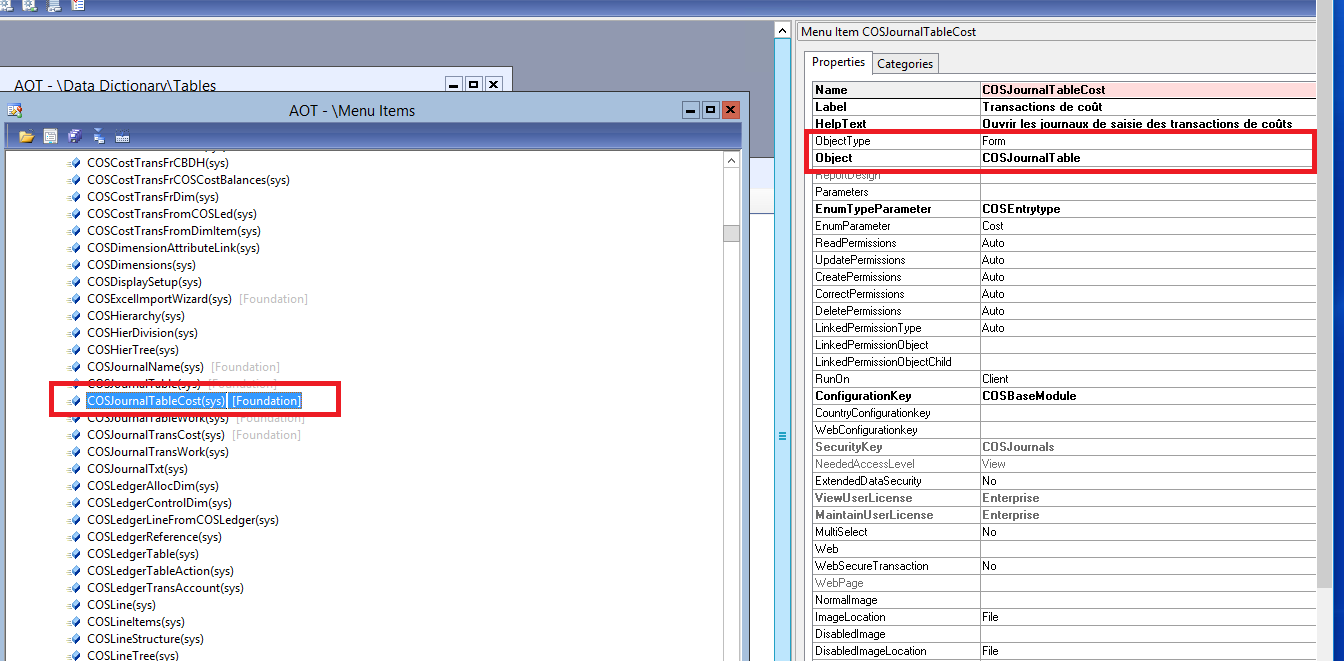
2021.item.png

*This post is locked for comments

I have the same question (0)
  • AXTechie2120 Profile Picture
    568 on at

    Hi,

    You want to call the menuitem name in your code. Am i Right?

  • BASMA Profile Picture
    932 on at

    no,

    I have privilege ,I want to browse the menu items to get the name of menu Items which is set in this privilege.

    I want alse to know the form that opend this menu item?

  • Suggested answer
    Rustem Galiamov Profile Picture
    8,072 on at

    Hi BASMA!

    Try this:

    TreeNode root = TreeNode::findNode(#MenuItemsDisplayPath + "\\SalesTable");
        
    info(root.AOTgetProperty('Object'));

    You can set your menuItem name instead of SalesTable

  • AXTechie2120 Profile Picture
    568 on at

    hi Basma,

    static void searchSubNodes(Args _args)

    {

     str         treeNodeNames;

     void searchSubNodes (TreeNode _treeNode)

     {

         if (!_treeNode)

             return;

         _treeNode = _treeNode.AOTfirstChild();

         while (_treeNode)

         {

             if (_treeNode.AOTfirstChild())

             {

                 searchSubNodes(_treeNode);

             }

             if (_treeNode.applObjectType())

             {

                 treeNodeNames += strfmt("%1 %2\n", _treeNode.treeNodeName(),_treeNode.AOTgetProperty('ObjectType'));

             }

             _treeNode = _treeNode.AOTnextSibling();

         }

     }

     ;

     searchSubNodes (TreeNode::findNode(@"\Menu Items"));

     info(treeNodeNames);

    }

    Try this and let me know if it works!

  • BASMA Profile Picture
    932 on at

    Thanks for your reply, but I want to search menu item not only in display path but also in action and output

  • Suggested answer
    Rustem Galiamov Profile Picture
    8,072 on at

    You can check AOTgetProperty('ObjectType') and then use needed menu items path.

  • BASMA Profile Picture
    932 on at

    I dont understand your suggestion :

    root = TreeNode::findNode(@"\Menu Items"+"COSJournalTableCost"); i try this instruction but I get error:object not initialized

  • Verified answer
    Rustem Galiamov Profile Picture
    8,072 on at

    You can try to find object in different path:

        #AOT
         
        str find = "SalesTable";
        TreeNode menuItemFinded;
     
        menuItemFinded = TreeNode::findNode(#MenuItemsDisplayPath + "\\" + find);
            
        if (menuItemFinded)
           info(strFmt("Found menuitem %1", menuItemFinded.AOTgetProperty('Object')));
        else
        {
            menuItemFinded = TreeNode::findNode(#MenuItemsActionPath + "\\" + find);
            
            if (menuItemFinded)
                info(strFmt("Found menuitem %1", menuItemFinded.AOTgetProperty('Object')));    
            else
            {
                menuItemFinded = TreeNode::findNode(#MenuItemsOutputPath + "\\" + find);   
                info(strFmt("Found menuitem %1", menuItemFinded.AOTgetProperty('Object')));
            }
        }


Under review

Thank you for your reply! To ensure a great experience for everyone, your content is awaiting approval by our Community Managers. Please check back later.

Helpful resources

Quick Links

Responsible AI policies

As AI tools become more common, we’re introducing a Responsible AI Use…

Neeraj Kumar – Community Spotlight

We are honored to recognize Neeraj Kumar as our Community Spotlight honoree for…

Leaderboard > 🔒一 Microsoft Dynamics AX (Archived)

#1
Priya_K Profile Picture

Priya_K 4

#1
Martin Dráb Profile Picture

Martin Dráb 4 Most Valuable Professional

#3
Ali Zaidi Profile Picture

Ali Zaidi 2

Last 30 days Overall leaderboard

Featured topics

Product updates

Dynamics 365 release plans
