web
You’re offline. This is a read only version of the page.
close
Skip to main content

Announcements

News and Announcements icon
Community site session details

Community site session details

Session Id :
Finance | Project Operations, Human Resources, ...
Answered

How to enables Withholding Tax configuration and setup in GL. for Vendor tax transaction in Dynamics AX 12 R2

(2) ShareShare
ReportReport
Posted on by 91

HI Guys

I want to enable a complete Withholding Tax setup in GL modules,  currently, I can just see in my GL setup

- withholding tax code

-withholding tax group
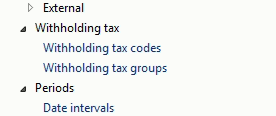
pastedimage1629364266186v1.png

I want to enable complete withholding setup in my systems like the standard below.
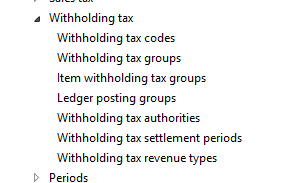
pastedimage1629364341016v2.png

is there any specific configuration required for enabling these setups?

please help I shall be very thankful for your kind assistance.

Thanks,

Regards

I have the same question (0)
  • Suggested answer
    Ramit Paul Profile Picture
    22,809 Most Valuable Professional on at

    Hi,

    You need to enable the feature from feature management.

    Check the blog I wrote on this, community.dynamics.com/.../new-feature-global-withholding-tax-in-msd365-fo

  • Suggested answer
    Prem Kumar Bachu Profile Picture
    3,422 on at

    Hi Maroof,

    Did you activated withholding tax in General ledger parameters? Tax setups differs country to country based on localizations, consider this in your comparison.

    Regards,

    Prem

  • Ludwig Reinhard Profile Picture
    Microsoft Employee on at

    Hello Maroof,

    Have you been able to get this issue resolved in the meantime or do you need any other help from the community?

    Best regards,

    Ludwig

  • Verified answer
    Maroof Ibrahim Profile Picture
    91 on at
    this issue was related to the localization in AX 2012 R2, my region was PAK for Item WHT. I just created new legal entiy with dfferent region that have available item WHT. 
     
    Issue was resolved
     
    Thanks

Under review

Thank you for your reply! To ensure a great experience for everyone, your content is awaiting approval by our Community Managers. Please check back later.

Helpful resources

Quick Links

Season of Sharing Community Challenge Winners!

Congratulations to our community stars!

Women in Power Builds Momentum

Expanding mentorship, skilling, and AI innovation

Congratulations to the June Top 10 Community Leaders

These are the community rock stars!

Leaderboard > Finance | Project Operations, Human Resources, AX, GP, SL

#1
André Arnaud de Calavon Profile Picture

André Arnaud de Cal... 428 Super User 2026 Season 1

#2
Subra Profile Picture

Subra 370

#3
Martin Dráb Profile Picture

Martin Dráb 283 Most Valuable Professional

Last 30 days Overall leaderboard

Product updates

Dynamics 365 release plans
