web
You’re offline. This is a read only version of the page.
close
Skip to main content

Notifications

Announcements

No record found.

Community site session details

Community site session details

Session Id :
Microsoft Dynamics AX (Archived)

Error on Payment file generation with use of bridging account

(0) ShareShare
ReportReport
Posted on by

What is the customer trying to do (business process)

  • A SEPA CT file should be generated – also when using a bridging account and use in the dialog for generating the payment a different bank account, as it has been defaulted in Methods of payment.

  • What is the business impact to the customer?

    • How does the problem impact their business?

  • User cannot create payments, as error message "no records were found to generate a payment file" occurs

    • How frequently does this issue occur (times daily/times weekly/times monthly)? daily
      Is there a workaround? Setup method of payment for each bank account separately – other manual work

Is the customer applying the workaround? No – too time consuming


    • How many users are affected by this issue? All AP Clerks

Steps to reproduce

  1. Update GER to the most actual version for ISO20022 Credit transfer (DE)

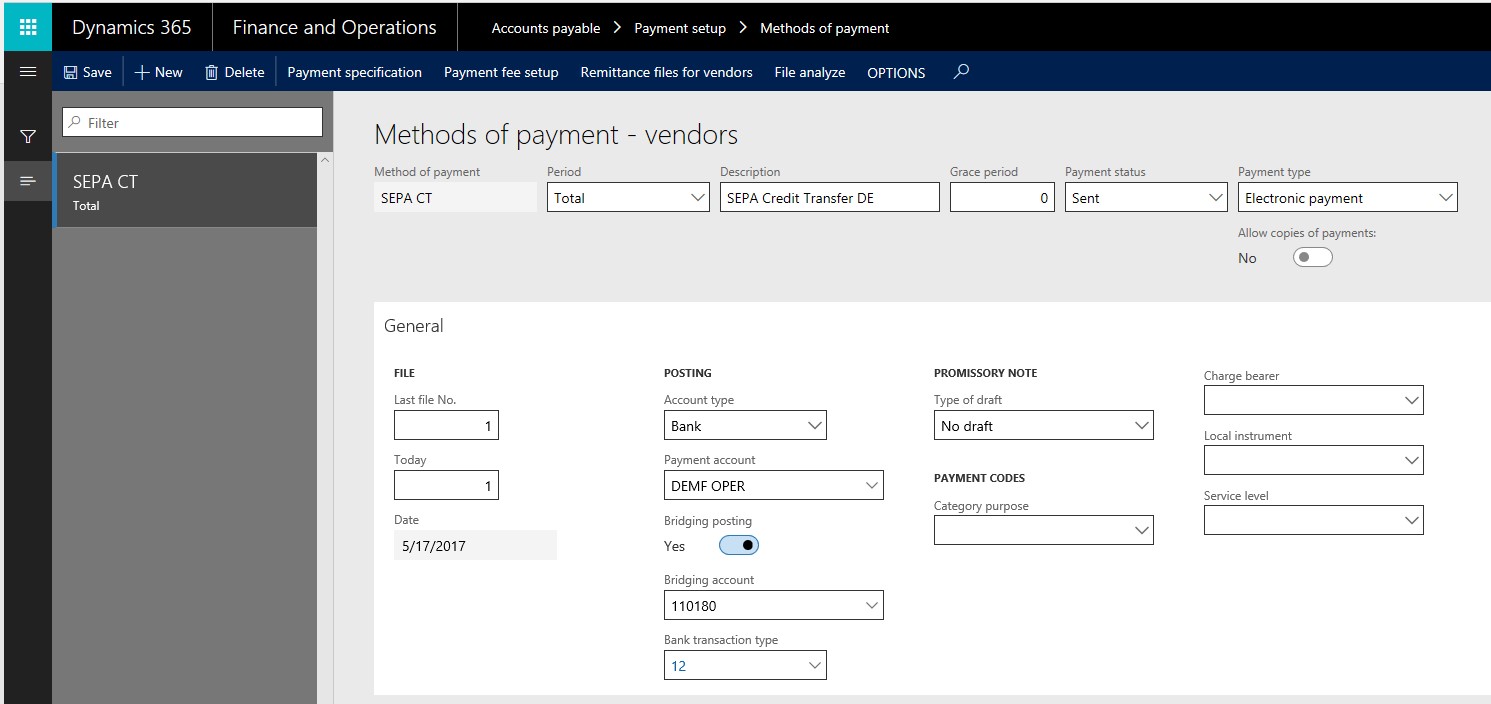
  2. Go to AP/Methods of payments, create a new method of payment and enter

  • Name = SEPA CT

  • Period = total

  • Description = SEPA Credit Transfer DE

  • Payment type = Electronic Payment

  • Account type = Bank

  • Payment account = DEMF OPEr

  • Bridging posting = yes

  • Bridging account = 110180

  • Bank transaction type = 12

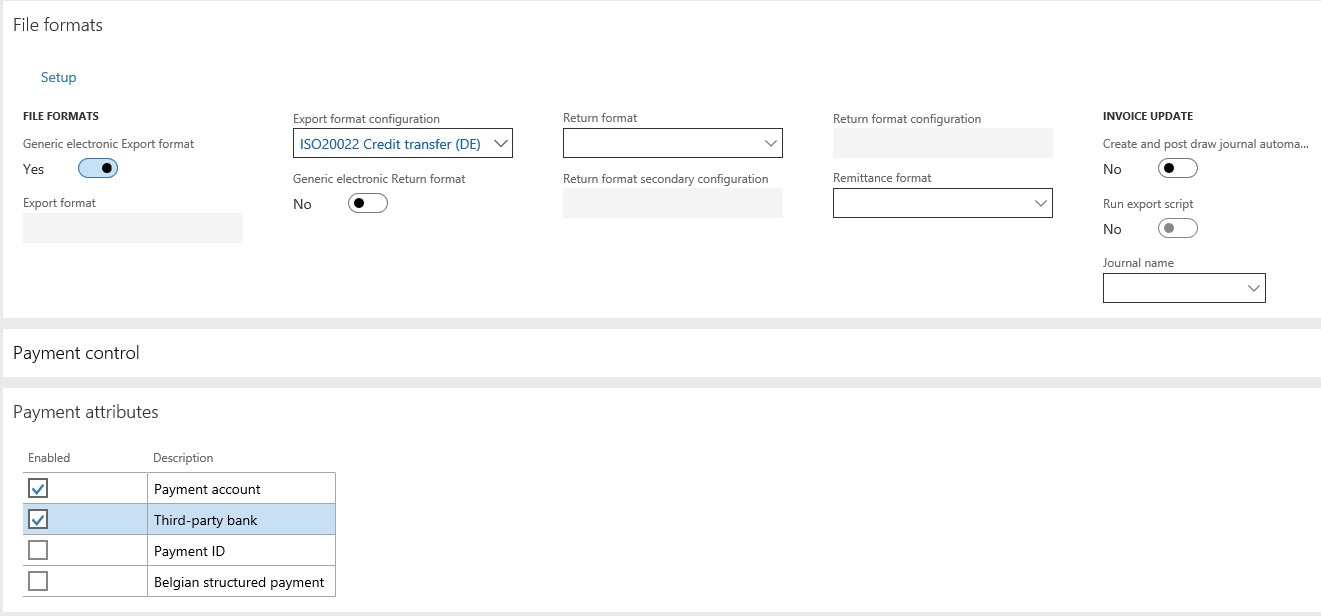
  • File Formats:

  • Generic Electronic Export Format = Yes

  • Export format configuration = ISO20022 Credit transfer (DE)

  • Payment attributes

  • Payment account = checked

  • Third party bank = checked

BP1.jpg

BP2.jpg


  3. Create a new company bank account, go to Cash and bank management/Bank account, create a new one and enter:

  • Bank account = DE Bank

  • Routing number = 1458

  • Bank account number = 987654

  • Main account = 110110

  • Name = DE Bank 2

  • Bank groups = BankEUR

  • Currency = EUR

  • Additional Information:

  • Swift code = SSKMDEMMXXX

  • IBAN = DE12500105170648489890

  • Address, country/region = DEU

BP3.jpg

 4. Setup a vendor with correct details, go to AP/Vendors, select DE-001 click edit and enter

  • Payment tab:

  • Terms of payment = Net10

  • Method of payment = SEPA CT

  • Go to Bank account and edit the existing one

  • Swift code = COBADEFFXXX

  • IBAN = DE36200400000628808808

  • Address Country/Region = DEU

BP4.jpg

  • Go back to vendor details and select the bank account to field bank account

BP42.jpg

 5. Create a vendor invoice, go to AP/Journals/Invoice journal, create a new one, go to lines and enter

  • Date = 12/10/2017

  • Account = DE-001

  • Invoice date = 12/1/2017

  • Invoice = 456

  • Credit = 555,00

  • Offset account type = Ledger

  • Offset account = 600120

BP5.jpg

  • Post the invoice

 6. Go to AP/Payments/Payment journal, create a new journal, go to lines and enter
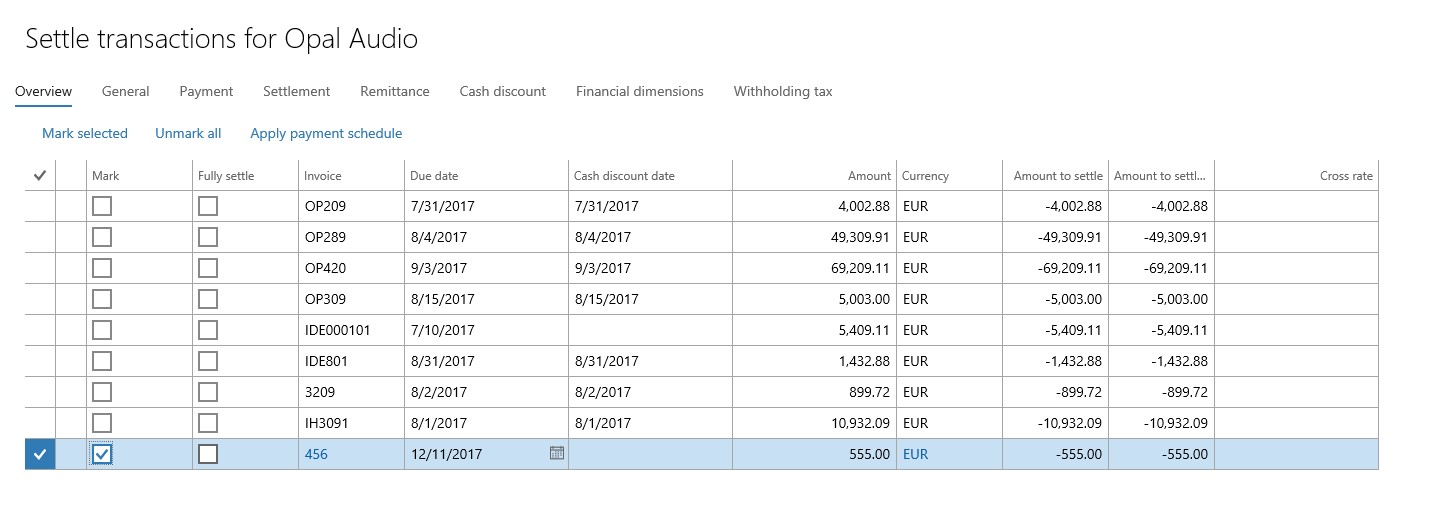
  • Date = 12/14/2017

  • Account = DE-001

  • Go to settle transactions and select the invoice created in step 5:

BP6.jpg

  • Close the settlement form, back to lines:

BP62.jpg

 7. Generate the payment, enter

  • Method of payment= SEPA CT

  • File name = BridgingAccountTest1

  • Bank Account = DEMF OPER – this is the bank account, which is defaulted in Method of Payment

BP7.jpg

  • Click OK

  • Processing date = 12/14/2017

  • Number of Invoices = 1

BP72.jpg

  • Click OK

  • File is created:

BP73.jpg

 8. Go back to the payment journal lines and set the payment status to “none”

  • Click again on Generate payments and change content to

  • File name = BridgingAccountTest2

  • Bank account = DE Bank – this is a different bank, which is not defaulted in the method of payment

BP8.jpg

  • Click ok

  • Processing date = 12/14/2017

  • Number of invoices = 1

BP82.jpg

  • Click OK


Actual Result

Error message “No records were found to generate a payment file”

BP83.jpg

Expected result

Payment file should be generated, as it worked in AX 2012:
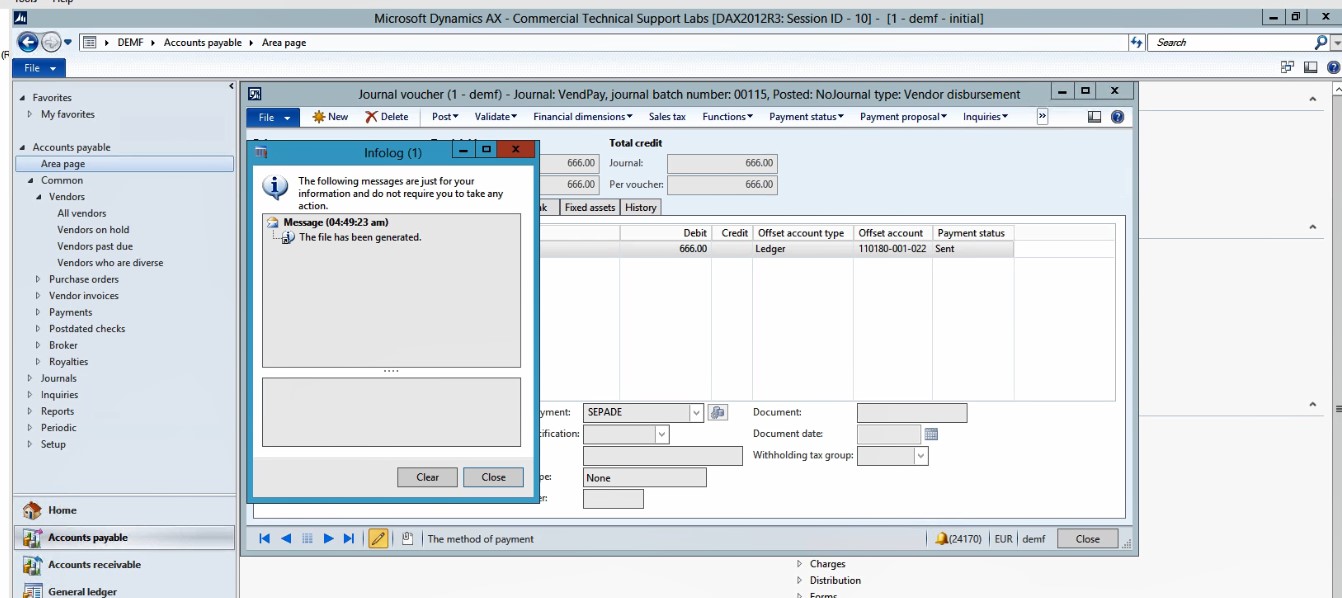
BP84.jpg

 Does anyone have an idea how to do that in Dyn365FO?

*This post is locked for comments

I have the same question (0)
  • Suggested answer
    dekaasboer Profile Picture
    1,530 on at

    Still getting used to Dyn365FO but checkin your first screenshot. Your method of payment filters on the payment status "sent". However the payment status should be adjusted after generating the payment file.

    Depending on your settings all lines should have the status none or approved when you generate your payment file.

  • Suggested answer
    Ludwig Reinhard Profile Picture
    Microsoft Employee on at

    Hi Alfonso,

    I do not understand why you do step 8 because the payment file was already created in step 7.

    Why do you reset the payment status and try to generate the payment file again but this time from a different bank account?

    Irrespective of that please check the following:

    1. That the other bank account 'DE Bank' is correctly setup with IBAN + SWIFT

    2. That the other bank account 'DE Bank' is linked to a separate method of payment that is selected in the journal.

    3. That the other bank account 'DE Bank' and the other payment method is selected in the generate payments form that opens after you hit the generate payments button

    4. Also check the following form: => payment proposal button => edit invoices for selected payments and see what accounts and method of payment is selected there.

    Best regards,

    Ludwig

  • André Arnaud de Calavon Profile Picture
    301,037 Super User 2025 Season 2 on at

    Hi Alfonso,

    Step 2 provided by Ludwig, is in my opinion your issue. For multiple bank accounts, you have to create multiple method of payments as this is being checked. If you need to pay from another bank account, you should have another method of payment which should be updated also on the journal lines before generating the file.

  • Alfonso Di Nisio Profile Picture
    on at

    Hi Rik, many thanks. We have to check it. I´ll keep you updated.

  • Alfonso Di Nisio Profile Picture
    on at

    Hi Ludwig, many thanks. We have to check it. I´ll keep you updated.

  • Alfonso Di Nisio Profile Picture
    on at

    Hi Ándre, many thanks. We have to check it. I´ll keep you updated.

Under review

Thank you for your reply! To ensure a great experience for everyone, your content is awaiting approval by our Community Managers. Please check back later.

Helpful resources

Quick Links

Responsible AI policies

As AI tools become more common, we’re introducing a Responsible AI Use…

Neeraj Kumar – Community Spotlight

We are honored to recognize Neeraj Kumar as our Community Spotlight honoree for…

Leaderboard > 🔒一 Microsoft Dynamics AX (Archived)

#1
Martin Dráb Profile Picture

Martin Dráb 4 Most Valuable Professional

#1
Priya_K Profile Picture

Priya_K 4

#3
MyDynamicsNAV Profile Picture

MyDynamicsNAV 2

Last 30 days Overall leaderboard

Featured topics

Product updates

Dynamics 365 release plans