web
You’re offline. This is a read only version of the page.
close
Skip to main content

Notifications

Announcements

No record found.

Community site session details

Community site session details

Session Id :
Finance | Project Operations, Human Resources, ...
Answered

Need help on create view (Computed column)

(0) ShareShare
ReportReport
Posted on by 901

Dear friends,

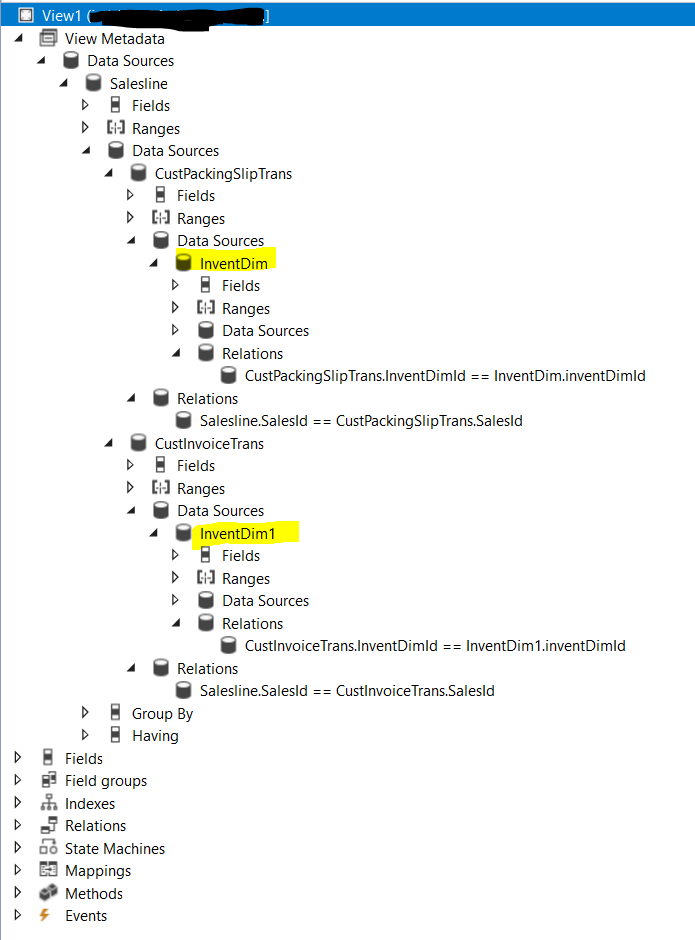
I would like to ask some help about View. When I create a view that in its data sources there are 2 tables in same level and then each has child data source of same table like the common InventDim table, how to create the display string using SysComputedColumn, which the result should choose first If the 1st InventDim is empty then show the 2nd InventDim ?

The View's structure is something like this :
pastedimage1635861850528v1.png

This is actually for a Data Entity, so in the methods I should create some method for the computed column using SysComputedColumn, right ? And later I can use it as my Data Entity's field. But I don't how it works to have those selection in the computed column's method, for lets say I want to display InventLocationId.

Like mentioned, I would like to show InventLocationID, if not from the InventDim related to CustInvoiceTrans, if it is empty, then take from InventDim related to CustPackingSlipTrans.

I thought can be something like this :

private static server str MyInvenLocation()
    {
        TableName   viewName  = tableStr(View1);
        str ret;
    
        str     InventLoc = SysComputedColumn::returnField(viewName, tableStr(InventDim),  fieldStr(InventDim, InventLocationId));

        str     InventLoc1 = SysComputedColumn::returnField(viewName, tableStr(InventDim1),  fieldStr(InventDim, InventLocationId));
                       
        
        return strFmt("CASE WHEN %1 = '' THEN ISNULL(%2, '') ELSE %1 END", InventLoc, InventLoc1);
        
    }

But error when Build. It says the 'InventDim1' is unknown.

Please help.

Thanks in advance.

I have the same question (0)
  • Tony zhong Profile Picture
    901 on at

    Been looking for some blogs, but I guess I'm still stuck. This code while looks logical to me (and Build passed) still produce synchronize error ->

     private static server str MyInventLocation()
        {
            TableName   viewName  = tableStr(View1);
            
            return SysComputedColumn::if(
                        SysComputedColumn::equalExpression(
                            SysComputedColumn::comparisonField(viewName, identifierStr(InventDim), fieldStr(InventDim, InventLocationId)),
                            SysComputedColumn::comparisonLiteral('')),
                        SysComputedColumn::returnField(viewName, identifierStr(InventDim1), fieldStr(InventDim, InventLocationId)),
                        SysComputedColumn::returnField(viewName, identifierStr(InventDim), fieldStr(InventDim, InventLocationId))
                );  
            
        }

    Anyone can lead me where I did wrong in this syntax ?

    Thanks

  • Verified answer
    Tony zhong Profile Picture
    901 on at

    Hi,

    Ok, the 2nd syntax looks good and working now. The error because of mistyped in one of datasource.

    Thank you.

  • WillWU Profile Picture
    22,361 on at

    Hi Tony,

    Did you try to copy the InventDim table and create a new one ?

  • WillWU Profile Picture
    22,361 on at

    Thank you for your sharing.

  • Tony zhong Profile Picture
    901 on at

    Hi Will,

    No, I just using the same table,  when we add same table name in a new node, it will added "_1", right ? Problem is I didn't manually add it but copy and paste from the one I have added before, so the "data source name" is not automatically added "_1" then I overlook to change the "copied" data source name in  one of its child data source.

    So there is a SQL syntax overlap each other inside the AOT structure. The method it self is correct (unless there is a better syntax, but it's ok, if no)

    Anyway you can close the issue as it is solved.

    Thanks.

Under review

Thank you for your reply! To ensure a great experience for everyone, your content is awaiting approval by our Community Managers. Please check back later.

Helpful resources

Quick Links

Responsible AI policies

As AI tools become more common, we’re introducing a Responsible AI Use…

Neeraj Kumar – Community Spotlight

We are honored to recognize Neeraj Kumar as our Community Spotlight honoree for…

Leaderboard > Finance | Project Operations, Human Resources, AX, GP, SL

#1
Martin Dráb Profile Picture

Martin Dráb 646 Most Valuable Professional

#2
André Arnaud de Calavon Profile Picture

André Arnaud de Cal... 529 Super User 2025 Season 2

#3
Sohaib Cheema Profile Picture

Sohaib Cheema 285 User Group Leader

Last 30 days Overall leaderboard

Product updates

Dynamics 365 release plans



