web
You’re offline. This is a read only version of the page.
close
Skip to main content

Notifications

Announcements

No record found.

Community site session details

Community site session details

Session Id :
Microsoft Dynamics AX (Archived)

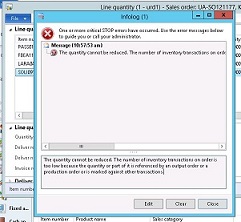
The quantity cannot be reduced. The number of inventory transactions on order is too low because the quantity or part of it is referenced by an output order

(0) ShareShare
ReportReport
Posted on by

We are facing issue while Ending Delivery reminder for some orders, below is one example. Need to end deliver reminder for item SOLI091702 in sales order UA-SO121177.

System shows error message as below.

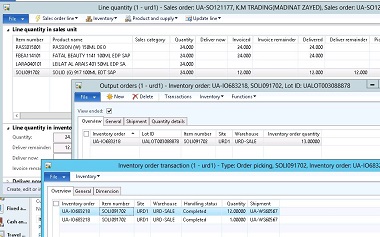
In 2nd screenshot you can see output order is created for 13 pcs and it shows 13 pcs as completed. but actually 12 pcs are delivered and 12 are reminding. System does not allow to end the output orders also, because of that delivery reminder also cannot be canceled.

Please suggest how to resolve.
 3566.error1.JPGerror2.JPG

*This post is locked for comments

I have the same question (0)
  • Guy Terry Profile Picture
    28,924 Moderator on at

    Hi Faisal,

    Do you use functionality known as Consolidated picking, WMSII or the 'Shipments' form in the Inventory management module?

  • Community Member Profile Picture
    on at

    Hi Guy,

    We are having the same situation where we cannot cancel a delivery remainder.

    We are using the new warehouse module in R3.

    Ordered 12, shipped 4, and we were allowed to only cancel 4 units instead of 8.

    We still have a delivery remainder of 4 that needs to be canceled.

    There is nothing in Reservations, nor is it marked---though there are two orders with LOT ID#,s and a remainder of 2 and 5 units. But they are not marked.

    Where else do we look, and how can we correct, and/o keep this from happening in the future?

    thanks for your help

    mm

  • Guy Terry Profile Picture
    28,924 Moderator on at

    Hi,

    What error do you get when you attempt to cancel a delivery remainder?

    And since you are using R3, can you confirm you started the process to ship the 4 by using the 'Release to warehouse' functionality.

  • Community Member Profile Picture
    on at

    Hi and thank you!

    The exact error message is:

    The Quantity cannot be reduced. The number of invdentory transactions on order is too low because the quantity or part of it is reference by an output order or a product order or is marked against other transactions

    And we batch the automatic release to the warehouse and we can manually release a specific order.

    mm

  • Guy Terry Profile Picture
    28,924 Moderator on at

    I did a little testing. As far as I can tell, if the sales order line has open work, you will not be able to cancel the Deliver remainder, but you will get a different error to the message you see.

    So lets assume the error is telling us the truth. From the Sales order line, do Inventory -> Marking. Is any quantity 'Marked'?

    Output orders are not used by R3 Warehouse management. Again from the order line, do you get the option Inventory -> Output order? If so, if you click it, does it ask you to create an output order, or show you an existing one?

    On the Pick and pack tab in the ribbon bar, are you able to click on 'Picking list registration', or is it greyed out?

    On the order line -> 'Line details' fast tab -> Product tab, is there anything in the 'Item reference' fields?

  • Community Member Profile Picture
    on at

    No options for Output Orders.

    The pick and pack tab is not greyed out. When clicking on that--within lines detail, the 4 units that Supposedly shipped in November is listed.

    I called the whse, and they said to put in 4 units in the Delivery remainder area, and hit OK.

    It processed.

    On the main screen of the order, though, it still shows the delivery remainder of 4 units.

    DC told me to cancel remainder, of which it did allow me

    The line status went from Open to Delivered.

    I am assuming (hoping) that the line status will change to Invoiced.

    All very strange to me in how all this has taken place.

    --and how do we keep it from happening again.....

  • Guy Terry Profile Picture
    28,924 Moderator on at

    Hi,

    You've got me a bit lost, to be honest. Are you saying you could open 'Picking list registration', and here you found the 4 units that have been shipped?

  • Suggested answer
    Community Member Profile Picture
    on at

    Hi,

    please try this on Test environment first then apply.

    1- confirm the output order number against the remainder qty (select the order line , click above button INVENTORY , where you can find the Output order , Unmarked view ended , and copy the INVENTORY ORDER NUMBER)

    2- open AOT ->Data Dictionary ->Tables -> WMSOrderTrans (Right click and open )

    3- in orderid field paste the same inventory order number .

    4- delete the raws whose ExpeditionStatus is Activated

    5- Now go to again the output order form , refresh the screen, and select End Inventory order in FUNCTIONS.

    6- now go to the sales order screen and easily cancel the deliver render quantity.

    7- please mark the answer correct , if you find this useful. others will get the solution.

    Thanks

  • Nike Profile Picture
    70 on at

    Hi Guy,

    I am facing the same issue. I have 8 lines in SO(print1). 3 lines are invoiced and those 3 lines are present in intercompany SO and PO(Those intercompany SO and PO are invoiced)

    Remaining 5 lines are opened and those lines I have to cancel but when I tried to cancel it I am getting the below error

    Quantity ordered may not be reduced because there are not enough inventory transactions with 'on order' status.

    I try to cancel the quantity through delivery remainder but still getting the same issue.(print 3)

    4201.pastedimage1638804186512v2.png

    7380.pastedimage1638804300369v4.png

    5187.pastedimage1638804355133v5.png

    Picking list registration tab is greyed out.

    2046.pastedimage1638804245079v3.png

  • AndreasL Profile Picture
    30 on at

    Did you solve the issue?

Under review

Thank you for your reply! To ensure a great experience for everyone, your content is awaiting approval by our Community Managers. Please check back later.

Helpful resources

Quick Links

Responsible AI policies

As AI tools become more common, we’re introducing a Responsible AI Use…

Neeraj Kumar – Community Spotlight

We are honored to recognize Neeraj Kumar as our Community Spotlight honoree for…

Leaderboard > 🔒一 Microsoft Dynamics AX (Archived)

#1
Martin Dráb Profile Picture

Martin Dráb 4 Most Valuable Professional

#1
Priya_K Profile Picture

Priya_K 4

#3
MyDynamicsNAV Profile Picture

MyDynamicsNAV 2

Last 30 days Overall leaderboard

Featured topics

Product updates

Dynamics 365 release plans