web
You’re offline. This is a read only version of the page.
close
Skip to main content

Announcements

No record found.

News and Announcements icon
Community site session details

Community site session details

Session Id :
Customer experience | Sales, Customer Insights,...
Answered

Missing Privileges to assign users to teams in different Business Units.

(0) ShareShare
ReportReport
Posted on by 30

Hi,

I have 3 BU (1 parent and 2 children) let's call them P1, C1, and C2. I also have a security role that should allow the users with it to assign other users to different teams. Lets call it Super User. Everything works fine when the Super User wants to add a user to a team when they are all in the same BU, but if Super User is in the BU P1 and he tries to add a user in a team from C1 or C2 then I get a permission error. Here are my current permissions:
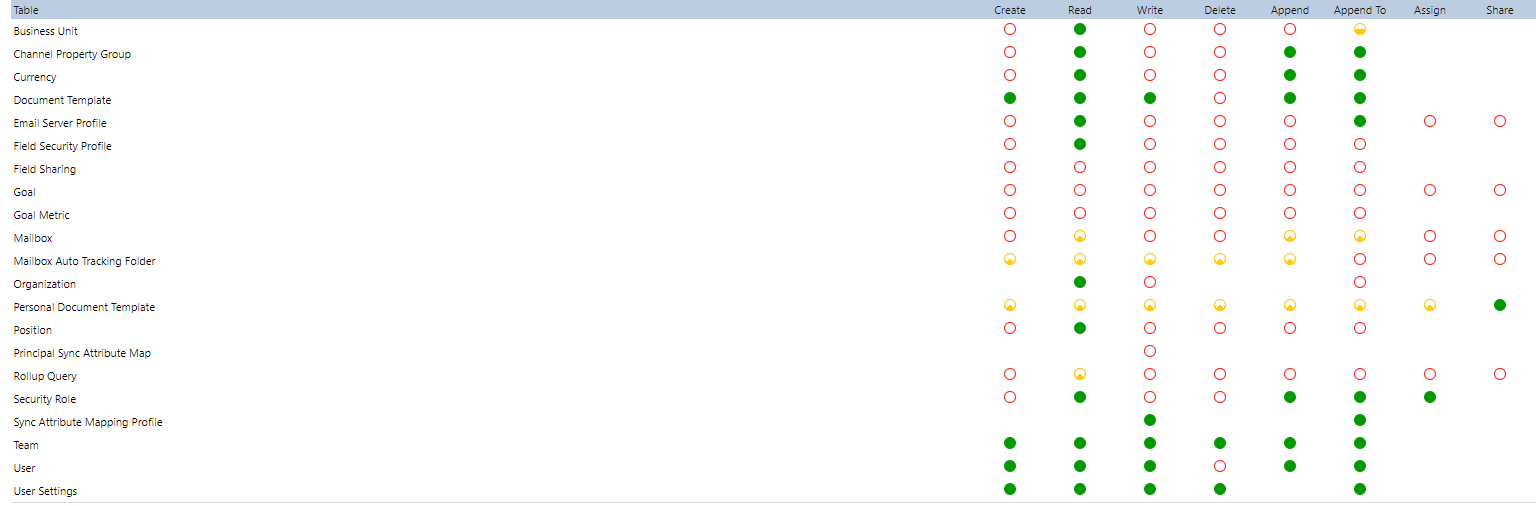
pastedimage1654197428860v1.png

The error message says that I'm missing the following privileges. My problem is that I can't seem to find them in the security role table so I don't know how I'm supposed to add them. 

Message: VerifyCallerPrivileges failed. To avoid elevation of privileges calling user should have all required privileges.
Calling user (systemuserid=654ca1ac-4530-ec11-b6e6-000d3a09f6b5, UserBU=82d007af-e249-e711-80f2-005056b029f4) attempted action='PreAddMembersChecks' which elevates calling user privileges.
User doesn't have total role privileges count=81, user has 677 privileges in user cache from 4 roles.
First 5 missed role privileges
PrivilegeName(PrivilegeId)/Depth/BusinessUnitId
prvAssignAsyncOperation(003d8a0f-c230-411c-a993-cc0a8aeaac96)/Basic/0f84a718-cf56-ec11-8f8e-000d3af4d98c
prvAppendToQueue(041fdb4c-bbb8-4792-90db-51c19d067ca2)/Local/0f84a718-cf56-ec11-8f8e-000d3af4d98c
prvCreatemsdyn_wallsavedqueryusersettings(07204286-7c41-4ff4-8ec1-c630eff24621)/Basic/0f84a718-cf56-ec11-8f8e-000d3af4d98c
prvAssignmsdyn_wallsavedqueryusersettings(0a9b99f9-c233-4f73-a27d-d710196e4c17)/Basic/0f84a718-cf56-ec11-8f8e-000d3af4d98c
prvAppendToImport(0b43ff39-e162-4a0c-9192-449982cb5830)/Local/0f84a718-cf56-ec11-8f8e-000d3af4d98c

Side note, everything works when I do it as Sys Admin. 

Any advice would be really appreciated. 

I have the same question (0)
  • Verified answer
    Abdul Wahab Profile Picture
    12,119 Moderator on at

    Hi dev2143,

    Hope you are doing well. This is what you need 

    pastedimage1654227644073v2.png

    I am explaining to you the first one using the below image.

    pastedimage1654228071504v3.png

    For the remaining you can read these: 

    Let me know if I can you more details.

    Thanks

    Regards,

    Power Platform/Customer Engagement Developer/Lead/Solution Architecture/Project Manager

    Direct/WhatsApp:+923323281237

    E-mail: abdulwahabubit@outlook.com

    Skype: abdul.wahabubit

  • Iagday Profile Picture
    32 on at

    Hi Abdul,

    Good answer!

    But is there's a way to get all the privileges missing (in the example above total role privileges count=81)  instead of having only the 5 first one's?

    Otherwise, it's a trial/error pattern (5 at a time).

    Thank you in advance.

Under review

Thank you for your reply! To ensure a great experience for everyone, your content is awaiting approval by our Community Managers. Please check back later.

Helpful resources

Quick Links

Introducing the 2026 Season 1 community Super Users

Congratulations to our 2026 Super Stars!

Meet the Microsoft Dynamics 365 Contact Center Champions

We are thrilled to have these Champions in our Community!

Congratulations to the March Top 10 Community Leaders

These are the community rock stars!

Leaderboard > Customer experience | Sales, Customer Insights, CRM

#1
ManoVerse Profile Picture

ManoVerse 196 Super User 2026 Season 1

#2
11manish Profile Picture

11manish 129

#3
CU11031447-0 Profile Picture

CU11031447-0 100

Last 30 days Overall leaderboard

Product updates

Dynamics 365 release plans
