web
You’re offline. This is a read only version of the page.
close
Skip to main content

Notifications

Announcements

No record found.

Community site session details

Community site session details

Session Id :
Microsoft Dynamics NAV (Archived)

How to add save as PDF option in report.

(0) ShareShare
ReportReport
Posted on by 1,893

Dear All,

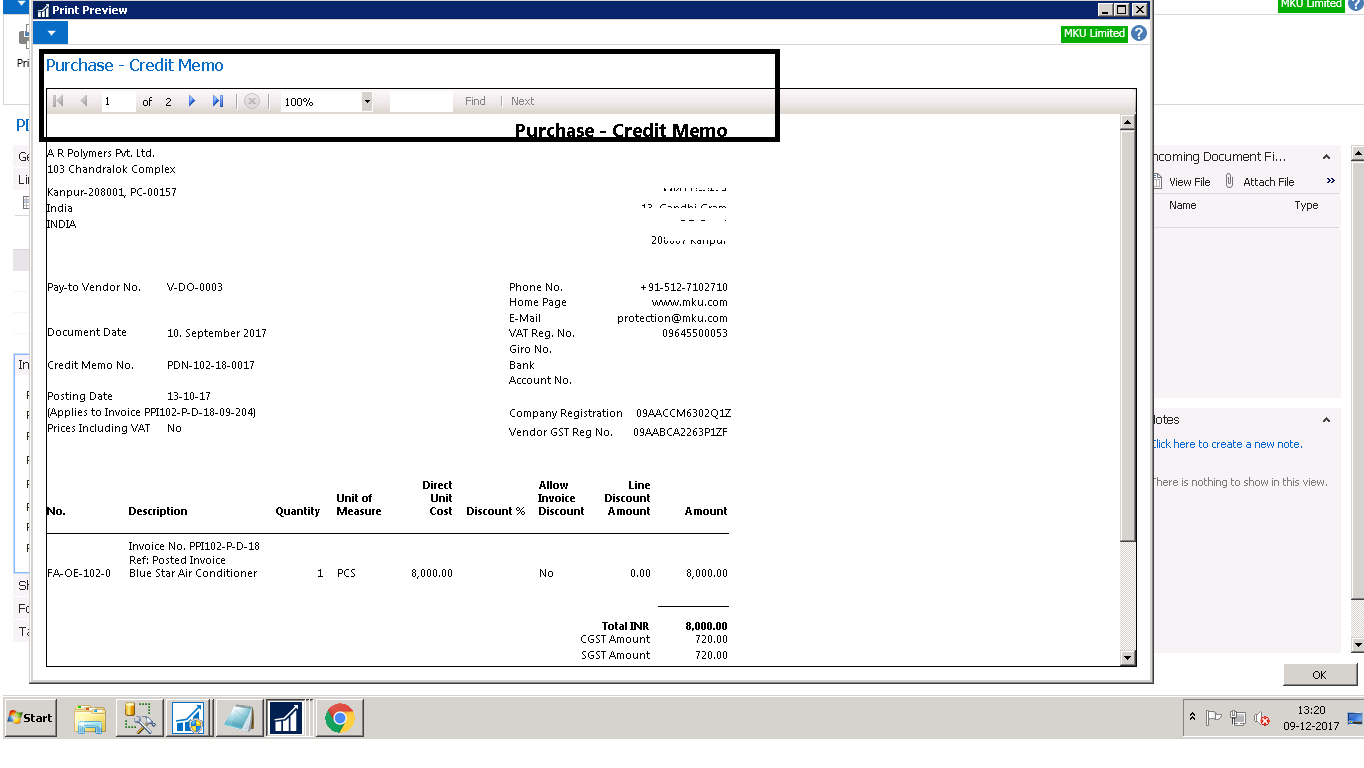
In navision 2016...report no. 407(Purchase - Credit Memo). I have save it as report no 50120(customised report). I have formatted as my company requirement with logo. Now report is ready but when I try to run it there have save as pdf option is not showing...please provide me some idea to add pdf option in my customised report.
4274.test01.png

*This post is locked for comments

I have the same question (0)
  • ipablocerdan Profile Picture
    111 on at

    Hi

    In the standard sales and purchases documents you cannot save as pdf in preview mode. You can save as pdf from request page. The report 407 is like this, try it.

    @ignatiuspc

  • manish.yadav Profile Picture
    1,893 on at

    Now the pdf problem is resolved. All is ok. But when I try to save it in pdf format, first page is comes as blank. How to resolve it. Please help me.

  • ipablocerdan Profile Picture
    111 on at

    Hi

    Any of object is out of range of the report. Delete company logo and try it.

    @ignatiuspc

  • manish.yadav Profile Picture
    1,893 on at

    Unfortunately, this didn't solve our problem. because company logo is the main part of the report. Actually base report 407 is always printing in 2 pages. that's why my report is printing in 2 pages. I have deleted the unnecessary part from my customised report.  

  • ipablocerdan Profile Picture
    111 on at

    I only suggested that you removed the logo to test if it was the object that was out of range. If the standard report has two pages, it is an error because some object is out of range.

    @ignatiuspc

  • manish.yadav Profile Picture
    1,893 on at

    As per your suggestion, I have removed the company logo. But still report pdf is saving in 2 pages. In first page all calculation is not showing. Only calculation showing in second pages.

  • ipablocerdan Profile Picture
    111 on at

    You need to know which object is out of range. I can’t help anymore, it’s the typical problem of standard documents, an object is out of the page, out of range.

    @ignatiuspc

  • manish.yadav Profile Picture
    1,893 on at

    I have solve it from my side. Now there is no page printing issue. But in report No. 407 I want to show the HSN code . I have added it in data item but not showing in report. How can I show the HSN code in report no. 407.?

  • ipablocerdan Profile Picture
    111 on at

    I hope you passed it on to the layout

    @ignatiuspc

  • manish.yadav Profile Picture
    1,893 on at

    yes, I have passed it on the layout and added on data item. But it is not showing in print form.

Under review

Thank you for your reply! To ensure a great experience for everyone, your content is awaiting approval by our Community Managers. Please check back later.

Helpful resources

Quick Links

Responsible AI policies

As AI tools become more common, we’re introducing a Responsible AI Use…

Neeraj Kumar – Community Spotlight

We are honored to recognize Neeraj Kumar as our Community Spotlight honoree for…

Leaderboard > 🔒一 Microsoft Dynamics NAV (Archived)

#1
HoangNam Profile Picture

HoangNam 7

Last 30 days Overall leaderboard

Featured topics

Product updates

Dynamics 365 release plans



