web
You’re offline. This is a read only version of the page.
close
Skip to main content

Notifications

Announcements

Community site session details

Community site session details

Session Id :
Finance | Project Operations, Human Resources, ...
Suggested Answer

The transactions on voucher XXXX do not balance as per <date>. (accounting currency: 0.00 - reporting currency: -0.00) - Margin in accounting currency

(0) ShareShare
ReportReport
Posted on by 215

Dear all, I am facing an error when trying to invoice a SO:

  • The transactions on voucher xxxxxx do not balance as per <DATE>. (accounting currency: 0.00 - reporting currency: -0.00)
    • Error in unit of amount in currency GBP. Must be rounded to 0.01.
      • The unit of -0.8333000000000000 GBP being posted to account xxx-xxx-xxxxxxx-xxxxxx-xxxxxxxxxx-xxx is outside the current penny rounding threshold.
      • The unit of -0.1667000000000000 GBP being posted to account xxxxxx-xxxxxx is outside the current penny rounding threshold.
      • The unit of -0.0033000000000000 GBP being posted to account is outside the current penny rounding threshold.

My accounting currency is GBP and my reporting currency is USD. 

My "Maximum penny difference" is et as = 2.00 and my "Maximum penny-rounding in the reporting currency" is also = 2.00. 

My SO is in GBP, as all the transactions related with the item in the SO are in GBP. 

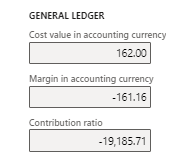
I have also noticed this in the "SO Totals" form, that I believe it can be the source of the error: 
pastedimage1630493586670v1.png

Can anyone help me with this one? 

Thank you. 

I have the same question (0)
  • Suggested answer
    Ludwig Reinhard Profile Picture
    Microsoft Employee on at

    Hi,

    Can you check your GL parameter and the penny rounding differences set up?

    Also, can you check the currency setup and verify what has been set up in the various rounding rule fields?

    Many thanks,

    Ludwig

  • Afonso Rodrigues Profile Picture
    215 on at

    Hi Ludwig, thanks for your reply.

    • "check your GL parameter" - what exactly do you want me to show you? 
    • "penny rounding differences set up" - where can I see this set up?
    • "check the currency setup and verify what has been set up in the various rounding rule fields":
      • pastedimage1630496342296v1.png

  • Suggested answer
    Alireza Eshaghzadeh Profile Picture
    14,738 Super User 2025 Season 2 on at

    Hi Afonso,

    As Ludwig mentioned, Please check the penny difference setup on general ledger parameters

    pastedimage1630498032161v1.png

    and check if you have defined setup for posting accounts against "Penny difference in reporting currency" and "Penny difference in accounting currency" on Accounts for automatic transactions.

    It seem that the issue can be related to the "Contribution ratio". Have you tried to delete the sales order line and add it again to the SO (In a case that you have run the packing slip) to check if it get updated?

    Regards,

    Alireza

Under review

Thank you for your reply! To ensure a great experience for everyone, your content is awaiting approval by our Community Managers. Please check back later.

Helpful resources

News and Announcements

Season of Giving Solutions is Here!

Quick Links

Responsible AI policies

As AI tools become more common, we’re introducing a Responsible AI Use…

Neeraj Kumar – Community Spotlight

We are honored to recognize Neeraj Kumar as our Community Spotlight honoree for…

Leaderboard > Finance | Project Operations, Human Resources, AX, GP, SL

#1
Abhilash Warrier Profile Picture

Abhilash Warrier 732 Super User 2025 Season 2

#2
André Arnaud de Calavon Profile Picture

André Arnaud de Cal... 413 Super User 2025 Season 2

#3
Martin Dráb Profile Picture

Martin Dráb 284 Most Valuable Professional

Last 30 days Overall leaderboard

Product updates

Dynamics 365 release plans



