Hi,
Thank you for your query.
Here are answers to your both questions:
- Confirmation Dialog: in your JavaScript command (function) you can use Xrm.Navigation.openConfirmDialog to take user consent before converting the order.
- Use Built-in Fulfil Order/Create Invoice function: you can directly call Sales.SalesOrderRibbonActions.Instance.FulfillOrder in your JS function and there is no need to add the library to the form, The $webresource:Sales/_static/sfa/salesorder/SalesOrderRibbonActions.js is already part of the order form.
To clarify further, I would do following steps to achieve this functionality:
- Hide Fulfil Order/Create Invoice button (do not remove, just hide).
- Add my custom button on the ribbon.
- Add a command for my button and add a JavaScript action.
Here is the sample JS Code to launch confirm dialogue and call built-in convert order function:
function convertOrder_custom() {

var confirmStrings = { text:"Are you sure you want to create invoice?", title:"Confirmation Dialog" };
var confirmOptions = { height: 200, width: 450 };
Xrm.Navigation.openConfirmDialog(confirmStrings, confirmOptions).then(

function (success) {
    if (success.confirmed) {

        console.log("Dialog closed using OK button.");

        // Cal function to create contract

        // Call function to convert order
        Sales.SalesOrderRibbonActions.Instance.FulfillOrder();

    }
    else
        console.log("Dialog closed using Cancel button or X.");
});


}
Here is a screen shot of Ribbon Workbench for your reference:

And here is the result:

When user click's OK, we get following Built-in Fulfil Order dialogue:
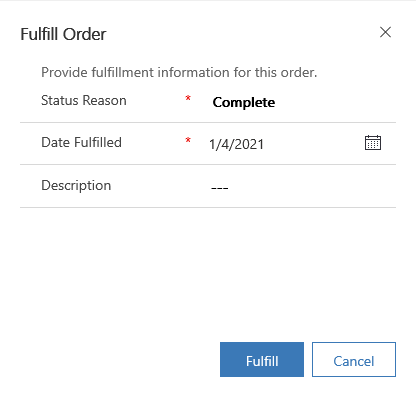
You can always, click on customize button command to get the JS function name of a built-in button.
Let me know if you need further clarification.
Best,
Wahaj
(if this helps, please mark this answer as verified)







