web
You’re offline. This is a read only version of the page.
close
Skip to main content

Notifications

Announcements

No record found.

Community site session details

Community site session details

Session Id :
Microsoft Dynamics AX (Archived)

Link Project Posted Transactions Grid to Respective Purchase Order Number - AX 2012 R3 CU11

(0) ShareShare
ReportReport
Posted on by 895

Hi,

I am using AX 2012 R3 CU11.

I have my List Page, Project's Posted Transactions grid. I have to display one more column displaying the corresponding Purchase Order Number. I have created a display method but it is coming blank as I am confused in finding the relation.
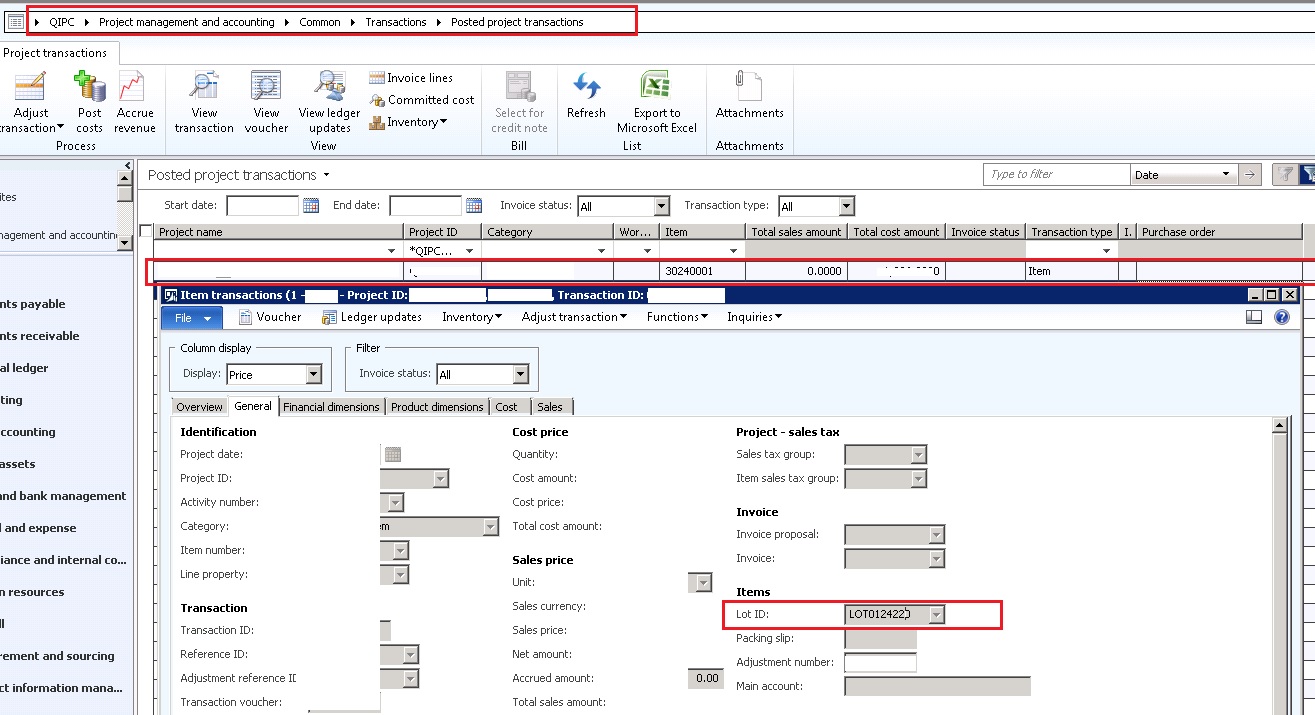
8662.Details_5F00_1.jpg

I was reviewing the transactions form (Inventory and warehouse Management)

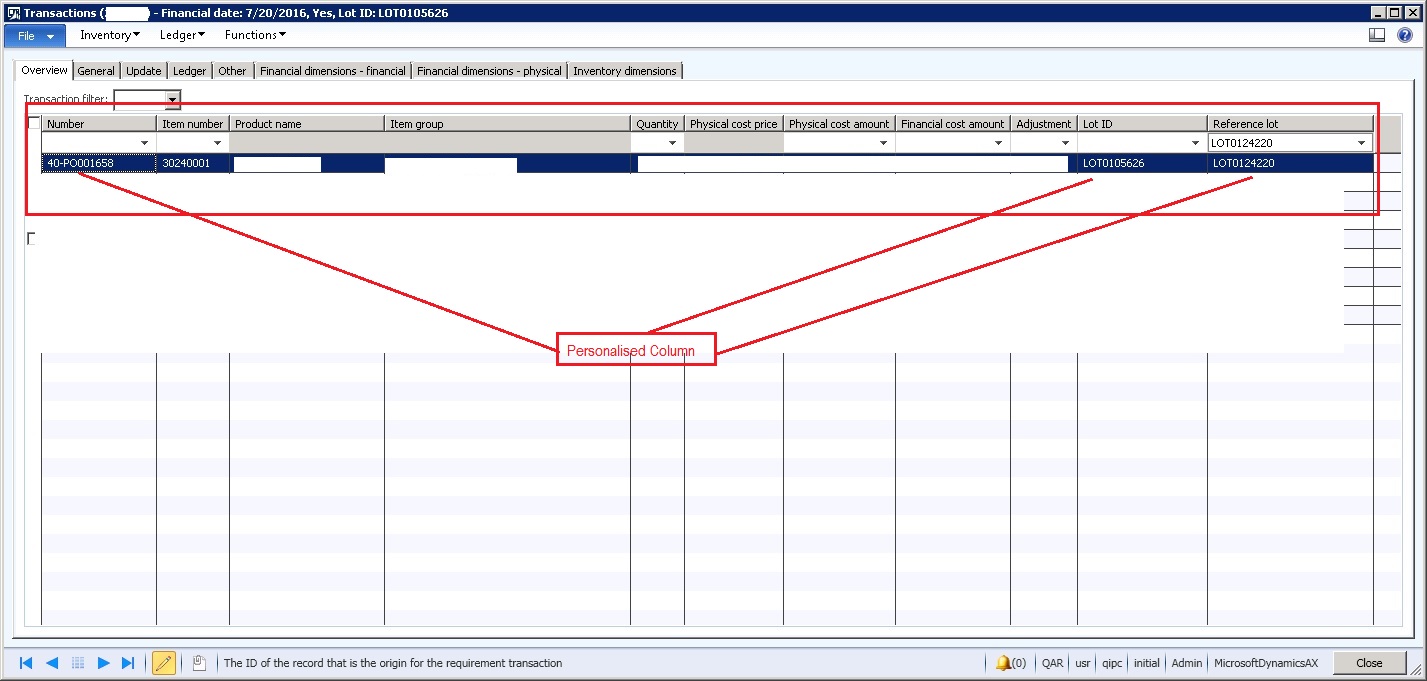
After I picked the LOT Id details from above Item Transactions Form (As shown Above), I search in the Inventory Transactions Form in the column "Reference Lot", I found the Purchase Order Number  in the "Number" column (Refer below image)
7266.Details_5F00_2.jpg

In 'InventTransOrigin" table, I used the same above Lot Id and searched it in the InventTransId of the InventTransOrigin table, and the record that I found has the ReferenceCategory as "Project". But there is one more entry in the InventTransOrigin with the ReferenceCategory as "Purchase Order" whose InventTransId value is the same as the LOT Id Inventory Transactions forms as shown in the above snapshot.

Details_5F00_3.jpg

My Query: Since for my requirement I need to have Purchase Order Number. I can get this "LOT0124220" ID from the Item Transactions form as shown in the first pic, how can I get "LOT0105626" using this value "LOT0124220"?

Note: In my query, I have mentioned InventTransIds #s of my system just to make things easy.

In case any other detail is required, please let me know. Would appreciate for some quick inputs.

Sincerely,

Muneeb

*This post is locked for comments

I have the same question (0)
  • Suggested answer
    Chaitanya Golla Profile Picture
    17,225 on at

    Hi,

    Please try with the following relation between ProjItemTrans & PurchLine and extract purchId from purchline:

    PurchLine.ProjTransId == ProjItemTrans.ProjTransId

    (or)

    If its an invoice transaction(s), then through following relation

    ProjItemTrans.VendInvoiceTransRecId == VendInvoiceTrans.RecId.

    Hope this information helps you.

    Thanks,

    Chaitanya Golla

  • Muneeb Profile Picture
    895 on at

    Hi Chaitanya,

    Thank you so much for your response.

    Unfortunately, the above relation didn't help me out.

    I have figured out to pick the Purchase Order Number using the tables - ProjItemTrans, InventTransOrigin &  InventTrans. But only for stocked items I am able to get the required Purchase Order Number using these tables.

    For non-stocked items and services(non-stocked), inventTrans will not have any record. I am still trying to figure out for Non-Stocked Posted Transactions of the Projects!, as I am not finding any related record in PurchLine table with the standard relation between ProjItemTrans and PurchLine.

    Sincerely,

    Muneeb

  • Muneeb Profile Picture
    895 on at

    Hi,

    From the Project's Posted Transactions grid as mentioned above, I am able to get the Purchase Order for Stocked items as the entry is there in the InventTrans table.

    However, I am unable to get the Purchase Order Number for Non-Stocked items since there is no entry in the InvenTrans table and using the relation between PurchLine & ProjItemTans too I am not getting any related record in Purchline.

    Can some one please share some insight regarding the relation on how can we get the Purchase Order number for Non-Stocked items on the Project's Posted Transaction Grid.

    Sincerely,

    Muneeb

  • Suggested answer
    Chaitanya Golla Profile Picture
    17,225 on at

    Hi,

    When you say service, table would be projEmplTrans. Please try with the following relation.

    VendTrans.Voucher == ProjEmplTrans.VoucherJournal

    Thanks,

    Chaitanya Golla

  • Muneeb Profile Picture
    895 on at

    Hi,

    The table 'ProjEmplTrans' does not contain any record. It is empty.

    By service I mean, the Item Model group of the item selected is non-stocked.

    Sincerely,

    Muneeb

  • Muneeb Profile Picture
    895 on at

    Hi,

    For Socked items,

    I am using the relation between ProjItemTrans - InventTransOrigin - InventTrans

    For Non-stocked Items,

    To get Purchase Order Number: I am using relations between ProjItemTrans - PurchLine

    To get the Transaction Origin: I am using relation between ProjItemTrans - GeneralJournalEntry - TransactionLog

    However, I am unable to get all the details as for some examples, I have 3 records in ProjItemTrans with same InventTransId (LOTID) and same RecID. And for all the these 3 records there is single record in InventTransOrigin. For this single record of InventTransOrigin, there are 3 records in InventTrans table.

    There is no direct relation between InventTrans and ProjItemTrans and hence I am unable to pick up the correct record from InventTrans using my current record in ProjItemTrans and hence I am getting undesired result.

    Can some one please throw some light for the info that i need by taking into account even the above details as mentioned earlier.

    Thanks a lot in advance.

    Sincerely,

    Muneeb

  • Muneeb Profile Picture
    895 on at

    Hi,

    My simple query is, I want to display a new column containing the details of corresponding  Purchase Order , Sales Order, Item Journal against all the Posted Transactions entry respectively for a given Project.

    For stocked and non-stocked items both.

    Thank in advance.

    Sincerely,

    Muneeb

  • Suggested answer
    Alfasith AX Profile Picture
    120 User Group Leader on at

    Hi,

    If you try to find by LOT** you will fail.

    display PurchId PurchId()
    {
    PurchLine PurchLine;
    ProjItemTransView projItemTransView;
    InventTransOrigin inventTransOrigin;
    ProjItemTrans projItemTrans;
    ;
    if(this.ProjTransId)
    {
    select projItemTrans where projItemTrans.ProjTransId == this.ProjTransId;
    select PurchLine where PurchLine.ProjTransId == projItemTrans.ProjTransIdRef
    && PurchLine.ItemId == projItemTrans.ItemId;
    return PurchLine.PurchId;
    }
    else return "";
    }

    Thanks,

Under review

Thank you for your reply! To ensure a great experience for everyone, your content is awaiting approval by our Community Managers. Please check back later.

Helpful resources

Quick Links

Responsible AI policies

As AI tools become more common, we’re introducing a Responsible AI Use…

Neeraj Kumar – Community Spotlight

We are honored to recognize Neeraj Kumar as our Community Spotlight honoree for…

Leaderboard > 🔒一 Microsoft Dynamics AX (Archived)

#1
Martin Dráb Profile Picture

Martin Dráb 4 Most Valuable Professional

#1
Priya_K Profile Picture

Priya_K 4

#3
MyDynamicsNAV Profile Picture

MyDynamicsNAV 2

Last 30 days Overall leaderboard

Featured topics

Product updates

Dynamics 365 release plans



