web
You’re offline. This is a read only version of the page.
close
Skip to main content

Notifications

Announcements

No record found.

Community site session details

Community site session details

Session Id :
Finance | Project Operations, Human Resources, ...
Unanswered

Export to excel Error

(0) ShareShare
ReportReport
Posted on by 87

Hello,

I have a class where I am exporting data to excel after some dialog options are chosen by the user. However, I keep on getting the error "An internal error has occurred. Please contact your system administrator" once it timeouts.

I am using at the end the below code snippet once the cells are filled

package.Save();
file::SendFileToUser(memoryStream, strFmt('Allowance %1', payPeriodFormat  '.xlsx'));
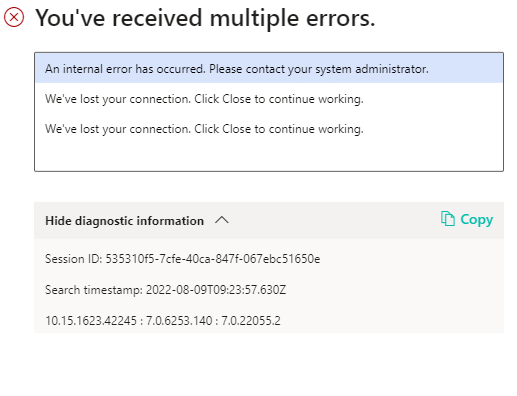
  

pastedimage1660037731458v1.png

I have the same question (0)
  • Komi Siabi Profile Picture
    13,107 Most Valuable Professional on at

    Hello ,

    Are you using SysOperationExecutionMode in your code? If yes which mode are you using ?

    Please, did you try debugging your entire code to see where the operation gets hooked?

    The snippet shared doesn't really give us much insight.

  • Anthony90288 Profile Picture
    87 on at

    Hi Komi,

    I have not used SysOperationExecutionMode in my code. It already works perfectly fine on the development environment so debugging doesnt give me any additional insight on why it behaves as such on the production instance. I am only facing this issue on the production environment.

    Would the below fix the issue? 

    package.Save();
    SysOperationExecutionMode executionMode = SysOperationExecutionMode::Synchronous;
    file::SendFileToUser(memoryStream, strFmt('Allowance %1', payPeriodFormat  '.xlsx'));

  • Komi Siabi Profile Picture
    13,107 Most Valuable Professional on at

    Hi Anthony,

    It will be nice to tell us if you are extending a base class or you are using a custom one. If you are using SysOperationServiceBase, then you can make use of SysOperationExecutionMode to handle the time out. 

  • Community Member Profile Picture
    on at

    Hi Anthonymgy,

    Looks like you are getting a timeout error. You may handle it in the code.

    Also, could you try running the report with parameters which gives less number of records to export?

    This may give you an idea about the error.

    Thanks

Under review

Thank you for your reply! To ensure a great experience for everyone, your content is awaiting approval by our Community Managers. Please check back later.

Helpful resources

Quick Links

Responsible AI policies

As AI tools become more common, we’re introducing a Responsible AI Use…

Neeraj Kumar – Community Spotlight

We are honored to recognize Neeraj Kumar as our Community Spotlight honoree for…

Leaderboard > Finance | Project Operations, Human Resources, AX, GP, SL

#1
Martin Dráb Profile Picture

Martin Dráb 559 Most Valuable Professional

#2
André Arnaud de Calavon Profile Picture

André Arnaud de Cal... 464 Super User 2025 Season 2

#3
Sohaib Cheema Profile Picture

Sohaib Cheema 250 User Group Leader

Last 30 days Overall leaderboard

Product updates

Dynamics 365 release plans



