web
You’re offline. This is a read only version of the page.
close
Skip to main content

Notifications

Announcements

No record found.

Community site session details

Community site session details

Session Id :
Microsoft Dynamics AX (Archived)

Delivery postal address

(0) ShareShare
ReportReport
Posted on by 1,470

Hi to all!

I have added a new field to select the delivery postal address on a new form. When I select the address is all ok:

Aufnahme2.png

but if I refresh the form (with F5), or if I close and open the form, the result is the following:
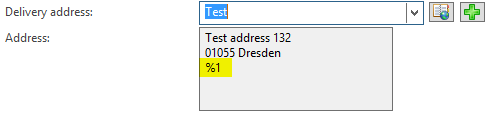
4403.Aufnahme3.png

Any ideas?

Thanks in advance.

Martina

*This post is locked for comments

I have the same question (0)
  • Community Member Profile Picture
    on at

    We can only help you if you provide us with a bit more details on how you've build the solution.

  • Martina Bergamo Profile Picture
    1,470 on at

    Hi!

    In the table I've added the following fields:

    - DeliveryPostalAddress (with relation on the LogisticsPostalAddress)

    - AddressRefTableId (with relation on Common table)

    - AddressRefRecId (with relation on Common table)

    I've created the class LogisticsLocationSelectForm_MyTable.

    In the form I've added the field for the address selection and the DataSource LogisticsPostalAddress as "Refrence Data Source" in the form, such as in the Sales Table.

    Finally, I've added the mapping in the TradaPostalAddress map.

  • Suggested answer
    Community Member Profile Picture
    on at

    Please verify that your class extends the 'LogisticsLocationSelectForm' class and you construct it in 'LogisticsLocationSelectForm.construct()' method.

    As your example, in salesLine, this method will be called in the modifiedField() method of salesLine table as follows:

    LogisticsLocationSelectForm_SalesLine::construct(this).copyAddressToCaller(this.getDeliveryEntityRecord(), this.DeliveryPostalAddress);

    Also please verify that your method names are the same as method names in 'LogisticsLocationSelectForm' class.

    If this did not help, then more info about your code is needed for more suggestions.

  • Martina Bergamo Profile Picture
    1,470 on at

    I've already added this code.

    The address in the table in saved correctly, and the references too.

    The code is the same as in the SalesTable. I've used the SalesTable as example.

  • 5400 Profile Picture
    7,162 on at

    It looks me issue with address format logic. Please check in SO after entering same address. Hope you have mapped correct address format code also.

  • Martina Bergamo Profile Picture
    1,470 on at

    I've found the problem.

    In the method DirUtility::replaceAddressToken, the code

    currTable.isFieldDataRetrieved(countryRegionFieldName) && currTable.isFieldDataRetrieved(addressFieldName)

    return false.

    But I still do not know why...

  • Verified answer
    Martina Bergamo Profile Picture
    1,470 on at

    I solved the issue.

    The solution is to add the following code in the init method of the form:

    logisticsPostalAddress_ds.addFieldToSelectionList(fieldNum(LogisticsPostalAddress, CountryRegionId));

    to retrieve the field!

    Thanks!

Under review

Thank you for your reply! To ensure a great experience for everyone, your content is awaiting approval by our Community Managers. Please check back later.

Helpful resources

Quick Links

Responsible AI policies

As AI tools become more common, we’re introducing a Responsible AI Use…

Neeraj Kumar – Community Spotlight

We are honored to recognize Neeraj Kumar as our Community Spotlight honoree for…

Leaderboard > 🔒一 Microsoft Dynamics AX (Archived)

#1
Martin Dráb Profile Picture

Martin Dráb 4 Most Valuable Professional

#1
Priya_K Profile Picture

Priya_K 4

#3
MyDynamicsNAV Profile Picture

MyDynamicsNAV 2

Last 30 days Overall leaderboard

Featured topics

Product updates

Dynamics 365 release plans



