web
You’re offline. This is a read only version of the page.
close
Skip to main content

Notifications

Announcements

No record found.

Community site session details

Community site session details

Session Id :
Finance | Project Operations, Human Resources, ...
Suggested Answer

Electronic Reporting no output produced in Production environment

(0) ShareShare
ReportReport
Posted on by

Hi 

This is a baffling problem, one that currently the Microsoft support team have been unable to solve. 

The problem is this I have the same vendor invoice ER in 3 environments (Dev, UAT & Prod) all on same build.pastedimage1635312225895v1.png  all with seemingly the same print management and ER destination settings. The report works perfectly in DEV and UAT enviornments but in the Production environment produces no output, no error message and no error in the run log with logging turned on. 

The processing dialog box appears as if it is producing the report and ends without error but no report. 

pastedimage1635312481247v2.png

A run log is produced that says "Residing in the configuration 'Volt invoice mapping' mapping 'RCTI Vendor invoice' has been used for this report's execution." but no hint of any error with the report

pastedimage1635312565922v3.png

 The print management settings are simply this 

pastedimage1635312741471v4.png

The reporting destination is set-up like this
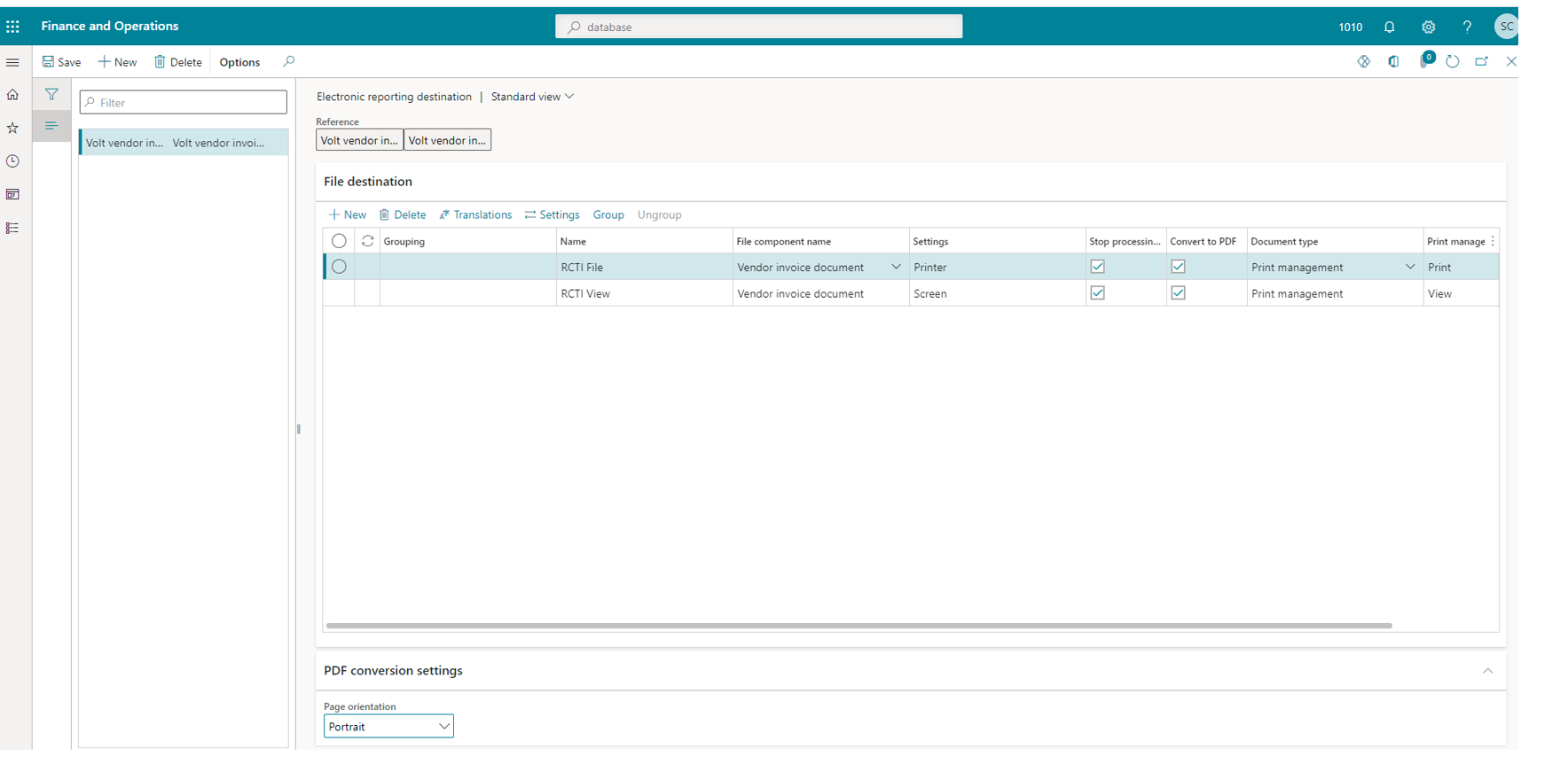
pastedimage1635312815035v5.png

The reporting comfiguration all appears to be OK if I valdate there are no errors and the excel report attachment is there as expected the same as the other environments where the report works as intended. 

pastedimage1635312975192v6.png

Has any one else had similar issues with GER and/or have any ideas on what else I can check.  The support team have the trace files for the report being sucessfully generated in the UAT environment and for the the same in Production. 

Thanks in advance 

Simon 


I have the same question (0)
  • Palislav Profile Picture
    5 on at

    Hello SimonX,

    We have got exactly same issue. Fortunately in DEV env. But it still is a problem.
    Did you manage to solve this in your environment? If yes, I would really appreciate if you can share the solution.

    Thanks
    Pavel

  • Suggested answer
    Alireza Eshaghzadeh Profile Picture
    14,679 Super User 2025 Season 2 on at

    Hi SimonX,

    Have you tried to change the electronics reporting destination to "Archive" to check if report will be saved on electronic reporting jobs?

  • KilluK Profile Picture
    7 on at

    Hi Simon!

    I've had the similar issue when I had set up Electronic reporting destination for the configuration and at the same time the configuration had "Run draft" setting enabled. You could check your configuration settings in PROD and verify if there is "Run draft" setting enabled and I also inactivated the setting in PROD > Configurations > User parameters > Run settings > No. After this change print management started to work as usual.

    BR,

    Kildu

  • Karen G Profile Picture
    55 on at

    I have experienced exactly the same issue and as mentioned above, Microsoft have not provided me with a satisfactory answer or resolution. Unfortunately, I'm not able to provide anything helpful just now but will be raising again with Microsoft and asking that it be escalated.

  • Community Member Profile Picture
    on at

    Hi Pavel

    yes after multiple screen sharing session I did manage to resolve. I can't remember exactly how and I have gone back through the support request. But what I think I ended up doing is deleting the print management settings altogether and this enabled me to produce output to the screen. I then added back the print management settings and everything worked as intended.  So you could try this and see if it helps.

    Best regards

    Simon

  • Hetal Gore Profile Picture
    102 on at

    Hi All,

    I am getting this same issue....

    Does anyone know a solution?

    Please advise.

    Kind regards

    Hetal

  • Hetal Gore Profile Picture
    102 on at

    Hi All,

    I managed to figure this out: the report is in draft so the user needed to have there user parameter under electronic reporting set to:

    Use destinations for draft status = Yes:

    Organisation Admin > Electronic reporting workspace > Reporting configuration > select the format > click configurations > User Parameter > tick yes to Use destinations for draft status.

    Thanks

    Hetal

  • Suggested answer
    Alireza Eshaghzadeh Profile Picture
    14,679 Super User 2025 Season 2 on at

    Hi Hetal,

    If you change the status to "Complete" the version will be applicable for all user without activating "Run Draft" for all users.

    pastedimage1667394683946v1.png

  • Hetal Gore Profile Picture
    102 on at

    Thanks Alireza.

    I wanted it to still be in draft as i am still testing the document.

    But thanks for confirming the above.

    Kind Regards,

    Hetal

Under review

Thank you for your reply! To ensure a great experience for everyone, your content is awaiting approval by our Community Managers. Please check back later.

Helpful resources

Quick Links

Responsible AI policies

As AI tools become more common, we’re introducing a Responsible AI Use…

Neeraj Kumar – Community Spotlight

We are honored to recognize Neeraj Kumar as our Community Spotlight honoree for…

Leaderboard > Finance | Project Operations, Human Resources, AX, GP, SL

#1
Martin Dráb Profile Picture

Martin Dráb 592 Most Valuable Professional

#2
André Arnaud de Calavon Profile Picture

André Arnaud de Cal... 478 Super User 2025 Season 2

#3
BillurSamdancioglu Profile Picture

BillurSamdancioglu 305 Most Valuable Professional

Last 30 days Overall leaderboard

Product updates

Dynamics 365 release plans



