web
You’re offline. This is a read only version of the page.
close
Skip to main content

Notifications

Announcements

No record found.

Community site session details

Community site session details

Session Id :
Microsoft Dynamics AX (Archived)

Contoso ecommerce webpage error

(0) ShareShare
ReportReport
Posted on by 796

I have just moved the AX 2012 R3 CU8 Contoso VM  that LCS created for me in Azure, to a new Hyper-V server.   Everything seems to be in order except for components of the online store and Enterprise portal.  

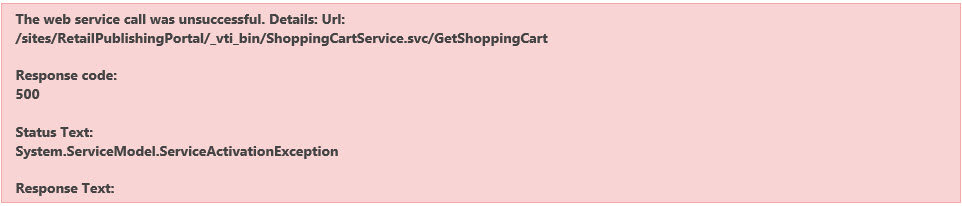
My main issue is the attached error that I see on every page of the Contoso store.  I do not know what is required to rectify the error.  

For copy and paste ease of use:

The web service call was unsuccessful. Details: Url:
/sites/RetailPublishingPortal/_vti_bin/ShoppingCartService.svc/GetShoppingCart

Response code:
500

Status Text:
System.ServiceModel.ServiceActivationException

Response Text:

0


*This post is locked for comments

I have the same question (0)
  • Bilal Issa Profile Picture
    4,370 on at

    Hi,

    please try to generate full CIL .

    Regards,

    Bilal

  • Solozmar Profile Picture
    796 on at

    Alright.  I'm running a compile, then I'll run a CIL and DB sync.   Just to rule all of that out.  

  • Solozmar Profile Picture
    796 on at

    So, compile, full CIL and DB sync have removed the first error.  Also, my Fabrikam store came online.  

    Now I see this sporadically when I click on Checkout:

    The web service call was unsuccessful. Details: Url:
    /sites/RetailPublishingPortal/_vti_bin/ChannelService.svc/GetChannelConfiguration

    Response code:
    500

    Status Text:
    System.ServiceModel.ServiceActivationException

  • Bilal Issa Profile Picture
    4,370 on at

    Hi ,

    can you please check if there is any inactive inbound port related to retail.

    System administration -> setup -> application integration framework -> inbound ports.

    Regards,

    Bilal

  • Solozmar Profile Picture
    796 on at

    No, ports for retail are running.  I'm doing a refresh of the AIFService.  

  • Solozmar Profile Picture
    796 on at

    Well, that seemed to correct the issue, but then I had a new certificate generated to allow external access and now I'm back where I started.

  • Verified answer
    SergeyP Profile Picture
    2,928 on at

    ServiceActivationException in this case often means an issue trying to activate a WCF Endpoint due to small (< 5%) amount of available RAM, please make sure your VM has enough. To find out details about this error please have a look into standard Windows Event Viewer - you will see the details there.

    If, while refreshing AIF Service, you restarted SQL Server or AOS (or even entire VM) that action would recycle processes and as a result free up RAM which would explain why it is working for you now.

  • Solozmar Profile Picture
    796 on at

    I looked into the memory usage and saw that "Sharepoint User Code Host" was opening dozens of sessions and consuming all the available memory.  I stopped it and set to manual.  Working perfectly now.  

Under review

Thank you for your reply! To ensure a great experience for everyone, your content is awaiting approval by our Community Managers. Please check back later.

Helpful resources

Quick Links

Responsible AI policies

As AI tools become more common, we’re introducing a Responsible AI Use…

Neeraj Kumar – Community Spotlight

We are honored to recognize Neeraj Kumar as our Community Spotlight honoree for…

Leaderboard > 🔒一 Microsoft Dynamics AX (Archived)

#1
Martin Dráb Profile Picture

Martin Dráb 4 Most Valuable Professional

#1
Priya_K Profile Picture

Priya_K 4

#3
MyDynamicsNAV Profile Picture

MyDynamicsNAV 2

Last 30 days Overall leaderboard

Featured topics

Product updates

Dynamics 365 release plans



