web
You’re offline. This is a read only version of the page.
close
Skip to main content

Notifications

Announcements

No record found.

Community site session details

Community site session details

Session Id :
Finance | Project Operations, Human Resources, ...
Suggested Answer

10.0.17 VHD - SSRS report

(0) ShareShare
ReportReport
Posted on by 4,131

Hi expert,

We download the 10.0.17 VHD from LCS, however it seems that the SSRS do not render properly. Any idea how to resolve it?

Thanks,

I have the same question (0)
  • André Arnaud de Calavon Profile Picture
    301,171 Super User 2025 Season 2 on at

    Hi Yuji,

    Can you tell what exactly you mean with 'do not render properly'? What is the current behavior and what should be in your opinion the correct result?

  • Leo Chen Profile Picture
    on at

    Would you please provide a screenshot of the issue? And if all SSRS reports have the same issue? More info is required.

  • JunZ Profile Picture
    50 on at

    I customized SSRS report in VHD locally. All standard report can shown up, but my customization SSRS can't not show up like below FERental.. is my duplicated reports.

     Screenshot-2022_2D00_04_2D00_01-031229.jpg

    I have 3 customized reports, none working. I replace standard report into my customized SSRS controller class in D365 Finance and operation, then it works well. 

    I check xml in AXReport folder and rdl file in model folder, both are located correctly.

    Screenshot-2022_2D00_04_2D00_02-015928.jpg

    Screenshot-2022_2D00_04_2D00_02-012850.jpg

    I rebuild my solution and synchro data. Check reporting server with web portal portal URL as well. Stop reporting server and re-start it. Customization SSRS report still can't see it.

    I debug and insert breakpoint at controller class in construct(args, _args), everytime it says no this report. So wierd.

    How did other developer fix VHD SSRS issue? Really appreciate if any reply. 

    Jun

  • Suggested answer
    Gunjan Bhattachayya Profile Picture
    35,423 on at

    Hi Jun,

    Did you deploy the reports you developed (from powershell or from VS project)? Deploying the report(s) should resolve your issue.

  • Suggested answer
    Srihari.molaka Profile Picture
    339 on at

    Hi Yuji,

    As Gunjan suggested, Please try deploying your reports. It will resolve your problem.

    Thanks and regards,

    Srihari.

  • JunZ Profile Picture
    50 on at

    I have tried to VS to deploy. It shows deployed, but still can not see it in SSRS reporting server.

    [quote user="Yuji"]

    Hi expert,

    We download the 10.0.17 VHD from LCS, however it seems that the SSRS do not render properly. Any idea how to resolve it?

    Thanks,

    [/quote]

    Hi Gunjan, thank you so much.

    I use PowerShell deploy all reports. 2 reports deployed successfully and can test well. The last one still not work. Doesn't matter how I run single report deploy with PowerShell.

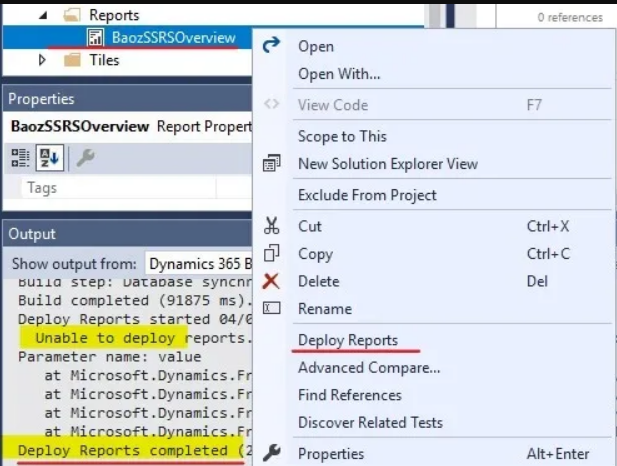
    I also tried to deploy from VS, and firstly deployed still failed as picture.

    I tried second time to rebuild and full data synchronization... and it shows deployed already but didn't show normal URL in output. So it is not working still. UI said something wrong when generating the report. I think something wrong in my metadata file for this report. I will continue to figure it out.

    I agree you are right, normally issue is from deploy. Other 2 are running by doing as you said. Screenshot-2022_2D00_04_2D00_02-114203.jpgThank you very much.

    8637.Capture.PNG

  • Gunjan Bhattachayya Profile Picture
    35,423 on at

    Hi Jun,

    This could be an issue with with the report design, for which it might not be getting deployed properly or could be some other issue with code being used to set the report name.

    Since this issue is different from the question originally asked in this thread (which is regarding SSRS rendering issues), I would suggest you start a new thread with details of the issue you are facing so that we could help you with the same.

  • JunZ Profile Picture
    50 on at

    Ok. I agree. I think it is inside of report. Because error said it can generate report but something wrong. It is not rendering issues about VHD now. Thanks. I close this topic. Jun

  • JunZ Profile Picture
    50 on at

    I found issue now and fix it.

    The number of defined parameters is not equal to the number of cell definitions in the parameter panel. Thus why. Now I can deploy. Just put here if it can help other. Thank Gunjan very much. Jun

  • Gunjan Bhattachayya Profile Picture
    35,423 on at

    Deployment failure is the usual culprit. Glad you were able to fix your issue :)

Under review

Thank you for your reply! To ensure a great experience for everyone, your content is awaiting approval by our Community Managers. Please check back later.

Helpful resources

Quick Links

Responsible AI policies

As AI tools become more common, we’re introducing a Responsible AI Use…

Neeraj Kumar – Community Spotlight

We are honored to recognize Neeraj Kumar as our Community Spotlight honoree for…

Leaderboard > Finance | Project Operations, Human Resources, AX, GP, SL

#1
André Arnaud de Calavon Profile Picture

André Arnaud de Cal... 467 Super User 2025 Season 2

#2
Martin Dráb Profile Picture

Martin Dráb 420 Most Valuable Professional

#3
BillurSamdancioglu Profile Picture

BillurSamdancioglu 241 Most Valuable Professional

Last 30 days Overall leaderboard

Product updates

Dynamics 365 release plans