web
You’re offline. This is a read only version of the page.
close
Skip to main content

Notifications

Announcements

No record found.

Community site session details

Community site session details

Session Id :
Microsoft Dynamics AX (Archived)

SSRS report - split the items into more sub-items

(0) ShareShare
ReportReport
Posted on by 1,260

Hi all,

I have a requirement where if the line type for the item is "BOM" then further divide the report into it's sub lines. How can I do this?

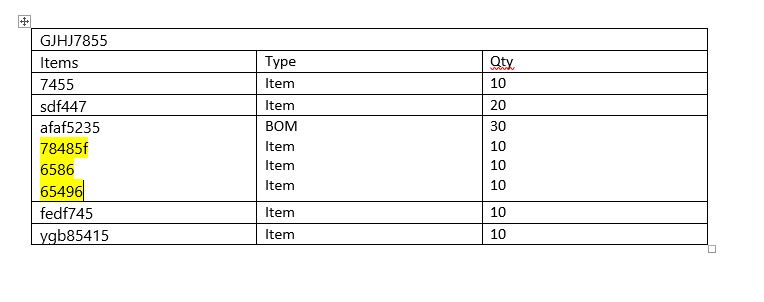
Report running on item: GJHJ7855

This item has Five sub items: 7455, sdf447, afaf5235, fedf745 and ygb85415

But out of the 5 items afaf5235 has it's own sub item more.

So I want to show my report as

Main report item: GJHJ7855

Sub items: 7455, sdf447, afaf5235, fedf745 and ygb85415

Sub item for afaf5235: 78485f, 6586, 65496

But I am not sure how to use the condition and show it on the report. I am not sure how to show the sub-sub items.(highlighted in yellow)
0624.Capture.JPG

*This post is locked for comments

I have the same question (0)
  • Suggested answer
    Mea_ Profile Picture
    60,284 on at

    Hi D_Meethu R,

    What about Recursive Hierarchy Group ?

  • Daljit Kaur Rahsi Profile Picture
    1,260 on at

    I am still not able to get recursive pattern on the BOM table.

    I select the item from the BOMVERSION table and lines from BOM table.

    If the BOM type is phantom

    Then I want to spilt that item Id into its sub lines

    I added the recursive pattern on the BOM table item id but no results.

    Is there anything I am missing?

  • Sohaib Cheema Profile Picture
    49,438 User Group Leader on at

    Have a look at this old thread. you can get BOM lines and then you can display those in any pattern on SSRS

  • Daljit Kaur Rahsi Profile Picture
    1,260 on at

    Sohaib,

    Will I have to create this tmp table in the thread and use it as my table for the ssrs report?

  • Sohaib Cheema Profile Picture
    49,438 User Group Leader on at

    if your report has got a temp table already, you don't need one.

  • Daljit Kaur Rahsi Profile Picture
    1,260 on at

    Sohaib,

    So I have the table created, and the lines only for level 0 are showing in the report and not the level 1,2,....

    Which part of the code should I include into my RDP class for insertLineTable method or processReport?

    Currently my code looks like -

    insertLineTable()

    private void insertLineTable(BOM _bom)
    {
        InventTable                 inventTable;
        EcoResProductTranslation    ecoResProductTranslation;
        int _level;
        BOMVersion _bomVersion;
        FormulaTmpLineTable lshFormulaTmpTable;
        
        lineTable.clear();
        
        lineTable.Position  = _bom.Position;    
        lineTable.BOMQty    = (_bom.BOMQty / _bom.BOMQtySerie) * 100; 
        lineTable.BOMQtySerie = _bom.BOMQtySerie;
        lineTable.Type = _bom.BOMType; 
        lineTable.ItemId    = _bom.ItemId; 
        lineTable.UnitId    = _bom.UnitId; 
        lineTable.RefItemId = _bomVersion.ItemId;
    
           //sets the product name
        select ItemId
        from InventTable
        where
            InventTable.ItemId                  == _bom.ItemId
        join Name from ecoResProductTranslation
        where
            ecoResProductTranslation.Product    == InventTable.Product &&
            ecoResProductTranslation.LanguageId == languageId;
        lineTable.EcoResProductName = ecoResProductTranslation.Name; // RAW MATERIAL
    
        if(bom.BOMQtySerie != 0)
        {
            lineTable.LSH_UsedAmount =  (_bom.BOMQty/_bom.BOMQtySerie) * totalQty; // Used
    
        }
    
        lineTable.insert();
    
    }


    processReport:

    [SysEntryPointAttribute(false)]
    public void processReport()
    {
        BOMVersion              bomVersion;
        ;
    
        languageId = SysUserInfo::find(curUserId()).Language;
    
        if (!languageId)
            languageId = CompanyInfo::find().LanguageId;
    
        contract    = this.parmDataContract();
    
        itemId                  = contract.parmItemId();
        InventDimId             = contract.parmInventDimId();
        totalQty                = contract.parmTotalQty();
    
        bomVersion.clear();
    
        ttsBegin;
        while select bomVersion
        index hint ItemFromToIdx
        where
            bomVersion.ItemId       == itemId &&
            (bomVersion.FromDate    <= today() || !bomVersion.FromDate) &&
            (bomVersion.ToDate      >= today() || !bomVersion.ToDate) &&
            !bomVersion.FromQty &&
            bomVersion.InventDimId  == InventDimId &&
            
        {
            bom.clear();
    
            while select bom
            where
                bom.BOMId == bomVersion.BOMId
            {
                this.insertLineTable(bom);
            }
        }
        ttsCommit;
    }


  • Sohaib Cheema Profile Picture
    49,438 User Group Leader on at

    very 1st thing which is bit strange to see; your RDP class is not using any query. have a look at your processReport method.

    it seems that you are just looping over, for a single item.

    2nd thing, as you might have observed that in my given example I am collecting all bom line into a container and then looping around container. I am using a standard class BOMSearch. if you want to loop by your choice then you would get what loop will return. you can compare results given by your loop with results using standard class BOMSearch

  • Daljit Kaur Rahsi Profile Picture
    1,260 on at

    Hi,

    Using the code that you provided in your link I was able to get the BOM items for level 2 in my report. Is there a way I can add a line of code to highlight the line in the SSRS report for the level 2 item numbers?

  • Sohaib Cheema Profile Picture
    49,438 User Group Leader on at

    SSRS does not knows if a line is level-1 or level-2 or level-n

    one opportunity that I can see is that with each line/record send level in a new field.

    then on ssrs using that field you can put any formatting using IIF statement of vb expressions

Under review

Thank you for your reply! To ensure a great experience for everyone, your content is awaiting approval by our Community Managers. Please check back later.

Helpful resources

Quick Links

Responsible AI policies

As AI tools become more common, we’re introducing a Responsible AI Use…

Neeraj Kumar – Community Spotlight

We are honored to recognize Neeraj Kumar as our Community Spotlight honoree for…

Leaderboard > 🔒一 Microsoft Dynamics AX (Archived)

#1
Martin Dráb Profile Picture

Martin Dráb 4 Most Valuable Professional

#1
Priya_K Profile Picture

Priya_K 4

#3
MyDynamicsNAV Profile Picture

MyDynamicsNAV 2

Last 30 days Overall leaderboard

Featured topics

Product updates

Dynamics 365 release plans
