web
You’re offline. This is a read only version of the page.
close
Skip to main content

Notifications

Announcements

No record found.

Community site session details

Community site session details

Session Id :
Microsoft Dynamics AX (Archived)

Posting error - Penny rounding threshold

(0) ShareShare
ReportReport
Posted on by 1,307

Hi,

I am migrating open AR using Opening balance entity (DMFLedgerJournalEntity). The debit/credit amounts in data file are of 2 decimals.
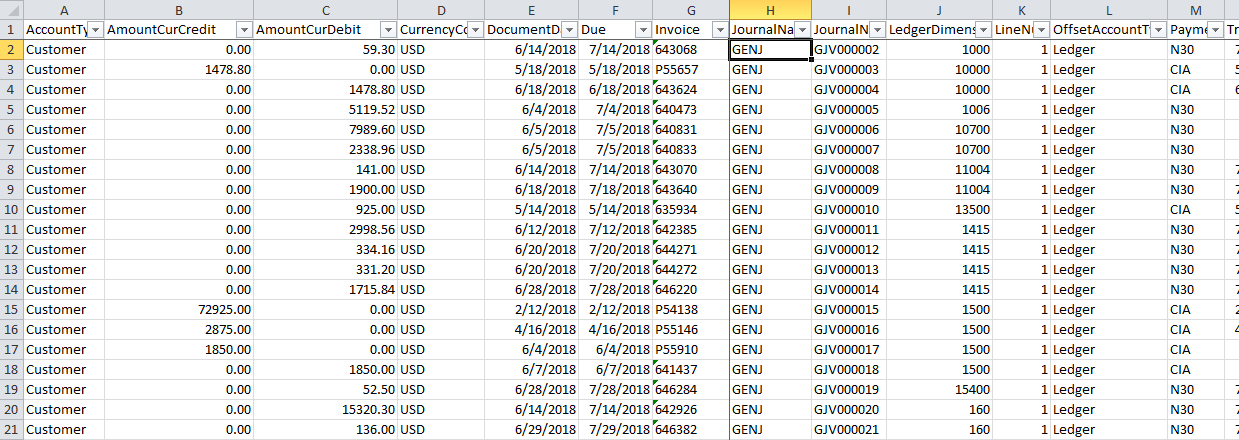
OpenAR_5F00_Data.png

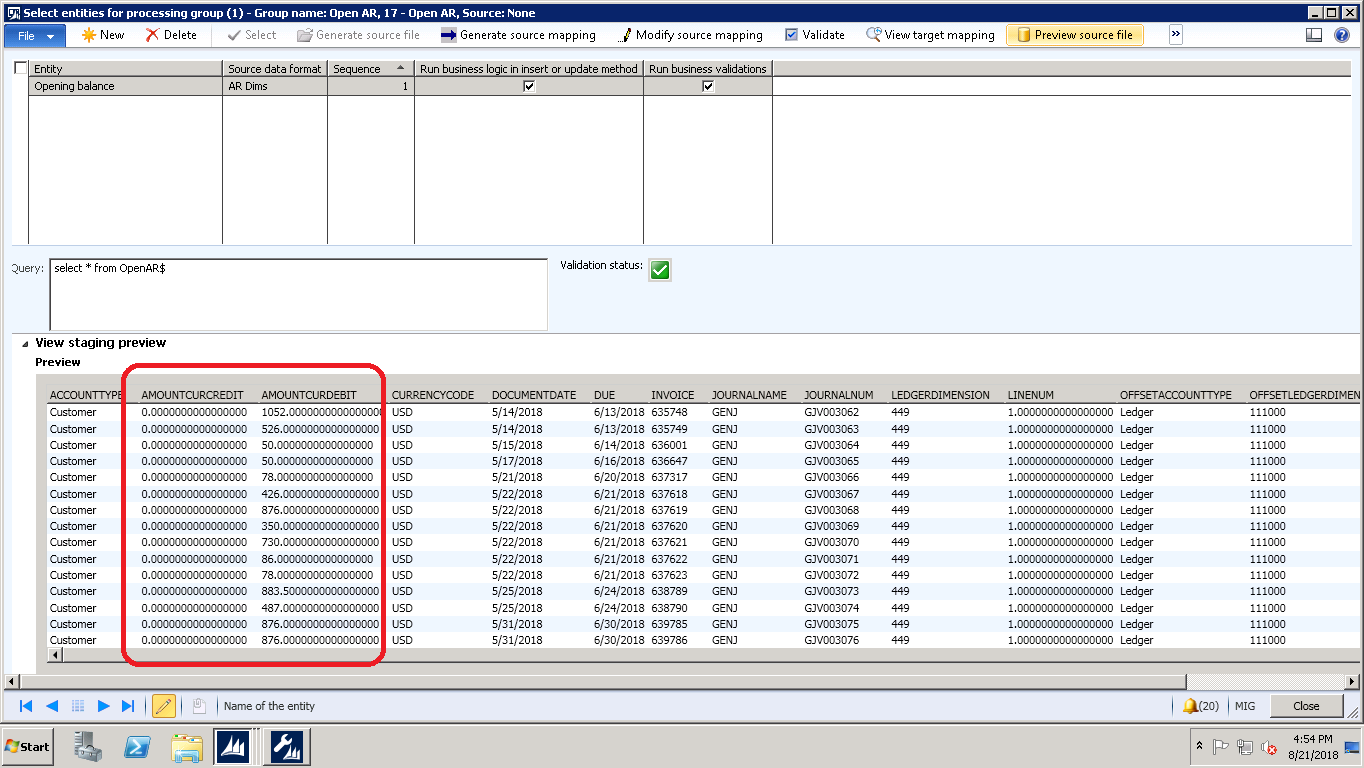
but when the staging data is viewed

OpenAR_5F00_DIXF_5F00_Data.png

Also posting is throwing an error.

Posting_5F00_OpenAR.png

Which currency setting is causing penny round threshold?

Thanks,

Lakshmi

*This post is locked for comments

I have the same question (0)
  • Suggested answer
    Ludwig Reinhard Profile Picture
    Microsoft Employee on at

    Hi,

    Can you make use of the rounding function in your data that are prepared in Excel to ensure that you have only 2 decimal places?

    Then try to upload those rounded data again.

    From the error message I would assume that only two lines with the +517.xxxx and -517.xxxx amounts are affected.

    Best regards,

    Ludwig

  • Lakshmi Karambakkam Profile Picture
    1,307 on at

    Hi ludwig ,

    Excel has only 2 decimals. The problem is with entity fields which are showing more decimals.

    For every currency, there will be currency rounding setup. Could you let me know where this setup would be for amountcurcredit and amountcurdebit so i can fix the setup?

    Apart from above solution,  is there any other way of fixing?

  • Suggested answer
    Ludwig Reinhard Profile Picture
    Microsoft Employee on at

    Hello Lakshmi,

    In the GL parameters we have the rounding variance setup that allows you specifying penny differences.

    Before doing that can you try to post your journal with the "post and transfer option".

    There should only be 2 transactions left and the newly created journal lines should automatically get rounded by Dynamics once created, which means that you should be able to post also the second journal without error.

    Best regards,

    Ludwig

  • Lakshmi Karambakkam Profile Picture
    1,307 on at

    Hi Ludwig,

    The GL parameters are properly set. I tried post and transfer option. its throwing the same error and is also not transferring the error lines to a new journal.

    OpenAR_2D00_PostAndTransfer.png

    Are there any pre-requisites to set before running Post and Transfer option or is there any solution to fix this?

    Thanks,

    Lakshmi

  • Suggested answer
    Ludwig Reinhard Profile Picture
    Microsoft Employee on at

    Hello Lakshmi,

    How does the file look like that you use for uploading the data?

    All the error messages indicate that the 13th decimal place contains a number other than 0.

    Are the number extracted from a different legacy system or somehow calculated?

    What you can test is whether overwriting those figures and ensuring that not more than 2 decimal places exist fixes the issue.

    Alternatively, have a look at the currency in which those amounts are uploaded and change the rounding precision for this currency.

    Best regards,

    Ludwig

  • Lakshmi Karambakkam Profile Picture
    1,307 on at

    Hi Ludwig,

    these numbers are extracted from legacy system and as I said before they are only of 2 decimals in the data sheet. The problem is with the rounding of the transaction currency amount.

    Rounding values are

    Currencies_5F00_USD_5F00_Setup.png  Currencies_5F00_USD_5F00_Setup.png

    I tried "Post and Transfer" option but the same error occurred and the error lines did not get transferred.

    One more interesting thing which I found out was that if I key-in the same credit/debit value in the General Journal\Lines form, journal is getting posted and the rounding error is not occurring.

    lakshmi

  • Suggested answer
    Ludwig Reinhard Profile Picture
    Microsoft Employee on at

    HOpenAR_2D00_PostAndTransfer.png"/api/data/v9.1/msdyn_richtextfiles(0F967A9B-C75D-4B4D-8427-ADB5A0DC4B8B)/msdyn_imageblob/$value?size=full">/api/data/v9.1/msdyn_richtextfiles(0F967A9B-C75D-4B4D-8427-ADB5A0DC4B8B)/msdyn_imageblob/$value?size=full

    When doing that, can display the data with let's say 20 decimal places in Excel?

    Best regards,

    Ludwig

  • Lakshmi Karambakkam Profile Picture
    1,307 on at

    Hi Ludwig,

    Here is the snapshot of excel data

    OpenAR_5F00_ExcelData.png

    Let me know if need any other info.

    Thanks,

    Lakshmi

  • Ludwig Reinhard Profile Picture
    Microsoft Employee on at

    Hello Lakshmi,

    Can you overwrite the number and enter 899.70 'hard'

    Then try to upload the file again.

    Best regards,

    Ludwig

  • Lakshmi Karambakkam Profile Picture
    1,307 on at

    could you please explain me what is meant by "hard"? what needs to be done?

Under review

Thank you for your reply! To ensure a great experience for everyone, your content is awaiting approval by our Community Managers. Please check back later.

Helpful resources

Quick Links

Responsible AI policies

As AI tools become more common, we’re introducing a Responsible AI Use…

Neeraj Kumar – Community Spotlight

We are honored to recognize Neeraj Kumar as our Community Spotlight honoree for…

Leaderboard > 🔒一 Microsoft Dynamics AX (Archived)

#1
Martin Dráb Profile Picture

Martin Dráb 4 Most Valuable Professional

#1
Priya_K Profile Picture

Priya_K 4

#3
MyDynamicsNAV Profile Picture

MyDynamicsNAV 2

Last 30 days Overall leaderboard

Featured topics

Product updates

Dynamics 365 release plans