web
You’re offline. This is a read only version of the page.
close
Skip to main content

Notifications

Announcements

No record found.

Community site session details

Community site session details

Session Id :
Customer experience | Sales, Customer Insights,...
Suggested Answer

Can't view event templates

(0) ShareShare
ReportReport
Posted on by

There is no system view set up for me to view event templates, can I get some help please.

Thanks,

Jon

I have the same question (0)
  • cloflyMao Profile Picture
    25,210 on at

    Hi jonrisual,

    There is a view for event templates in event entitylist.

    pastedimage1583846291956v1.png

    and it shall exists in Event views: 

    pastedimage1583846348123v2.png

    If it not exists, try to create a view with following filter criteria.

    pastedimage1583846439767v3.png

    In addition, make sure you current user role has full(org level) read privilege on Event entity.

    Regards,

    Clofly

  • Community Member Profile Picture
    on at

    Thanks for the quick reply,

    I don't think my events are being saved as templates either. I have tried clicking the button at the top of the page but I can't see this as a template when clicking 'create new from template'

  • cloflyMao Profile Picture
    25,210 on at

    Hi Jon,

    Actually an event template record is also an event record, event template record is just controlled by field "Is template".

    Do you mean you can't see any event template records in event template selector dialog(2) even if you had created an event template record(1)?
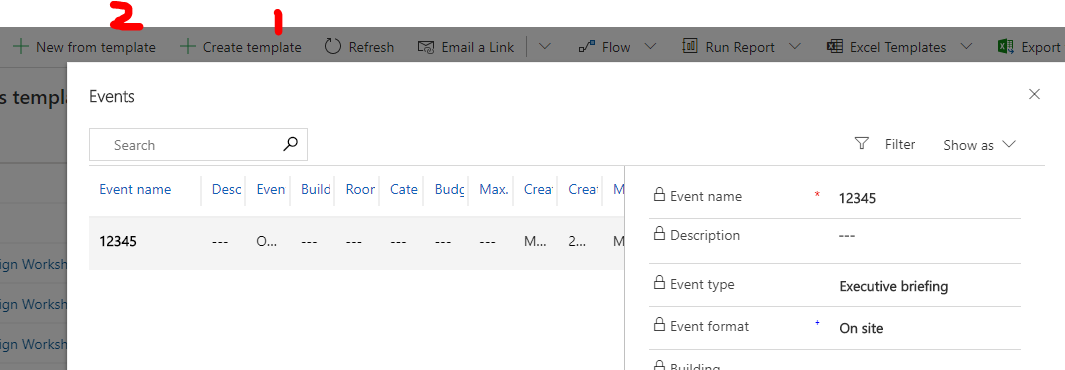
    pastedimage1583895795548v1.png

    Please check whether the record is actually saved in system.

    1. As we see, even default All events view will filter out template type records.
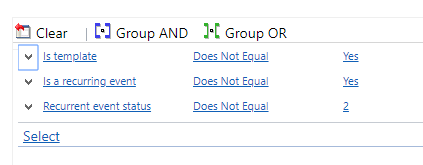
    pastedimage1583895916958v2.png

    2. Create a new custom view which hasn't any filter criteria, and add Is template field into the view, save it and publish all customization. 
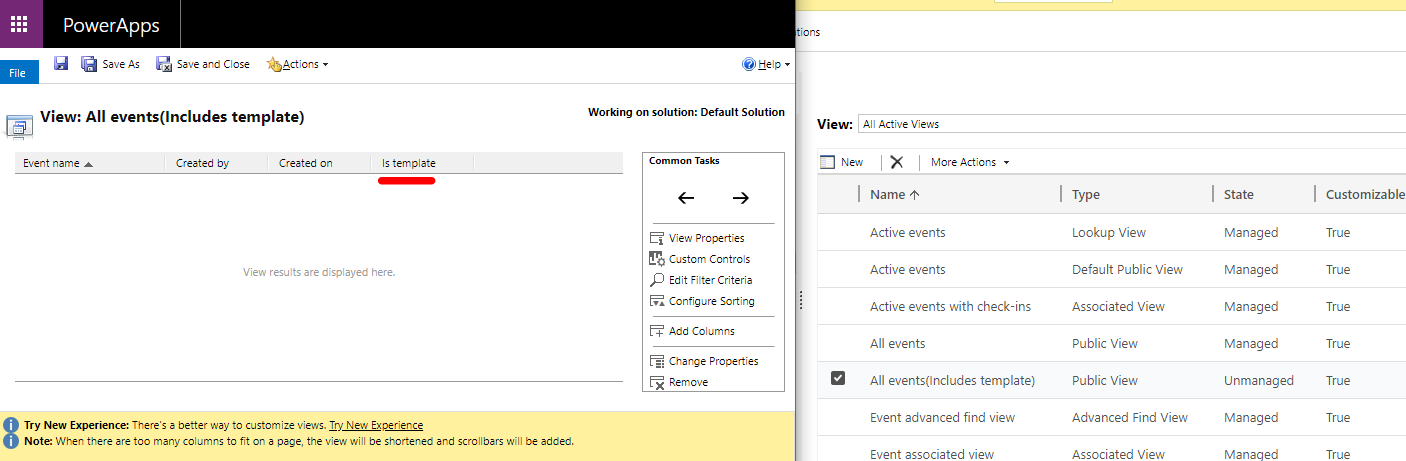
    pastedimage1583896033114v3.png

    3. Then under the view, we can see which event record is template type.
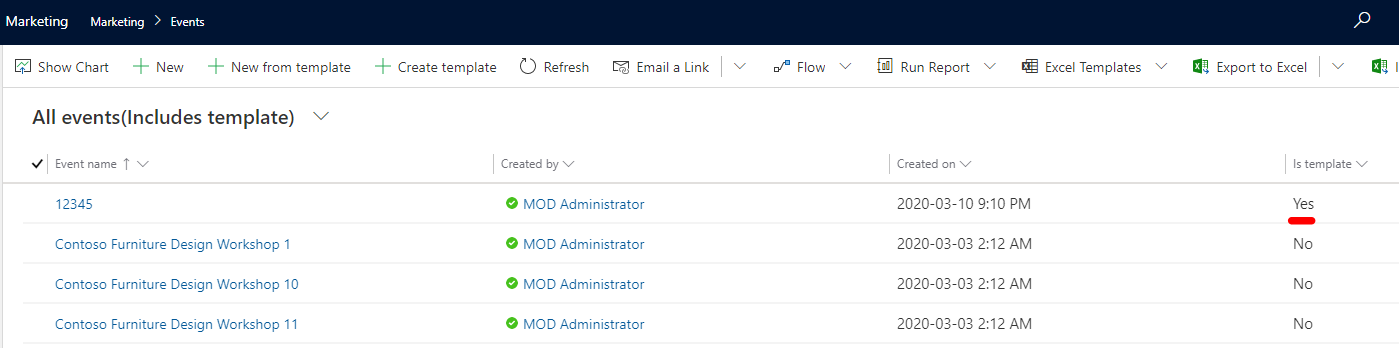
    pastedimage1583896384859v1.png

    4. If template record exists but you can't see it in dialog, it might be you still don't have enought privileges to export template,(even if it's same type entity)

    please assign necessary privileges(full level is recommended) to those entities for your current user role.

    * Marketing data import

    * Custom Control

    * Grid

    All of them are in Custom Entities tab.

    Regards,

    Clofly

  • Suggested answer
    ShravanSuri Profile Picture
    1,255 on at

    Hi Jon,

    Could you please share additional details here? It seems to be a permissions issue. Are you on the latest version of marketing? If not, upgrading to the latest version might help - we’re improving product performance with every release.

    Please let us know how we can help further.

    Thanks,

    Shravan

  • cloflyMao Profile Picture
    25,210 on at

    Hi ,

    Have the problem been solved?

    Regards,

    Clofly

Under review

Thank you for your reply! To ensure a great experience for everyone, your content is awaiting approval by our Community Managers. Please check back later.

Helpful resources

Quick Links

Responsible AI policies

As AI tools become more common, we’re introducing a Responsible AI Use…

Neeraj Kumar – Community Spotlight

We are honored to recognize Neeraj Kumar as our Community Spotlight honoree for…

Leaderboard > Customer experience | Sales, Customer Insights, CRM

#1
Tom_Gioielli Profile Picture

Tom_Gioielli 137 Super User 2025 Season 2

#2
#ManoVerse Profile Picture

#ManoVerse 57

#3
Jimmy Passeti Profile Picture

Jimmy Passeti 50 Most Valuable Professional

Last 30 days Overall leaderboard

Product updates

Dynamics 365 release plans
